Best Text-to-Video AI Tools in 2026: One Prompt, Five Renders
A roundup that renders instead of ranking. One product brief, typed once, sent to five text-to-video models on this platform, and every clip on this page is the result.
Scene select — 10 scenes
Most “best text-to-video” lists rank products nobody at the keyboard has rendered on. This one is the other way round. We wrote one brief, typed it once, and sent that exact text to five models on this platform. Every clip below is what came back, shown next to the prompt that made it.
Start with the bias, because you should not have to guess at it: we build OpenClips.AI, and all five of these models run inside it. That is why the renders exist, and it is also why every spec on this page is rendered from the catalog the composer bills against instead of typed by a writer. When a vendor changes something, this post moves with the model pages.
Text-to-video is the hard mode
The distinction matters more than the roundups admit. Image-to-video hands the model a still you have already approved and asks it to move. Text-to-video hands it a sentence and asks it to invent the whole photograph first: the lens, the surface, the light, the object in the middle of the frame.
So a text-only brief is where models disagree most, and that disagreement is the interesting part. Five models, one paragraph, five different films.
1
brief
5
models
5
different films
The brief
Deliberately hard for a text-only prompt: a reflective surface, a moving light, a slow camera move, and an instruction the model can quietly disobey.
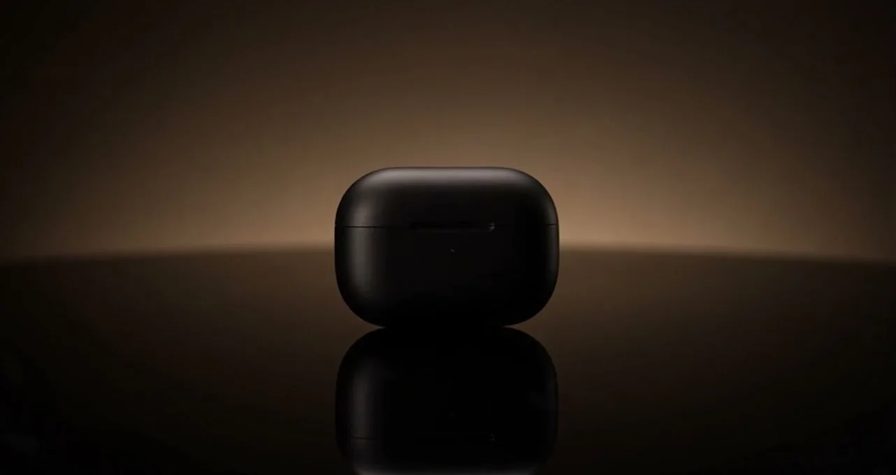
Cinematic product shot: a matte black wireless earbud case turns slowly on a dark reflective surface, a single warm rim light sweeps across it, macro lens, shallow depth of field, slow push-in, plain unbranded caseRun this prompt →
Copy it. Run it. Every card below fires that same text.
1. Seedance 2.5 — the one that behaved
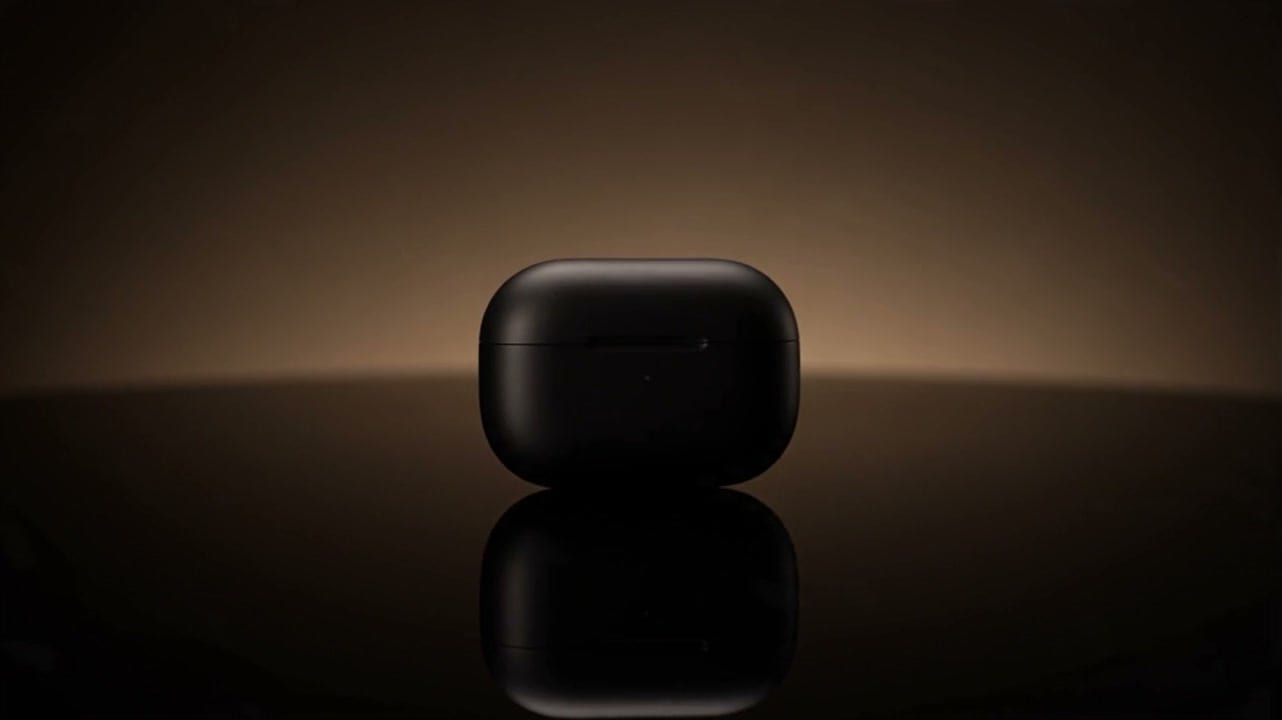
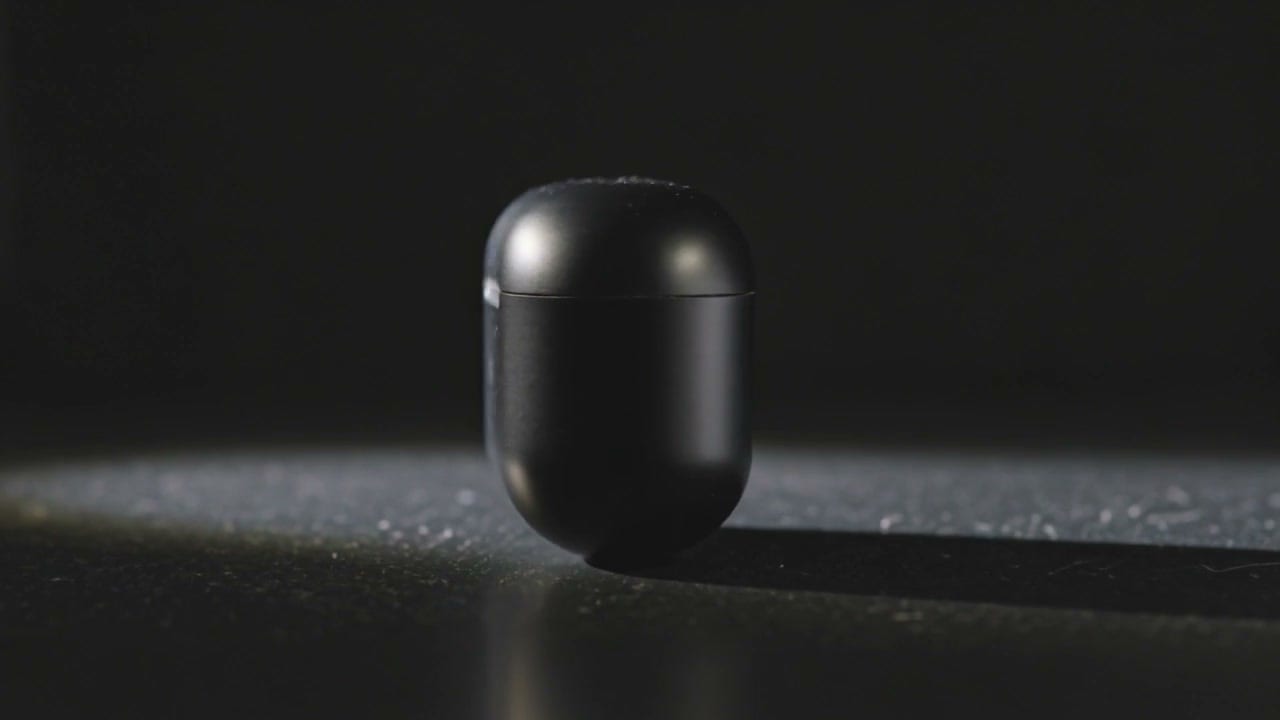
ByteDance’s flagship gave the closest reading of the brief. The warm streak sits behind the case rather than on it, the reflection under the product is doing real work, and the object stays plain the way the prompt asked. It is the frame at the top of this page.
| Modality | Video |
|---|---|
| Length | 4s to 30s |
| Resolutions | 480p, 720p, 1080p |
| Audio | Available |
| References | Up to 30 |
| Price | from ⚡51 per render (from ≈$0.05/s) |
ByteDance documents the family on its own Seed research site. The full grid, the presets and the rest of our proof roll live on the Seedance 2.5 page.
2. Kling 3.0 — the tactile one
Kling read “macro lens” harder than anyone else and pushed in until the surface grain became the subject. Look at the texture under the case. That is the most physical of the five, and the least like a product page.
The trade is composition: the case is centred and the warm rim light the brief asked for reads more as a spill from above than a sweep across.
| Modality | Video |
|---|---|
| Length | 3s to 15s |
| Resolutions | 720p, 1080p, 4k |
| Audio | Available |
| References | Up to 1 |
| Price | from ⚡46 per render (from ≈$0.06/s) |
Kuaishou runs the consumer product at kling.ai. Ours is on the Kling 3.0 page.
3. MiniMax H3 — the one that lit it
H3 took “a single warm rim light sweeps across it” as the whole assignment and built the shot around the light instead of the object. The result is the most graphic frame of the five: an outline of gold, a black shape inside it, and almost no product detail at all.
That is either exactly what you wanted or completely useless, and knowing which is why you render before you commit.

| Modality | Video |
|---|---|
| Length | 4s to 15s |
| Resolutions | 768P, 2K |
| Audio | Available |
| References | Up to 9 |
| Price | from ⚡39 (from $0.16) |
MiniMax publishes at minimax.io, and the version we run is on the MiniMax H3 page.
4. Kling O1 — the one that broke the rule
O1 makes the prettiest surface of the set. It also disobeyed. The brief said plain and unbranded, and O1 shipped a copper trim band, a raised button and a mark along the top edge that reads as lettering.
This is the failure mode worth knowing about before a client sees it. A text-only model invents the product, and inventions include marks you did not ask for. If the object has to be your object, animate a still instead.

| Modality | Video |
|---|---|
| Length | 3s to 10s |
| Resolutions | 720p, 1080p |
| Audio | Available |
| References | Up to 7 |
| Price | from ⚡31 per render (from ≈$0.04/s) |
The Kling O1 page carries the roles and the grid.
5. Seedance 1.0 Pro — the cheap draft
The oldest model in the test, and the one to reach for while the shot is still an argument. It invented a bokeh field nobody asked for and rotated the case into a three-quarter view, but the light behaves and it comes back fast.
Look at the price row against the other four. That gap is the whole reason to draft here and finish elsewhere.

| Modality | Video |
|---|---|
| Length | 2s to 12s |
| Resolutions | 480p, 720p, 1080p |
| Audio | None |
| References | Up to 2 |
| Price | from ⚡10 per render (from ≈$0.02/s) |
The Seedance 1.0 Pro page carries the sheet.
The text-to-video models we did not put in the test
Three more accept a text-only brief here and have pages of their own. They are not in the five because the shared render was not shot on them, and we will not show you a clip we did not make.
Veo 3.1 is the one to beat on rendered light, and the one that punishes a vague brief hardest. Google DeepMind documents the family on its own page; ours is the Veo 3.1 page.
| Modality | Video |
|---|---|
| Length | 4s to 8s |
| Resolutions | 720p, 1080p |
| Audio | Available |
| References | Up to 3 |
| Price | from ⚡326 per render (from ≈$0.34/s) |
Runway Gen-4.5 is the odd one out of this three. It answers a text-only brief, but the controls that make it worth choosing want a reference to work from. The Runway Gen-4.5 page has the sheet.
| Modality | Video |
|---|---|
| Length | 2s to 10s |
| Audio | None |
| References | Up to 1 |
| Price | from ⚡49 per render (from ≈$0.10/s) |
Wan 2.7 is the purest text-to-video model on the roster: it takes a brief and nothing else. The Wan 2.7 page carries the grid.
| Modality | Video |
|---|---|
| Length | 2s to 15s |
| Resolutions | 720P, 1080P |
| Audio | None |
| References | None |
| Price | from ⚡41 per render (from ≈$0.08/s) |
The tools that are not here at all
Naming them is honest. Selling you a spec sheet for a product we cannot dispatch is not, so this section carries opinions and vendor links only.
Sora is the name most people still type, and OpenAI has published its deprecation schedule on the API deprecations page. Check the date before you build a workflow on it.
Pika, Luma and the rest of the consumer app tier are quick to start and hard to direct. They are a fine evening. They are not a pipeline.
Higgsfield sells camera moves as the product, which is a real answer to a real problem, and a different one from picking a model.
The short version
- Closest to the brief: Seedance 2.5. It read the whole paragraph.
- Most physical: Kling 3.0. Macro grain, real surface.
- Most graphic: MiniMax H3. It shot the light, not the object.
- Prettiest, least obedient: Kling O1. Watch for marks you did not ask for.
- Cheapest draft: Seedance 1.0 Pro. Argue here, finish elsewhere.
One brief is not a benchmark. It is a habit: write the shot once, send it to three models, look at what comes back, then spend the real money on the one that understood you. Start on the models roster, or read the ranked list of AI video generators for the wider field.