Paste a link or attach a photo. Ask in plain words.
candle.jpgPhoto
Use OpenClips, make a 15-second ad for my candle from example.com/products/jar-candle
What is MCP
What is MCP?
MCP is a plug for your AI.
It lets ChatGPT, Claude and other AI apps use tools for you. Plug in OpenClips and your chat makes videos and images.
Your AI chat
MCP
OpenClipsSeedance 2.5Seedream 5.0 ProSeedream 5.0 LiteNano Banana Pro
Videos and images
MCP stands for Model Context Protocol. It is an open standard. Most big AI apps support it.
What you get
Your AI chat becomes a studio.
Make a 15s ad for my candleJust askPlain words. Your AI writes the prompt.
Seedance 2.5Seedream 5.0 ProSeedream 5.0 LiteNano Banana ProSeedance 2.0Kling 3.0GPT Image 2Gemini Omni FlashSeedance 2.5Every top model86 live models. Your AI picks the right one.
Product Brand AvatarKnows your productsIt reads your products, brands and avatars.
Price shownApprovePrice before it rendersYou see the price. Then you approve.
Saved to your libraryEvery video and image lands there.
You stay in controlApprove in your browser. Remove it anytime.
86 live models, including Seedance 2.5, Seedream 5.0 Pro, Seedream 5.0 Lite, Nano Banana Pro.
Made from one message
What you can make.
Real results. Each one made with the prompt under it.
Ads
UGC, cinematic spots and product photos.
Made with this promptUGC adUsing OpenClips MCP, generate a vertical UGC ad for my product: a creator talks it straight to camera, hook in the first two seconds, casual phone energy.
Made with this promptCinematicUsing OpenClips MCP, generate a cinematic spot for my brand: slow push-ins, moody light, one hero line at the end.
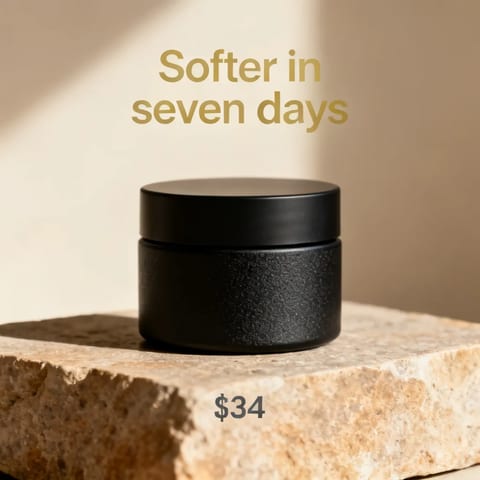
Made with this promptProduct HeroUsing OpenClips MCP, generate a product image for my product, a matte black skincare jar on a warm stone ledge: studio light, the headline "Softer in seven days" above it, the price "$34" small underneath.
Made with this promptUnboxingUsing OpenClips MCP, generate an unboxing clip for my product: hands open the box on camera, real creator pacing, end on the product in use.
Made with this promptTV CommercialUsing OpenClips MCP, generate a TV commercial for my product: polished grade, product center frame, a closing tagline card.
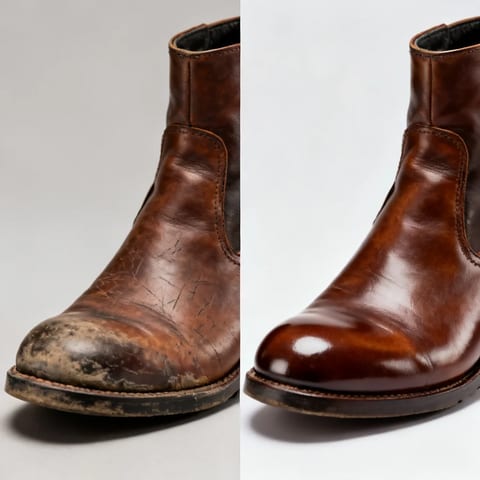
Made with this promptBefore / AfterUsing OpenClips MCP, generate a before-and-after image for my product: on the left a scuffed, dull leather boot, on the right the same boot cleaned and polished, one split frame, same light both sides.
How-to videos
Your product, one clear step at a time.
Made with this promptPour kettle stepsThe steps in order: fill to the line, set the temperature, the pulse pour in slow circles over the grounds, the cup. One step per beat, the kettle doing the work.
Made with this promptCream in four stepsThe steps in order: a clean face, a fingertip of the cream, worked up the cheek, done. The product does the work, one step per beat.
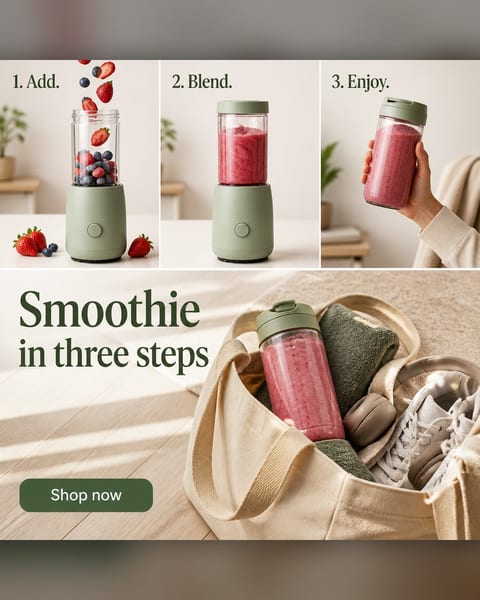
Made with this promptBlenderMake a square four-panel how-to ad for this blender with steps "1. Add. 2. Blend. 3. Enjoy." and a "Shop now" button.
Made with this promptCurling ironMake a square ad of this curling iron in three labelled step panels beside a woman with waves, headline "Waves in three steps" and a "Shop now" button.
Made with this promptVitamin C serumA numbered how-to ad (1-2-3) for a vitamin-C serum routine: three clean panels showing cleanse, apply, glow, the product in each. Headline: Three Steps to Glow.
Made with this promptEyeshadow paletteMake a square ad of this eyeshadow palette with numbered labels pointing to a model's sunlit eye, headline "Sunset Mermaid Eye Palettes" and a "Shop Eyeshadows" button.
Reels
From a brief to a finished Reel. Captions and sound included.
Made from a chat in ClaudeDanFounder & CEO, OpenClipsA photo, a voice note and a brief. A 75-second film.
Made on OpenClipsTamaraIT SPOT 2026 event promoShe never filmed it. It still sounds like her.
Made on OpenClipsMarkoTalking-head Reel on personal brandsEight minutes of raw takes. One Reel. Three languages.
For power users
Get the most out of OpenClips.
The app works great on its own. MCP is the power-up. Your AI does the clicking.
2 phone photos Real files2 photos. A whole launch.Here are two phone photos of our new shoe and jacket. Make the launch: key visuals, a lookbook, ads and a billboard. 66 files came back, from product shots to a billboard.See the whole shoot
ImpactPOVStreet Real files3 hooks to test.Make three 5-second vertical hooks for paid social. A macro splash, a POV lace-up, a night sprint. 3 takes, not one film to hope on.
Photo · dan.jpgVoice · 0:21 Real filesA Reel from a brief.Generate the script and make the Reel. I'm the founder of OpenClips, coming to IT SPOT. A film studio with a storm ship, fire and a car. Then a power cut, and Santa on a horse. Reel ready. 1:15, 9:16, captions and a cover.AI Reel Maker
USDEFRJPBRSA Real files6 markets. One ad.Localize this ad for Germany, France, Japan, Brazil and Saudi Arabia. Keep the photo. Change the words and the price. Same shot. Their language, their price.
KOVA is a demo brand. Every KOVA file here came out of OpenClips, through MCP.
New to OpenClips? Start in the app. Come back for the power-up. Open the app
MCP
Your AI is ready. Plug it in.
Connecting is free. Videos spend ⚡ credits at app prices. ⚡50 on signup.
MCP stands for Model Context Protocol. It is an open standard that lets AI apps use outside tools. Connect OpenClips and ChatGPT or Claude can make videos and images for you.
Yes, with OpenClips connected. Turn on Developer mode, add OpenClips as a connector and ask in plain words. It renders on top video models and saves to your library.
Yes, with OpenClips connected. Press Add to Claude, approve, then ask. Claude picks the model and OpenClips renders the image or video.
No. You copy, paste and approve in your browser. There are no API keys to manage.
Connecting is free. Each video or image spends ⚡ credits at the same price as the app. You see the price before anything renders. New accounts get ⚡50 on signup.
You sign in and approve in your browser. To stop it, remove the OpenClips connector in your AI app.
Into your OpenClips library, next to everything you make in the app. Download, share or remix them anywhere.
Claude and ChatGPT, plus Claude Code, Cursor, VS Code, Grok, Hermes, OpenClaw and any other app that supports MCP.

 candle.jpgPhoto
 OpenClips


 Made with this promptProduct Hero
 Made with this promptBefore / After
 Made with this promptBlender
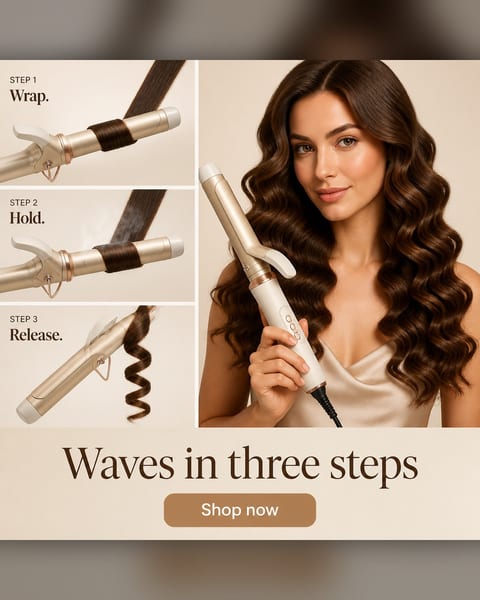 Made with this promptCurling iron
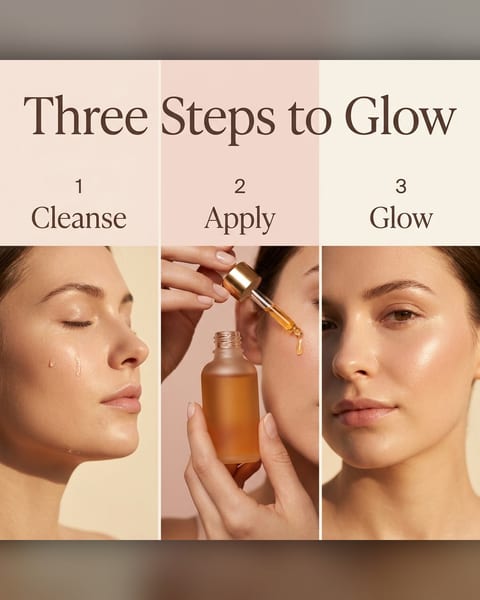 Made with this promptVitamin C serum
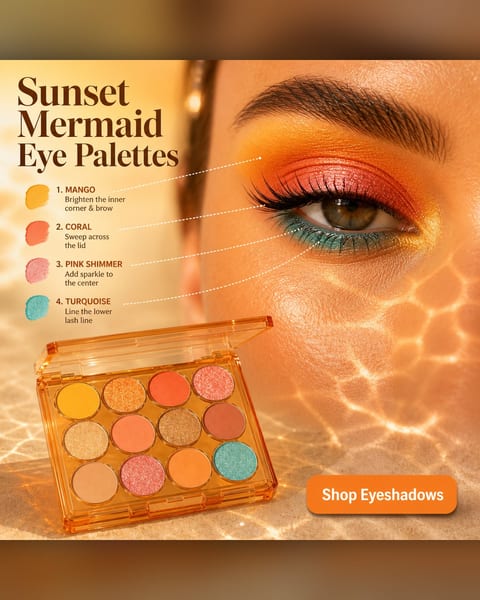 Made with this promptEyeshadow palette
 2 phone photos


 Real files2 photos. A whole launch.Here are two phone photos of our new shoe and jacket. Make the launch: key visuals, a lookbook, ads and a billboard. 66 files came back, from product shots to a billboard.See the whole shoot
  Photo · dan.jpgVoice · 0:21 Real filesA Reel from a brief.Generate the script and make the Reel. I'm the founder of OpenClips, coming to IT SPOT. A film studio with a storm ship, fire and a car. Then a power cut, and Santa on a horse. Reel ready. 1:15, 9:16, captions and a cover.AI Reel Maker




 Real files6 markets. One ad.Localize this ad for Germany, France, Japan, Brazil and Saudi Arabia. Keep the photo. Change the words and the price. Same shot. Their language, their price.