How to Earn Credits With Your AI Videos: Share Your Workflow on OpenClips
Your best AI video can do more than collect likes for two days. Publish it as a community workflow, share it with your invite link, and every friend who pays through it earns you ⚡600.

Scene select — 9 scenes
You spend an evening on a shot that finally works. The character holds, the product reads, the pacing lands. You post it, it does well for a couple of days, and then the feed moves on.
The prompt, the model choice and the reference trick that made it work go with it.
Community workflows are built so your craft does not disappear with the post. Here is what sharing one actually gets you, with a real example and the credit math.
What a community workflow looks like
A community workflow is a finished AI video plus the full recipe behind it: every step, the model each step used, the prompt, and what each step feeds into the next. A visitor watches the result, opens the recipe, uploads their own photo or product, and runs it.
The OpenClips community holds more than 770 of these across 17 categories, from product showcases and UGC ads to cinematic one-takes.
A real one: same recipe, a different product
The Foul Ball Catch. A foul ball smashes straight through a broadcast camera, ricochets into the stands, and a fan catches it bare-handed without moving the product in their other hand an inch. Fireworks go off, then the camera makes an extreme macro pass over the ball and over the product: a 15-second vertical game-day spot, sound and all, made in one Seedance 2.0 step.
The visitor brings two things: a photo of their face and a photo of their product. They add both, pick the format, length and quality, and nothing spends until they press Add your photo to start. The camera smash, the catch and the stadium stay the same. The person and the product change.
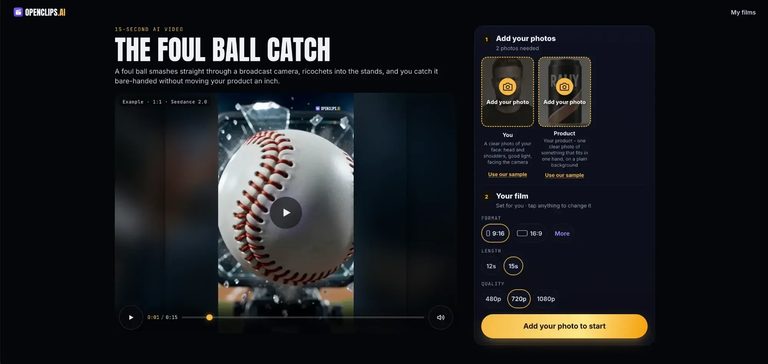
Same scene, same pacing, same camera moves, any product. That is what a brand sees when they open your workflow, and why they run it. One person figured out the structure, and now everyone can use it, with the credit staying where it belongs.
Benefit 1: Visibility with the people who hire
Brands and agencies no longer ask whether AI video works. They ask what it looks like for their category, and they look for examples they can point at.
Hiring for AI creative runs on proof. A buyer wants to see that you can follow a structure, keep a product or a face consistent, and deliver in a specific niche. A published workflow shows all of it on one page:
- The result, so they judge the quality in seconds.
- The recipe, so they see it was a method, not a lucky render.
- Your name, so they know who made it.
A link to a screenshot proves you made one good video. A link to a workflow proves you can make it again, for them.
Benefit 2: ⚡600 for every friend who pays through your link
Every OpenClips account comes with an invite link. Open your profile and you
will find it in the Share OpenClips box, with a Copy invite link button.
The link carries your personal ?ref code, so everyone who signs up through it
is attributed to you.
When one of them makes their first payment, you earn ⚡600 credits. They land in your wallet about an hour later. It does not matter what they buy: one friend choosing the Starter plan, the smallest one, earns you the same ⚡600.

The same box keeps score for you: Visits (how many people opened your link), Signups (how many created an account) and Earned (the credits you got back). You can see which workflows bring people in and share more of those.
A workflow is the best thing you can attach that link to. A bare “try this tool” link asks people to trust you. A link next to a finished video and the full recipe shows them exactly what they will be able to make, so they arrive already wanting to run it.
Credits are one wallet across the whole roster, from Seedance and Kling to Veo, MiniMax and Seedream. Here is what referrals turn into, at current prices:
| Friends who pay | You earn | That pays for |
|---|---|---|
| 1 | ⚡600 | 12 five-second Seedance 2.5 clips at the lightest setting, or 75 Seedream 5.0 Lite images |
| 2 | ⚡1,200 | More than a full month of Starter (⚡900) |
| 6 | ⚡3,600 | More than a full month of Creator (⚡3,200) |
The loop is simple. A strong workflow brings in people who want to make the same thing, each one who pays funds your next experiments, and those experiments become the next workflow worth sharing.
Where to share it
- Under the original post. If the video already did well on X, TikTok or Instagram, reply with the workflow link: “Here is the full recipe, run it with your own product.”
- In your bio as a “make this yourself” link.
- In client pitches, so a prospect can try your format with their own product.
- In creator communities and Discord servers, where people ask “how did you make this?”
For agencies: a showcase your clients can test
If you make AI video for clients, a workflow does something a PDF portfolio cannot: the client can try it.
Send a prospect the workflow link, and they can run it with their own product before they ever sign anything. They see their brand inside your format on the first call. Every workflow you publish in a category, beauty, food, real estate, fashion, makes you easier to find as the team that owns that format. And if the client signs up through your invite link and pays, that is ⚡600 back to you.
Why a workflow beats selling a prompt
Prompt marketplaces have existed for years, and buyers there learned a hard lesson: a prompt on its own rarely reproduces the preview. The model changed, the settings were missing, or the reference image was the real secret.
A workflow ships the whole chain:
| Selling a prompt | Sharing a workflow | |
|---|---|---|
| Buyer sees the result first | A thumbnail | The full video |
| Model and settings included | Rarely | Every step |
| Multi-step recipes (sheet, still, video) | Hard to package | Built in |
| Buyer runs it in one click | No, copy and paste | Yes, upload and go |
| You stay credited | Until it gets copied | On the workflow’s page |
People run what they can see working, and they can reproduce it without guessing.
What makes a workflow people actually run

Look at the most-run workflows and the same five traits show up.
- One clear swap. The best workflows ask for exactly what they need, like a face and a product photo. The visitor never touches the prompt. The more obvious the swap, the more runs.
- Works for anyone who swaps in. Write the prompt so it survives any person or any product being dropped in. Do not hardcode a hair color, a gender or a brand name into the scene. A workflow that only works for one face is a post, not a template.
- A strong first frame. Your cover is your hook. Pick the frame that makes a brand think “I want that.”
- Steps that explain themselves. Every step has a one-line “what it does.” Use it. “Builds a character sheet so the face holds in every shot” beats “Step 2.”
- The right category and industry. That is how brands filter. A product ad in the right category lands in front of the people who buy product ads.
How to publish yours
You do not fill in a form. You publish from chat, through the OpenClips MCP: connect your AI assistant to OpenClips once, then ask it to package your video as a workflow.
- Connect your assistant (one time). Here’s how to connect OpenClips to your AI assistant →
- Make the video, in OpenClips or straight from chat.
- Ask your assistant to publish it. Tell it what the visitor swaps in and where the workflow belongs. For example:
Publish my last video as a community workflow. Call it "Final Whistle". The visitor uploads one face photo and one product photo. Category: product showcase. Lay out the recipe step by step, with the model and the prompt for each step, and pick the strongest frame as the cover.
4. Check the recipe before it goes live. Read each step’s one-line “what it does”, make sure the prompt works for any product or face, and confirm the category.
5. Share it with your invite link. Copy it from your profile and post the workflow wherever your audience is. Your published workflows also collect under Shared workflows on your profile.
One more reason to publish this week: The Big Sell
If you want to put all of this to work right now, The Big Sell is still open. It is the OpenClips ad track at Big Screen Hack London: make a 20 to 60 second ad for a real brand, and the winning ad plays on the Science Museum IMAX screen on Friday 16 October, plus $1,500 cash.
- Deadline: Sunday 11 October, 12:00 noon BST
- Who can enter: anyone 18+, anywhere in the world, solo or as a team
- Credits to make it: joining the challenge gives you ⚡2,400 OpenClips credits
- Judged on: brand fit, emotion and craft, seasonal relevance, and how reusable your workflow is
That last one is the point of this whole article. A strong entry is also a strong workflow: publish it, share it with your invite link, and it keeps working long after the screening.
See the full rules and enter The Big Sell →
Your best render already did the hard part. Publish the recipe, put your name on it, share it with your invite link, and let every friend who joins pay for your next one.
Browse the community to see what is already there, then share yours.
New to OpenClips? Start creating, ⚡50 on signup, no card.