Kling 4.0 Review: Long Takes, a Real Text Test and Prompts You Can Copy
Kling 4.0 promises whole ads in one pass, timed keyframes and text that reads. We ran four side-by-side tests against Kling 3.0 and Seedance, built a prompt kit on Kling’s own guide, and wrote down where it still slips.

Scene select — 12 scenes
What Kling 4.0 is, in one minute
Kling 4.0 is Kuaishou’s newest video model. Flash, the fast version, opened on 28 September to Ultra Yearly subscribers. The full model followed on 15 October.
What it brings, from Kling’s own guide:
- Long takes: a whole ad in one generation, with no stitching.
- Keyframes: up to 10 images pinned to moments in the clip: first frame, last frame or middle frames.
- Omni Reference: images, videos, elements and voice profiles in one job, so a whole product kit rides along.
- Prompt: up to 8,000 tokens.
- Text: on-screen text, emoji and logos in multiple languages.
- Dialogue: English, Chinese, Japanese, Korean, Spanish, Portuguese, German, French and Hindi.
- Editing: change existing clips with a written instruction.
- Coming soon: 10-bit HDR, extending clips to two minutes, and API pricing.
One rule most first looks miss: Keyframes and Omni Reference cannot be combined in one generation. Keyframes lock what the frame looks like at set moments. Omni Reference locks who and what is in it.
Test 1: on-screen text, Kling 4.0 vs Kling 3.0
Same prompt on both: a woman pinches toward the lens and a handwritten “Good morning, beautiful” appears.
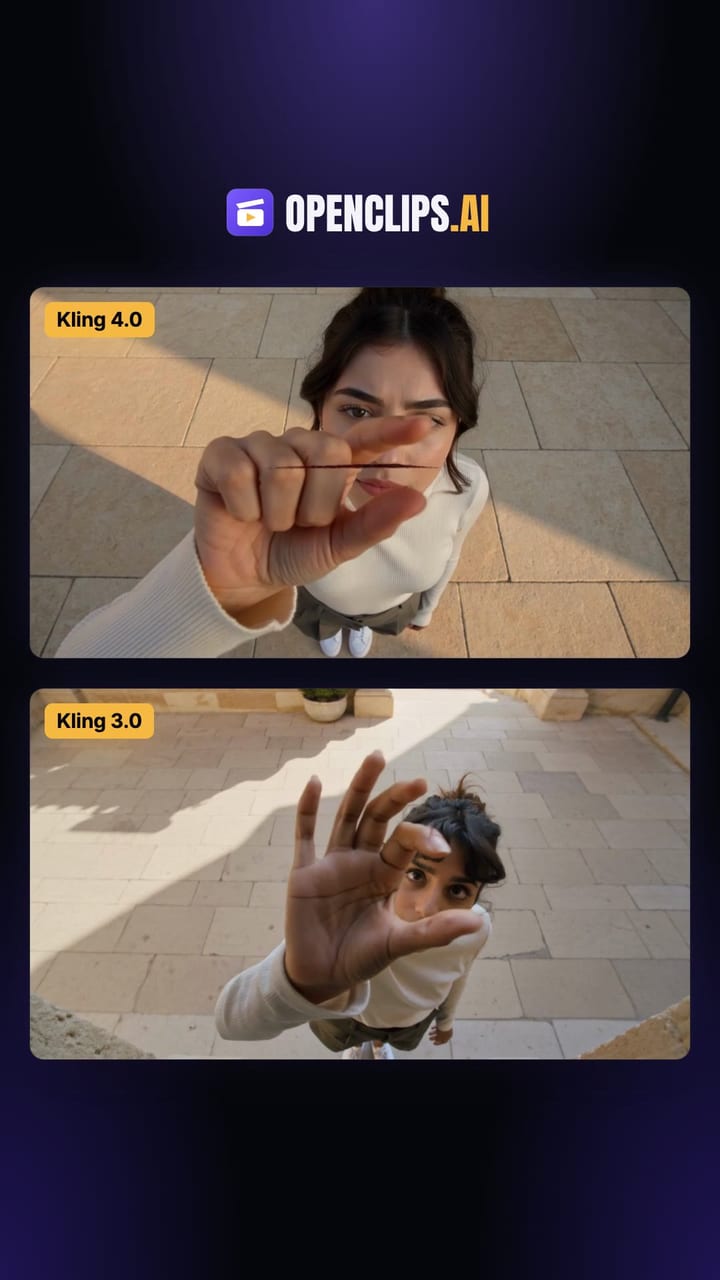
Top, Kling 4.0: she pinches as asked, and the line writes itself out from her fingers in dark red script, every letter right, then holds while she walks off. Bottom, Kling 3.0: she waves an open palm instead of pinching, the text comes out in plain print instead of handwriting, and “beautiful” becomes “baaulublJ”.
For subtitles, Kling’s guide says to spell out font size, alignment, how long they stay up and whether they sync with dialogue.
Test 2: the stitching problem Kling 4.0 is built to fix
Before 4.0, a longer Kling ad meant building it from separate clips. We made two short Kling 3.0 clips with the same character line, “a woman in her late twenties with shoulder-length wavy dark-brown hair, wearing a cream linen shirt and light-blue jeans”, different beats and no reference image, the way you would build a longer ad:
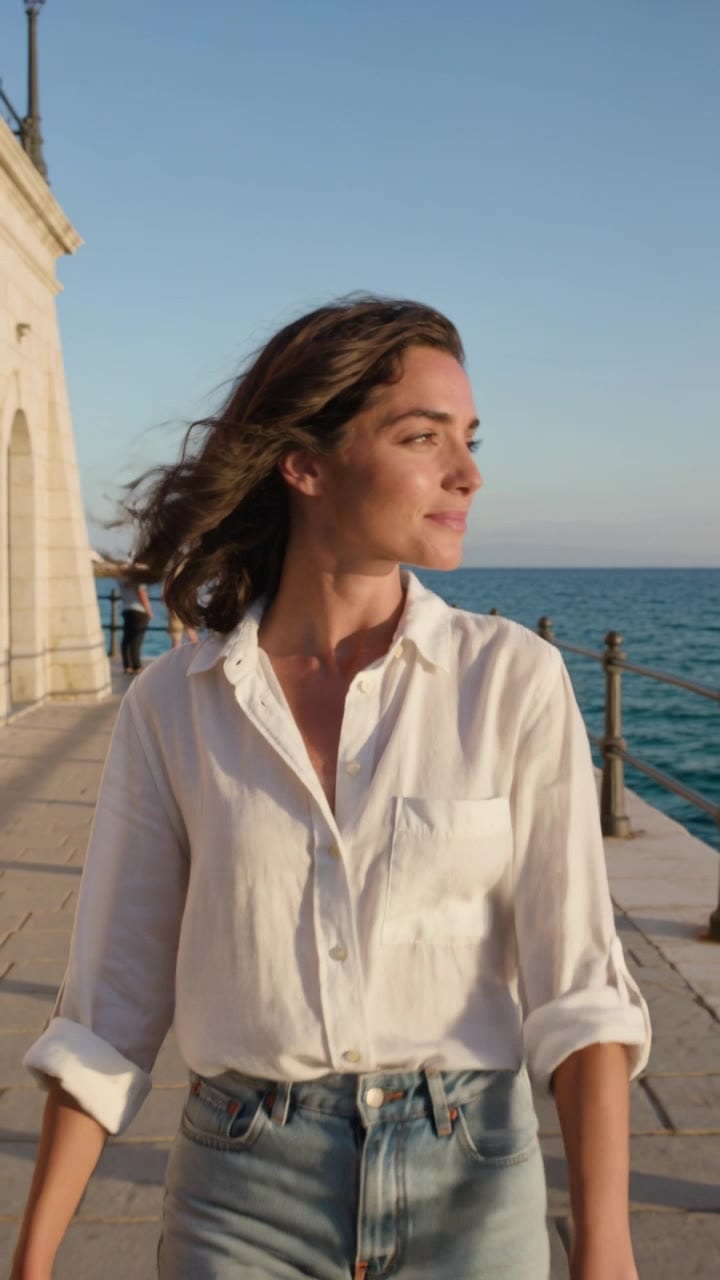
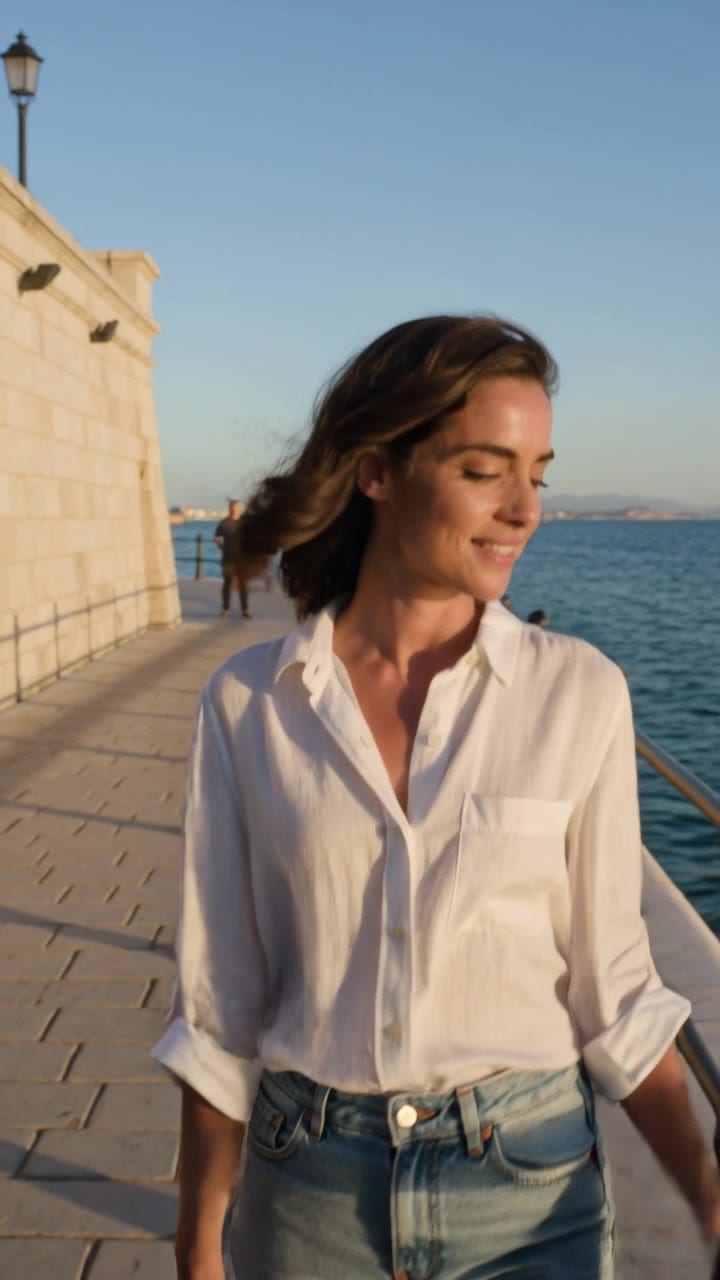
The clothes carry over. The person does not. Clip 1 has a fuller face and curlier hair by an arched building with a lamp post. Clip 2 has a narrower face, straighter hair and a flat fortress wall. Cut together, that reads as two different women.
Kling 4.0 writes the whole take in one pass instead, so there is no seam where the face can change.
Test 3: action, Kling 4.0 vs Seedance 2.5
A desert chase: a flying vehicle, a leap between cars, a struggle inside and a walk-off into the sunset. Same prompt on both.
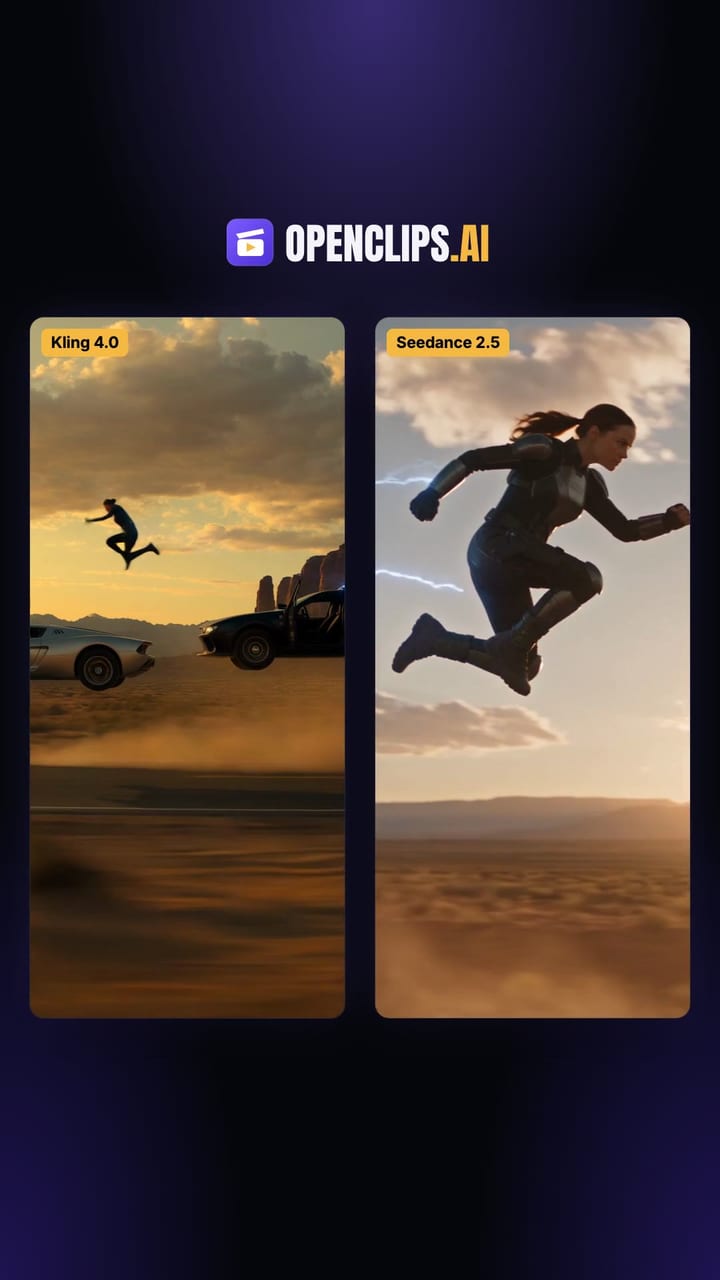
Both land every beat. They read the “flying” part differently. Kling 4.0 makes the black chase car itself hover on rear thrusters, the woman leaps onto the silver car’s roof and drops in through the sunroof, and the ending shows her walking the driver away from a burning wreck. Seedance 2.5 adds a separate drone-style craft that stays in most shots, wraps the jumper in blue electric arcs and turns the crash into a fireball.
Our read: Kling 4.0 plays it as a grounded stunt, Seedance 2.5 goes bigger on effects. Pick by the look of your brand.
Test 4: a selfie vlog, Kling 4.0 vs Seedance 2.0
A handheld London walk at dusk: shop windows, a red bus, the Underground sign and a coffee cup to camera.
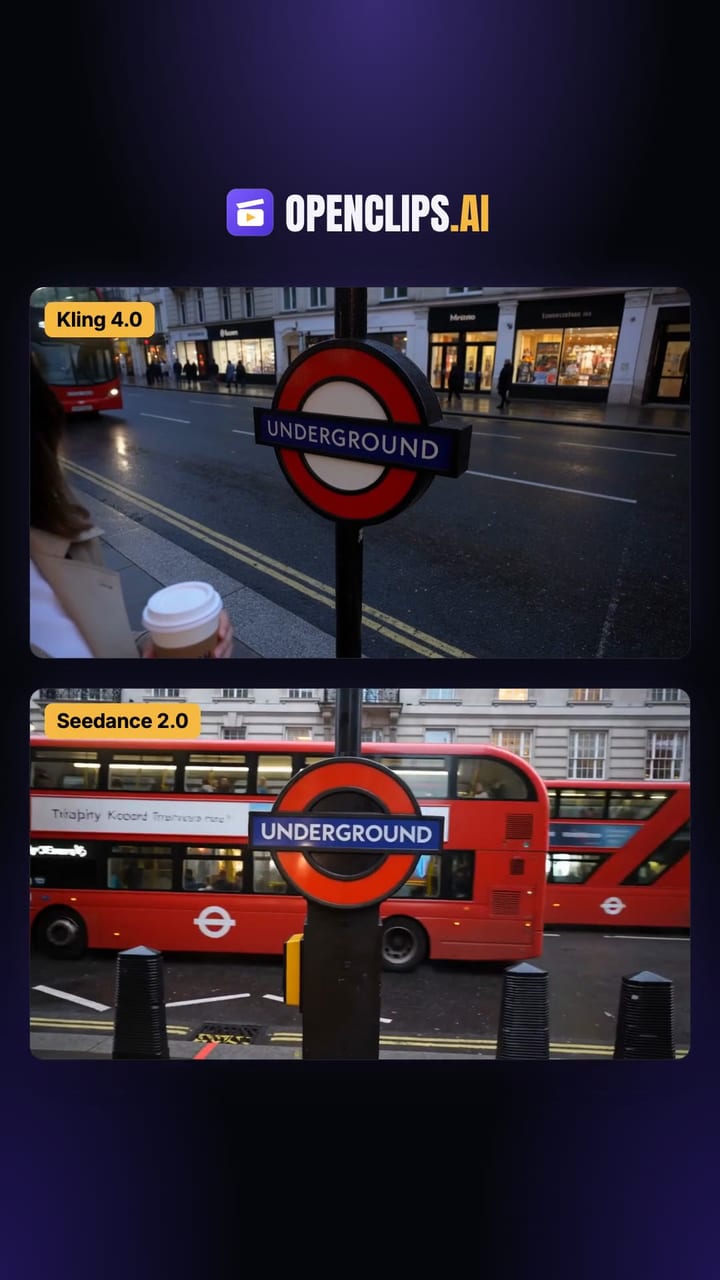
Kling 4.0 shoots it like a wide phone lens in blue-hour light: the camera swings off her to the Underground roundel as a red bus passes, comes back to the same face, and she winks. Both wrote MEEAH on the cup, Kling 4.0 as marker on a kraft sleeve, Seedance 2.0 printed on white. Seedance 2.0 is warmer, with brighter shop windows and full double-deckers in frame.
Kling 4.0 vs Kling 3.0 at a glance
| Kling 3.0 | Kling 4.0 | |
|---|---|---|
| Long ads | Stitched from separate clips | One pass |
| Frame control | Start and end frame | Up to 10 keyframes |
| References | Images or a video | Images, videos, elements and voices |
| Holding references | Drifts after the first frames | Holds better (YouArt) |
| Long prompts | Weights the opening clauses | Follows up to 8,000 tokens |
| Sound | Mono | Stereo |
| On-screen text | Often garbled (our Test 1) | Spelled right (our Test 1) |
| Fast camera pans | Flicker | Fewer artifacts |
| Speed | Faster | Slower, longer queues at peak |
Kling 3.0’s own numbers on OpenClips:
| Modality | Video |
|---|---|
| Length | 3s to 15s |
| Resolutions | 720p, 1080p, 4k |
| Audio | Available |
| References | Up to 1 |
| Price | from ⚡46 per render (from ≈$0.06/s) |
Which Kling should you use?
| You need | Use | Why |
|---|---|---|
| A long ad in one take | Kling 4.0 | One pass, no seam |
| Text, price or logo in the shot | Kling 4.0 | Our Test 1 |
| A product reveal at an exact second | Kling 4.0, Keyframes | Middle frames with timings |
| Same face, product and voice all locked | Kling 4.0, Omni Reference | The whole kit in one job |
| Fast drafts and hook tests | Kling 4.0 Flash | Shorter takes, no end frame or multiple keyframes |
| Cheap, simple short clips | Kling 3.0 | Faster, with published rates |
Prompt kit: copy, paste, swap the brackets
These are templates we wrote to the structure in Kling’s official 4.0 guide: say what each asset controls, set the scene, list timed events, then add an audio line. We have not rendered these exact prompts, so treat them as starting points.
A woman in her 30s with [hair] in a [outfit] at [place], [time of day] light.
0 to 8 s: she walks toward camera holding [product], slow push-in.
8 to 18 s: she stops, lifts [product] to eye level, camera circles left.
18 to 30 s: close-up of [product] in her hand, she smiles at the lens.
Audio: soft street ambience, she says "[line]". No background music.
Use @Image1 as the first frame.
0 to 10 s | Keyframe 2: [product] on the table, camera slides in from the right.
10 to 20 s | Keyframe 3: hand lifts [product], light catches the label.
20 to 30 s | Keyframe 4: hero shot, [product] centered on a clean background.
Handwritten dark red script appears at the center of the frame: "[exact text]".
It writes in from left to right over 2 seconds, holds for 4 seconds, stays level as the camera moves. No subtitles.
@Image1 defines the woman; preserve her face and hair.
@Image2 defines the product; preserve its shape, label and color.
@Image3 defines the location.
[Scene, timed events, audio line, as in prompt 1.]
To edit an existing clip: start with “Edit @Video1”, say what to change and end with “Keep everything else unchanged.” Kling’s guide warns that “Reference @Video1” makes a new video instead of editing yours.
What each feature is for in a real ad
- One-pass long takes: UGC testimonials and story ads with one face and no seam.
- Keyframes: the packshot or end card exactly where your edit needs it.
- Omni Reference: your real product, not a lookalike.
- On-screen text: prices, offers and hooks inside the shot.
- Voice profiles: one voice across a series of ads.
Limits and failure modes
- It adds things you did not ask for. MindStudio saw an unprompted gesture and a gray jacket that was in neither prompt nor reference.
- Emotion can be flat even when lip sync works (MindStudio).
- Physics still slips. In MindStudio’s fire test, a candle did not melt.
- Surprise cuts and music. Multi-shot is on by default, so the model splits shots by itself. Flash testers also reported unrequested background music and soft detail in wide shots. Describe your shots, and add “No background music” if you plan to add your own.
- Negative prompts backfire. Kling’s guide says they can increase errors. It names only two negatives worth writing: no subtitles and no background music.
- Aspect ratio follows your first keyframe, so crop it to 9:16 before uploading for Reels.
- No official per-second price yet. Kling marks API pricing “coming soon”.
Checklist before you hit generate
- Pick one entry point: Keyframes or Omni Reference.
- Open with one sentence: subject, scene, action, emotion.
- Give every @asset a role.
- Write timed beats, one camera move each.
- Put exact text and dialogue in quotes.
- Swap “cinematic” for real light, materials and framing.
- Draft on Flash, finish on 4.0.
How to use it on OpenClips
- Open the video generator and pick Kling 4.0.
- Paste a prompt from the kit and add your keyframes or references.
- Pick your aspect ratio and length, check the price on the Generate button, and generate.
Seedance 2.5 on OpenClips holds a face through a long take too: our one-pass Seedance 2.5 test kept the same face from the first frame to the last, with no cuts.
Made something worth repeating? Publish it as a community workflow. Here’s how sharing earns you credits →
One pass, text that reads. New to OpenClips? Start free with ⚡50 on signup, no card.
Sources, read on 22 October 2026: Kling’s Kling 4.0 model user guide, CellCog’s “Kling 4.0 is out”, fal’s “What is Kling 4.0?”, YouArt’s Kling 4.0 vs Kling 3.0, MindStudio’s Kling 4.0 first look, MyClaw’s Kling 4.0 review, and Let’s Data Science’s report on Kling AI opening Kling 4.0 to all users.