Sign up and save up to 50% on a yearly plan.Sign up free →Black Friday: up to 50% off yearly plans.See the deal →

New people. Same moves.

Mirage Swap Plus AI video generator

Show who should be in the shot. Mirage Swap Plus replaces the people. Every step, the setting and the camera stay.

From $0.252/s on MAX yearly

  • 480p · 720p · 1080p
  • Up to 9 references
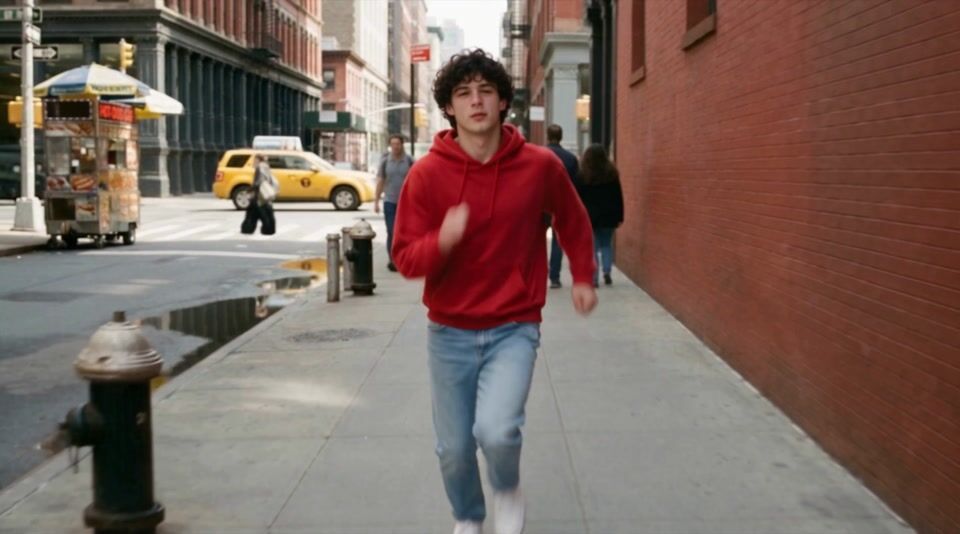
Fully replace the man walking toward the camera…
Hero take
  • 480p · 720p · 1080p
  • Up to 9 references

● Made with Mirage Swap Plus

Straight off the model

Every example is one render, with the prompt that made it.

  • Mirage Swap Plus example 1Video

    Fully replace the man walking toward the camera…

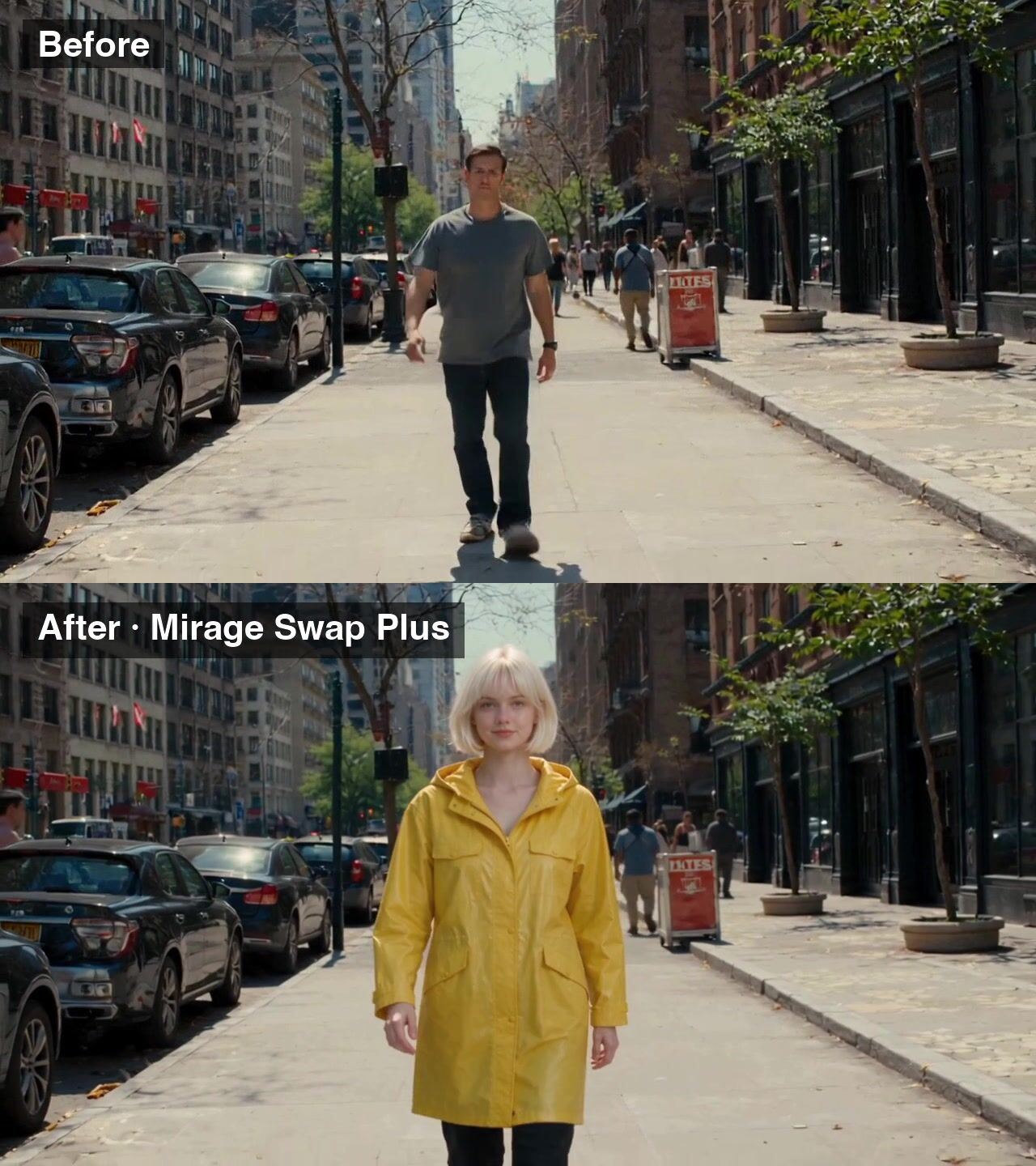
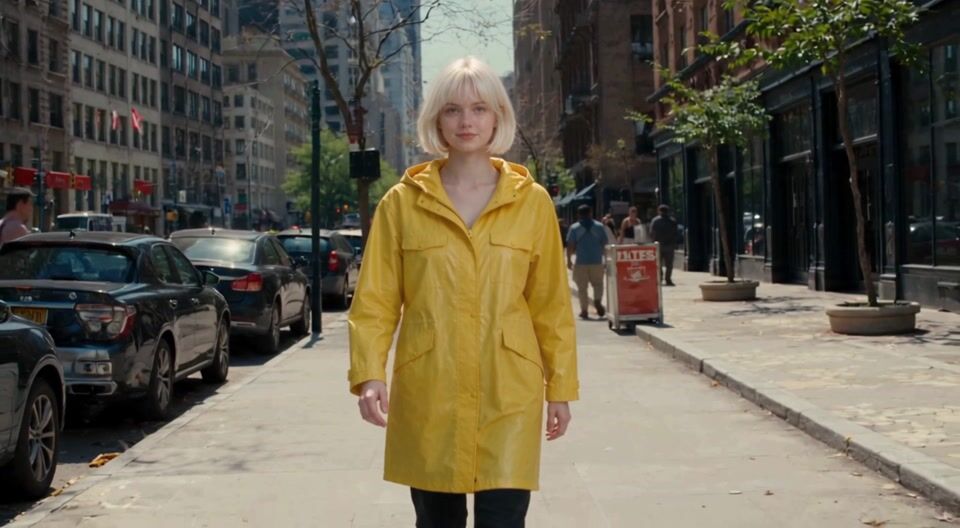
    Fully replace the man walking toward the camera with the woman in image 1: her short platinum bob, bright yellow raincoat, black trousers and white sneakers. Keep his walk, his position, the New York street, the camera movement and the timing.

    Verbatim prompt
    Fully replace the man walking toward the camera with the woman in image 1: her short platinum bob, bright yellow raincoat, black trousers and white sneakers. Keep his walk, his position, the New York street, the camera movement and the timing.
  • Mirage Swap Plus example 2Video

    Fully replace the man walking toward the camera…

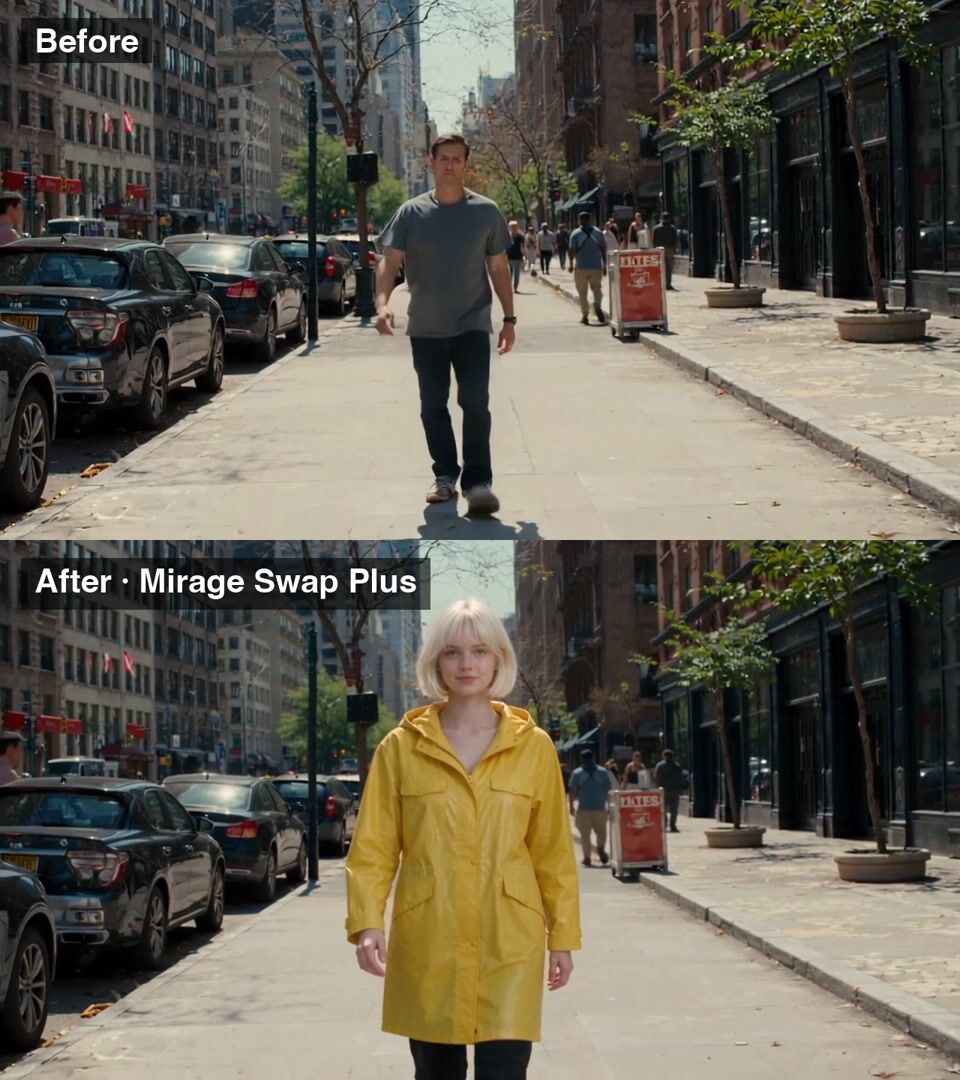
    Fully replace the man walking toward the camera with the woman in image 1: her short platinum bob, bright yellow raincoat, black trousers and white sneakers. Keep his walk, his position, the New York street, the camera movement and the timing.

    Verbatim prompt
    Fully replace the man walking toward the camera with the woman in image 1: her short platinum bob, bright yellow raincoat, black trousers and white sneakers. Keep his walk, his position, the New York street, the camera movement and the timing.
  • Mirage Swap Plus example 3Video

    The dancer replaced by the man in one reference…

    The dancer replaced by the man in one reference photo, every move kept. Before on top, after below.

    Verbatim prompt
    The dancer replaced by the man in one reference photo, every move kept. Before on top, after below.
  • Mirage Swap Plus example 4Video

    Replace a person

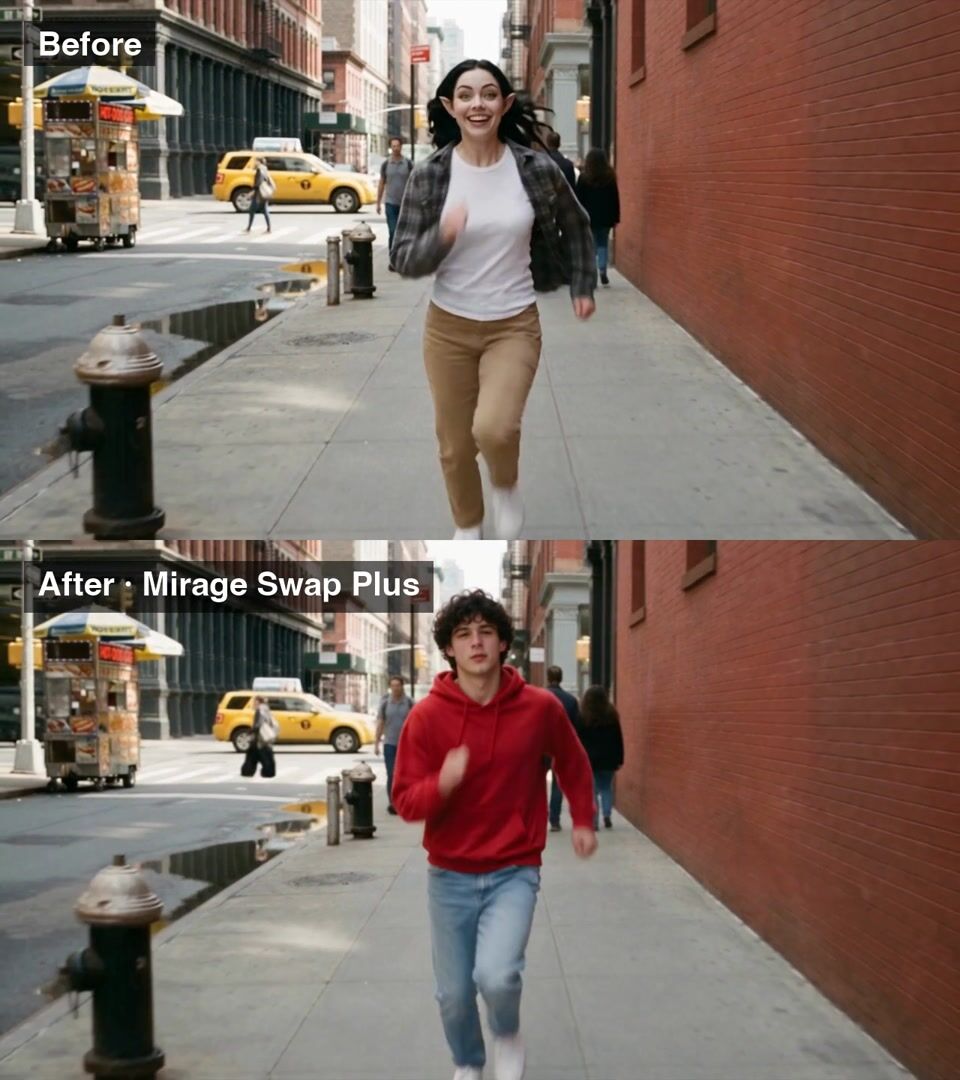
    Replace a person: the same wall-run on the same street, with a new person in it.

    Verbatim prompt
    Replace a person: the same wall-run on the same street, with a new person in it.

● Use cases

What people make with Mirage Swap Plus

Swap one or several people in a video. Every move kept.

Video

Recast the walk-on

Verbatim prompt
Fully replace the man walking toward the camera with the woman in image 1: her short platinum bob, bright yellow raincoat, black trousers and white sneakers. Keep his walk, his position, the New York street, the camera movement and the timing.
Video

Recast the dancer

Verbatim prompt
The dancer replaced by the man in one reference photo, every move kept. Before on top, after below.
Video

Recast the stunt

Verbatim prompt
Replace a person: the same wall-run on the same street, with a new person in it.

● Why people pick it

What is Mirage Swap Plus good at?

01

Built for groups

The newest Mirage engine. Best when several people need swapping.

02

Every move kept

Walks, dances and wall-runs carry over step for step.

03

Up to 9 reference images

Show each new person. Name them image 1, image 2 and on.

04

Four edit types

Person, product or background, restyle, or a free edit.

05

480p or 720p

Keep the source frame, or pick a new ratio. Sound on or off.

● Side by side

How does Mirage Swap Plus compare?

The closest video models on OpenClips, on the same credits.

SpecMirage Swap PlusMiniMax H3 Max RecastMirage SwapMirage Swap Fast
Made byMirage Swap PlusMirageMiniMax H3 Max RecastMiniMaxMirage SwapMirageMirage Swap FastMirage
PriceMirage Swap Plusfrom 61 credits per secondMiniMax H3 Max Recastfrom 57 credits per secondMirage Swapfrom 46 credits per secondMirage Swap Fastfrom 38 credits per second
OutputMirage Swap PlusMP4MiniMax H3 Max RecastRASTERMirage SwapRASTERMirage Swap FastRASTER

Prices are the catalog's, quoted before every render.

● Specs

Mirage Swap Plus specs

StatusLive in the app, the API and the MCP
Made byMirage
ModalityVideo
InputsOne video, Text prompt, up to 9 reference images
Longest prompt3,000 characters
Aspect ratioauto
Edit typeFree edit · Replace a person · Replace a product or background · Restyle the video
Generate audioOn / off
Resolution480p · 720p · 1080p
OutputMP4
Pricefrom 61 credits per second · $0.252/s on MAX yearly

● How it works

How do you use Mirage Swap Plus on OpenClips?

01

Add your video

Pick one clip from your library or upload it. Up to 15 seconds.

02

Pick the edit

Free edit, replace a person, replace a product or background, or restyle.

03

Show the new look

Attach up to 9 images of the new person, product or place.

04

Say what changes and what stays

Name the swap first. Then list what must not move.

05

Pick the settings and generate

Resolution, frame and sound. Mirage Swap Plus shows the credits before you run it.

● Tips

Tips for better results with Mirage Swap Plus

  • Describe each new person

    Name the hair, clothes and shoes. Point to the image for each one.

  • List what stays

    Their walk, their position, the street, the camera and the timing.

  • One photo per person

    Swapping three people? Attach three photos and map each in the prompt.

  • Need 1080p?

    Mirage Swap renders up to 1080p with the same inputs.

● Made for

What can you make with Mirage Swap Plus?

Person swapsGroup swapsRecast adsDance clipsAction shotsStreet footageLifestyle adsUGC variants

● Questions

Mirage Swap Plus FAQ

Mirage Swap Plus is the Mirage Swap video editor on the newest Mirage engine. It is best at replacing one or several people in a video while keeping every move, the setting and the camera. It renders at 480p or 720p and runs in the OpenClips app, the REST API and the MCP.

Swap Plus runs on a newer engine and handles several people in one clip best. Mirage Swap renders up to 1080p. Both take the same inputs and the same four edit types.

Up to 15 seconds, one clip per run.

Up to 9. Use one clear photo per new person, and say in the prompt which image replaces whom.

Yes. Pick Replace a product or background, Restyle the video or Free edit. For a product or background swap at 1080p, use Mirage Swap.

Mirage Swap Plus opens with your first purchase: any plan or credit pack. A new account still gets ⚡30 on signup with no card, for the models the free plan runs.

Mirage Swap Plus costs from 61 credits per second, paid from your OpenClips credits. That is from $0.252/s on MAX yearly. The price is shown before you generate.

Yes. Mirage Swap Plus runs from the OpenClips app, the REST API and the MCP server, with the same settings and the same price.

Recast your next clip

Show the new people. Keep every move.

Swap people in a video

What is Mirage Swap Plus?

Mirage Swap Plus replaces the people in a video and keeps everything they do. Upload a clip of up to 15 seconds, attach a photo of each new person and describe them. Their walk, their dance or their stunt carries over step for step, on the same street, with the same camera move. It runs on the newest Mirage engine and is the pick when more than one person needs swapping.

Recast a video without a reshoot

  • Recast an ad: keep the take you paid for and change who is in it.
  • Swap a group: replace two or three people in one run, one reference photo each.
  • Keep the action: dances, walks and wall-runs keep their timing.

The Mirage Swap line-up

  • [Mirage Swap](/models/mirage-swap/) renders up to 1080p. Use it for the final version.
  • [Mirage Swap Plus](/models/mirage-swap-plus/) runs on the newest Mirage engine. Use it to swap several people at once.
  • [Mirage Swap Fast](/models/mirage-swap-fast/) costs less, at 480p or 720p.
  • [Mirage Swap Mini](/models/mirage-swap-mini/) is the cheapest, for drafts and quick tests.

All four take the same inputs: one clip of up to 15 seconds, up to 9 reference images and a prompt.

Prompt guide for person swaps

Describe the new person and point to the image: "Fully replace the man walking toward the camera with the woman in image 1: her short platinum bob, bright yellow raincoat, black trousers and white sneakers." Then list what stays: "Keep his walk, his position, the New York street, the camera movement and the timing."

● Where to go next

Related models