What Is Wan 3.0? Alibaba’s 30-Second AI Video Model (2026)
Wan 3.0 is Alibaba’s flagship AI video model: one continuous clip with its own dialogue, music and effects, from a text prompt, images, audio, a document or a public web page.

Scene select — 8 scenes
Wan 3.0 is Alibaba’s flagship AI video model. It makes one continuous clip with its own dialogue, music and effects from a text prompt, images, audio, a document or a public web page. The card below has its lengths, resolutions and from-price on OpenClips.
| Modality | Video |
|---|---|
| Length | 2s to 30s |
| Resolutions | 480P, 720P, 1080P |
| Audio | Available |
| References | Up to 10 |
| Price | from ⚡21 per render (from $0.042/s) |
That makes it one of the few models that can hand you a whole ad in one long take. Below: what Alibaba shipped, where Wan 3.0 is strong for ads, what it costs, how it compares with Seedance 2.5, Kling 4.0 and MiniMax H3, and five prompts to paste into the composer.
What is Wan 3.0?
Wan is Alibaba’s video model family, run through Alibaba Cloud Model Studio. Wan 3.0 was added to Model Studio on 6 August 2026 as a public beta, and Alibaba announced general availability on 24 August 2026. Two weeks after the beta, a faster build called Wan 3.0 Prime followed: Alibaba calls it the accelerated version, with the same capabilities as the standard model.
What Alibaba lists for Wan 3.0:
- Length: twice as long per generation as its predecessor, Wan 2.7, at 30 fps.
- Resolution: three tiers, listed on the card above.
- Sound: the model writes dialogue, background music and sound effects together with the picture, and Alibaba says the voice works in several languages.
- Inputs: text, images, audio, video, documents and web pages. In practice that means a first frame (or a first and last frame pair), a set of reference images, a few short reference audio clips, and one document or one public web page per render.
- Multi-shot: a single prompt can describe several shots with timestamps, and Alibaba suggests about four to six seconds per shot.
Is Wan 3.0 open source? No. The Wan-Video GitHub hosts open models up to Wan 2.2, and there is no Wan 3.0 repository. The Next Web reported at launch that the 3.0 weights are closed, which makes Wan 2.2 (July 2025) the last open-weights Wan video flagship. If you want Wan 3.0, you use it through an API or a platform like OpenClips.
How good is it? A kombitz.com roundup (14 November 2026) reports Wan 3.0 at the top of “the video arena” at 1175 Elo but does not name the arena, so treat it as a signal, not a ranking for a pitch deck.
What Wan 3.0 does well for ads
One long take, voice and music in it. MiniMax H3 stops at 15 seconds, so a 30-second spot there means two clips and a cut. Wan 3.0 runs the whole spot in one pass, with voice, room tone and music in the same render. That matters most for UGC-style reviews, where a cut mid-sentence gives the trick away.
Sound that lands on the action. Here is a 10-second Wan 3.0 render from our library. The prompt asked for a slow pour into a six-level champagne tower, one glass cracking with a sharp ping “at about the fifth second”, a collapse and a laugh.
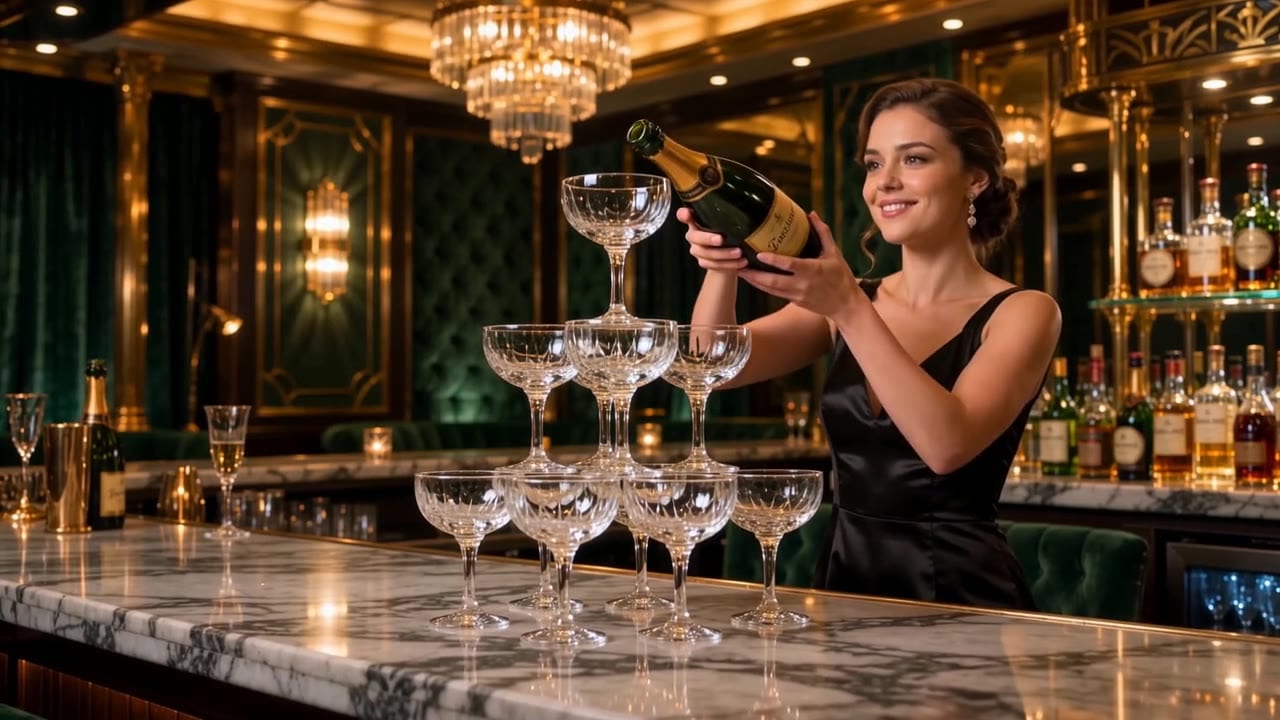
She pours for the first four seconds, a sharp ping lands at about 5.3 seconds, the tower tips and crashes onto the marble over the next two seconds, and she covers her mouth and laughs to close the take.
The beats arrive in the order they were written, and the sound follows the picture. The bottle label came out as invented script, which is what you want when you plan to add your own product later. For a drinks, food or beauty brand, that is the lesson: describe the hand, the pour and the sound in order, and Wan 3.0 keeps them in step. Want to see how another model handles it? Here is the same prompt on MiniMax H3.
Many inputs in one render. A deep set of reference images means you can hand it the product, the person and the set at once and cite them as “Image 1”, “Image 2” in the prompt. The audio tracks let you bring a voice sample or a music bed. And the document or web page input lets you point it at a product page or a one-page brief and ask for an ad built from it. If that is your main use, our guide to turning a product link into a video ad walks through the whole flow.
A price in the middle. In the same-photo test on our channel, Wan 3.0 sat between Seedance 2.5 and MiniMax H3 on price, and today’s quotes say the same: at our default resolution it costs less per second than Seedance 2.5.
Watch: Seedance 2.5 vs MiniMax H3 vs Wan 3.0: Same Photo, Same Prompt (Best AI Video Model for Ads) From 2:33, watch the Wan 3.0 take: sand bursts off the dune around the woman in the red silk dress, then the camera pushes in until she looks straight into the lens.
How much does Wan 3.0 cost on OpenClips?
On OpenClips the model is called Wan 3.0 and sits in the Generate composer next to the other video models, all on one credit wallet. Price depends on two things only, length and resolution; the Wan 3.0 model page prices every combination, and the card above shows the from-price.
A few things worth knowing before you render:
- The middle resolution is the sweet spot. It is the default, and it is what we use for ad tests. The top resolution doubles the price, so save it for the version you will actually run.
- Sound off does not save credits. Alibaba states that switching audio on or off does not change the price, and our quotes agree.
- Attachments are included. In our quotes, adding a first-frame photo or a web page link did not change the price of a clip.
- Wan 3.0 Prime is the faster build of the same model. The model page lists a typical wait of about 2 minutes against about 5 for standard Wan 3.0. It costs more per clip.
The exact price is always on the Generate button before you render. New accounts get ⚡30 once on signup, no card needed, but the Wan 3.0 page notes that the model opens with a first purchase (a plan, or a credit pack from $10 for ⚡800), so those signup credits go to the models the free plan runs. Commercial use is not on the Free plan. If you are buying credits anyway, the Black Friday deal on yearly plans adds bonus credits you keep and ends 30 November.
How to use Wan 3.0 on OpenClips
- Open the composer. Go to the Wan 3.0 model page and press Generate, or pick Wan 3.0 in the model list on Generate.
- Write the beats. Thirty seconds is a scene, so give it an order to follow: one action per beat, with timestamps, and the spoken lines in quotes.
- Attach what the shot needs. Choose one route: a first frame (or a first and last pair), or reference stills and audio tracks, or one document or public web page. Cite each attachment in the order you added it.
- Set the frame, length and resolution. Frames are adaptive, 16:9, 4:3, 1:1, 3:4 and 9:16. Leave length and resolution at what the shot needs; the composer opens on the default.
- Check the quote and render. The ⚡ price sits on the Generate button, and a render takes about 5 minutes.
Wan 3.0 vs Seedance 2.5, Kling 4.0 and MiniMax H3
All four live in the same OpenClips composer, so the choice is about the job, not the subscription. Each card below carries that model’s length, resolutions, audio, references and from-price.
| Modality | Video |
|---|---|
| Length | 4s to 30s |
| Resolutions | 480p, 720p, 1080p |
| Audio | Available |
| References | Up to 30 |
| Price | from ⚡51 per render (from $0.052/s) |
| Modality | Video |
|---|---|
| Length | 3s to 30s |
| Resolutions | 720p, 1080p |
| Audio | Available |
| References | Up to 10 |
| Price | from ⚡96 (from $0.396) |
| Modality | Video |
|---|---|
| Length | 4s to 15s |
| Resolutions | 768P, 2K |
| Audio | Available |
| References | Up to 9 |
| Price | from ⚡39 (from $0.161) |
| Wan 3.0 | Seedance 2.5 | Kling 4.0 | MiniMax H3 | |
|---|---|---|---|---|
| Maker | Alibaba | ByteDance | Kuaishou | MiniMax |
| Sound | On by default, switchable | On or off | Always on | Written in the same pass |
| Beyond images | Audio tracks and 1 doc or web page | None | Up to 5 clips | None |
How to pick:
- Wan 3.0 when you want a long take with dialogue and sound for less than Seedance or Kling, or when the brief lives in a document or a product page.
- Seedance 2.5 for the big cinematic moment and for jobs with many references, since it takes the deepest reference set. Our Seedance 2.5 guide covers it in depth.
- Kling 4.0 when on-screen text, a logo or a fixed keyframe must stay legible, or when you want to edit a clip you already have. See Kling 4.0 vs Seedance 2.5.
- MiniMax H3 for lots of cheap variations with natural physics, shorter takes, and a sharper top tier. See MiniMax H3 vs Seedance 2.5.
And Wan 2.7, the older model in the same family? At our default resolution it costs the same as Wan 3.0 today, but it renders picture only, stops at half the length and takes no voice tracks or documents. Keep it for quick look tests where nobody speaks; for anything that has to talk, Wan 3.0 is the better buy.
If you are still choosing a model family, the side-by-side Seedance 2.5 vs Wan 3.0 comparison page lists every setting, and our roundup of the best AI video generators covers the wider field.
Copy-paste Wan 3.0 ad prompts
These are starting points: swap in your product and keep the structure. Each prompt gives one action per beat, keeps every object in a hand or on a surface, and says what you should hear, because Wan 3.0 follows beats in the order you write them. Cite your attachments in the order you add them (“Image 1”, “Image 2”). Each card’s title carries its settings.
One continuous 30-second take, vertical 9, photorealistic, soft window light. A woman in her late twenties sits at a light wooden kitchen table, talking to the camera like a friend. The small jar from Image 1 rests on the table at frame-right.
0 to 5 s: She smiles and says: "Okay, I have to show you the cream I keep reaching for."
5 to 10 s: Her right hand picks up the jar and holds it beside her face, label toward the lens.
10 to 15 s: She lowers the jar and holds it in her right hand at chest height while her left hand slowly unscrews the lid.
15 to 21 s: She sets the jar and the lid on the table and dips her right ring finger into the cream.
21 to 26 s: She smooths the cream onto the back of her left hand, tilts it toward the lens and says: "It feels so light. That's the whole review."
26 to 30 s: She rests both hands on the table beside the jar and smiles. End state: open jar on the table at frame-right, label to camera, lid beside it.
Camera: static, eye level, medium close-up.
Sound: her voice close and clear, quiet room tone, the lid turning, the jar tapping on wood.
Run this prompt →
Image 1 is the opening frame: a glass bottle of olive oil standing on a pale stone counter next to a small white bowl, morning light from frame-left.
0 to 4 s: The camera holds still. Soft birdsong outside the window.
4 to 8 s: A woman's right hand enters from frame-right and wraps around the bottle.
8 to 12 s: She tilts the bottle and pours a thin golden stream into the bowl.
12 to 15 s: She sets the bottle back on the counter, label facing the camera, and her hand leaves frame-right. End state: bottle and bowl on the counter, oil shining in the bowl.
Camera: static, slightly above counter height.
Sound: birdsong, the glass touching stone, a soft pour.
Run this prompt →
A 20-second coffee ad in four shots, photorealistic, warm morning kitchen, wooden counter, steam in the light.
Shot 1, 0 to 5 s: Close-up. A man's hands open a kraft paper coffee bag on the counter and fold the top back.
Shot 2, 5 to 10 s: Medium shot. His right hand pours hot water from a gooseneck kettle in slow circles into a pour-over cone that sits on a white ceramic cup.
Shot 3, 10 to 15 s: Medium close-up. The cone rests on the counter beside the cup. His right hand lifts the full cup and he takes a slow sip.
Shot 4, 15 to 20 s: Medium shot. He sets the cup down on the counter beside the coffee bag. End state: cup and bag side by side on the counter.
Sound: a light acoustic guitar bed, paper crinkling, water pouring, a cup set on wood.
Run this prompt →
One continuous 15-second take, vertical 9, photorealistic, a cosy living room at night lit by a floor lamp. A man and a woman in their thirties sit side by side on a sofa. A small closed gift box rests on the woman's lap.
0 to 4 s: She looks at the man and says: "You said no presents this year."
4 to 8 s: She lifts the lid off the box with both hands and sets it on the sofa beside her.
8 to 12 s: Her right hand takes the product from Image 1 out of the box and turns it slowly toward the camera.
12 to 15 s: The man smiles and says: "I said a lot of things." End state: both on the sofa, the product in her right hand, label visible, the open box on her lap.
Camera: static, medium two-shot, eye level.
Sound: their voices, a soft crackle of a fireplace, paper rustling.
Run this prompt →
Make a 15-second vertical ad for the product on the attached web page. Show the product the way the page describes it, in a bright, real home setting.
0 to 5 s: A woman stands at a kitchen counter. The product rests on the counter in front of her.
5 to 10 s: Her right hand picks it up and turns it slowly toward the camera.
10 to 15 s: She sets it back down on the counter and nods at the camera. End state: product on the counter, front facing the lens.
Camera: static, eye level, medium shot.
Sound: an upbeat light music bed, the product set down on the counter.
Run this prompt →
For more structure ideas, our video prompt formula and 15-second UGC ad formula work well with Wan 3.0’s beat-by-beat style.
Limits and how to work around them
- On-screen text and audio texture. Alibaba itself says audio texture and on-screen text accuracy are still maturing. Keep prices, offers and CTAs out of the prompt and add them in the edit. If the text must be inside the shot, Kling 4.0 is the safer pick.
- First frame or references, not both. A first frame (or first and last frame pair) cannot be combined with reference images, a document or a link, and on OpenClips a first frame does not take audio tracks either. Pick one route per render.
- Short audio references. Alibaba caps reference audio at a few short clips, so trim a voice sample to its best few lines before you attach it.
- Documents and links. One file (PDF, Word, PowerPoint, Excel, text and more) or one link per render, never both, and the link must open without a login. Prompt expansion stays on with either, so the model adds details of its own: still write the beats you care about.
- Composer gaps. Alibaba’s API can take reference videos, edit an existing clip from a text instruction and extend a clip. The OpenClips composer takes images, audio, one document or one web page, but not those video modes yet. For editing a clip you already have, use Kling 4.0.
- No 21:9. The frames are adaptive, 16:9, 4:3, 1:1, 3:4 and 9:16. For an ultra-wide hero, use Seedance 2.5 or Kling 4.0.
- Closed weights. You cannot run Wan 3.0 on your own GPU. If you need that, Wan 2.2 is the last open release.
- Longer than one take. Chain clips: our guide to making longer AI videos shows how.
Try Wan 3.0 on your own product: open Wan 3.0 on OpenClips.
New to OpenClips? Start free, ⚡30 on signup, no card.
Sources
- Alibaba Cloud Model Studio, Wan 3.0 video generation guide: length, resolutions, audio, input limits, multi-shot, edit and extend.
- Alibaba Cloud Model Studio, Wan 3.0 API reference: lengths, 30 fps, audio does not affect price, document types.
- Alibaba Cloud Model Studio, newly released models: Wan 3.0 listed on 6 August 2026, Prime on 20 August 2026.
- Alibaba Cloud, Wan 3.0 officially launched: general availability on 24 August 2026.
- Alibaba Cloud blog, Alibaba unveils Wan3.0: public beta, multilingual voice, twice the length of Wan 2.7.
- Alibaba Cloud blog, Wan3.0 at general availability: launch details and the audio and text caveat.
- Alibaba Cloud Model Studio, Wan 3.0 Prime: the accelerated version.
- Wan-Video on GitHub: open model releases up to Wan 2.2.
- The Next Web, “Alibaba launches Wan3.0, its 30-second video model” (24 August 2026): closed weights.
- kombitz.com, “AI Image & Video Model News Roundup, November 14, 2026”: the 1175 Elo arena claim.
- OpenClips, Wan 3.0 model page, Seedance 2.5 vs Wan 3.0 and pricing: settings, inputs, prices and plan terms; OpenClips Generate quotes, 16 November 2026.