What Is MiniMax H3? Versions, Prices and Prompts (2026)
MiniMax H3 is the third-generation video model from MiniMax, the company behind Hailuo. On OpenClips it comes in four lines: H3, H3 Highspeed, H3 Lite and H3 Max, with Turbo drafts.
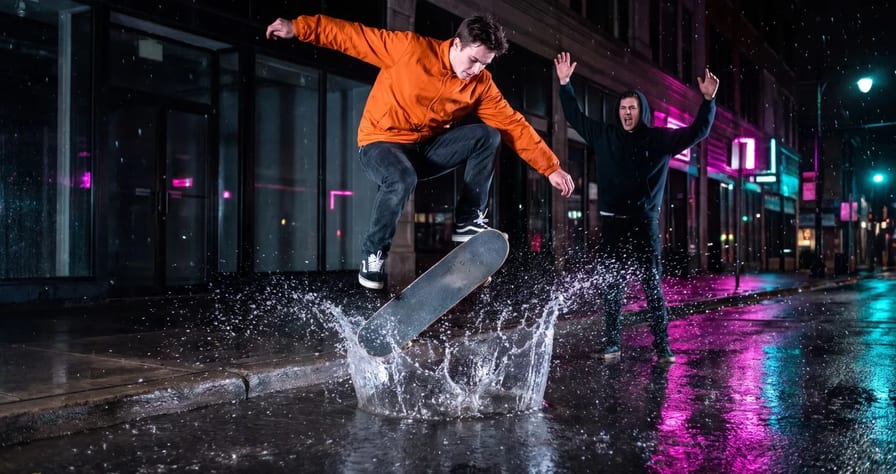
Scene select — 8 scenes
MiniMax H3 is the third-generation video model from MiniMax, the Shanghai company behind the Hailuo video models. Released on 31 July 2026, it reads text, images, video and audio in one prompt and returns clips with their own stereo soundtrack. On OpenClips it comes in four lines: H3, H3 Highspeed, H3 Lite and H3 Max, with Turbo drafts. For most ads, start with H3, draft hooks on Lite, and use Max when one face or outfit must hold across several shots.
For the head-to-head with ByteDance’s model, read MiniMax H3 vs Seedance 2.5. This is the model guide: versions, prices and prompts.
Who makes MiniMax H3, and is it Hailuo 3?
MiniMax builds it. Its earlier video models shipped as Hailuo (Hailuo 02, then Hailuo 2.3, still on OpenClips), and the H3 launch post says the team set the Hailuo 02 architecture aside. So if you searched for “Hailuo 3”, this is the model you mean. The API id is MiniMax-H3.
Two versions have a second parent. H3 Max is fal Research’s post-train of the open H3 weights, tuned for prompt adherence and visual quality (announced 27 August 2026). H3 Max Turbo is fal’s faster post-train, built for its own inference stack.
What is new in MiniMax H3
MiniMax calls H3 a general-purpose multimodal model. What changes for ad makers:
- One context for everything. Text, images, a clip and audio go into the same prompt. On OpenClips that is a set of images, a reference clip and a few audio tracks.
- Sound in the same pass. Every render comes back with a 32 kHz stereo soundtrack, as the model card says and our H3 files confirm. You steer it by writing the sounds you want.
- A sharper top tier. MiniMax says its top-tier price per second is under a third of mainstream models, and its base-tier price under half of their standard tier.
- A rebuilt model. New tokenizer, VAE and transformer. The base renders at its standard tier, and for the top tier the model regenerates its own output instead of using a separate upscaler.
- Frames or references. Pin a first frame (and optionally a last), or attach references. One render cannot mix the two.
Here is one plain-language prompt on H3: a pour, a collapse, a reaction and the room sound in one take.
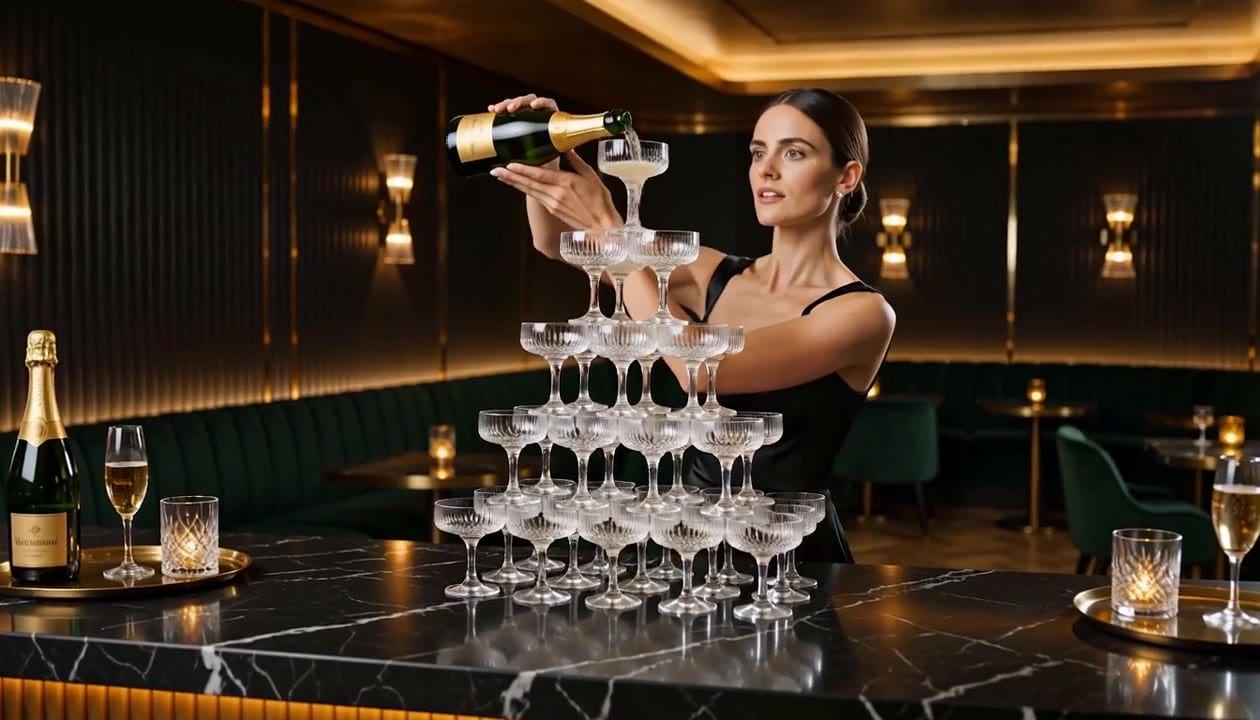
A woman in a black satin dress pours from a bottle she holds into a six-level coupe tower, the champagne cascades, the tower gives way at about 6 seconds and she laughs with her hand over her mouth.
The same prompt on Wan 3.0 is in What is Wan 3.0. There it costs about twice as many credits as here.
Watch: MiniMax H3 Makes the Sound Too (AI Video With Audio) From 0:09 the clip plays with the sounds its prompt listed: a crunch, ice, a crash and a fizz.
MiniMax H3 versions and prices on OpenClips
Each version’s card carries its lengths, resolutions, references and from-price. The exact price is always on the Generate button.
| Modality | Video |
|---|---|
| Length | 4s to 15s |
| Resolutions | 768P, 2K |
| Audio | Available |
| References | Up to 9 |
| Price | from ⚡39 (from $0.161) |
| Modality | Video |
|---|---|
| Length | 4s to 15s |
| Resolutions | 480p, 768p |
| Audio | Available |
| References | Up to 9 |
| Price | from ⚡33 (from $0.137) |
| Modality | Video |
|---|---|
| Length | 4s to 15s |
| Resolutions | 480p, 768p |
| Audio | Available |
| References | Up to 9 |
| Price | from ⚡21 (from $0.087) |
| Modality | Video |
|---|---|
| Length | 5s to 15s |
| Resolutions | 480P, 768P |
| Audio | Available |
| References | Up to 9 |
| Price | from ⚡49 (from $0.203) |
| Modality | Video |
|---|---|
| Length | 5s to 15s |
| Resolutions | 480P, 768P |
| Audio | Available |
| References | None |
| Price | from ⚡16 per render (from $0.013/s) |
| Version | Model id | Inputs | Typical wait |
|---|---|---|---|
| MiniMax H3 | minimax-h3 | Text; first frame or first + last; or images, a clip and audio as references | About 3 to 7 min |
| H3 Highspeed | minimax-h3-highspeed | Same as H3 | Under a minute |
| H3 Lite | minimax-h3-lite | Same as H3, no adaptive ratio | About a minute |
| H3 Max | minimax-h3-max-t2v, -i2v, -r2v | Text; first frame (+ last); or images, a clip and audio as references | Under 1.5 min |
| H3 Max Turbo | minimax-h3-max-turbo-t2v, -i2v | Text or first frame, no references | Under a minute |
Sound is always on in every version. Also worth knowing:
- More than five images, or any reference clip, raises the price on H3, Lite and Highspeed.
- H3 offers seven frame shapes, including 21:9 and adaptive. Lite drops adaptive, and Max’s first frame lane follows the shape of your photo.
- MiniMax pitches Highspeed between quality and speed, but on OpenClips today it quotes above H3 at the same tier. Pick it for the wait, not to save credits.
H3 opens with your first purchase: a plan, or ⚡800 for $10. The ⚡30 signup grant runs the free-plan models, and commercial use starts on paid plans. Until 30 November 2026 (4 PM PT), yearly plans on /pricing/ add Black Friday bonus credits, from ⚡500 on Starter to ⚡14,500 on MAX, and Starter is $63 for the first year. For cost against other models, see the cheapest AI video generators.
Which MiniMax H3 version for which ad job
| Ad job | Pick | Settings to start with | Why |
|---|---|---|---|
| Packshot or pour from your own photo | H3 | First frame, standard tier | Starts on your exact photo, so the label stays yours |
| Hero cut for a landing page or big screen | H3 | Top tier, a long take | The only line with the sharper top tier |
| Ten hook drafts before you pick one | H3 Lite | First frame, lowest tier, short | A cheap draft |
| Same face or outfit across several scenes | H3 Max (references) | Standard tier, short | Built to hold cited references |
| Quick look at a text-only idea | H3 Max Turbo | Lowest tier, shortest | The cheapest draft, back in about a minute |
| A client waiting on the call | H3 Highspeed | Standard tier, short | Under a minute instead of several |
We gave H3 Max one photo of a woman in a red leather jacket and asked for three scenes. Face, hair and jacket held in all three. In the café and rooftop, it cut to a close-up (at 3.0 s and 2.5 s) instead of the slow push-in we asked for. Handy for an edit, but write “one continuous shot” if you need a single take.
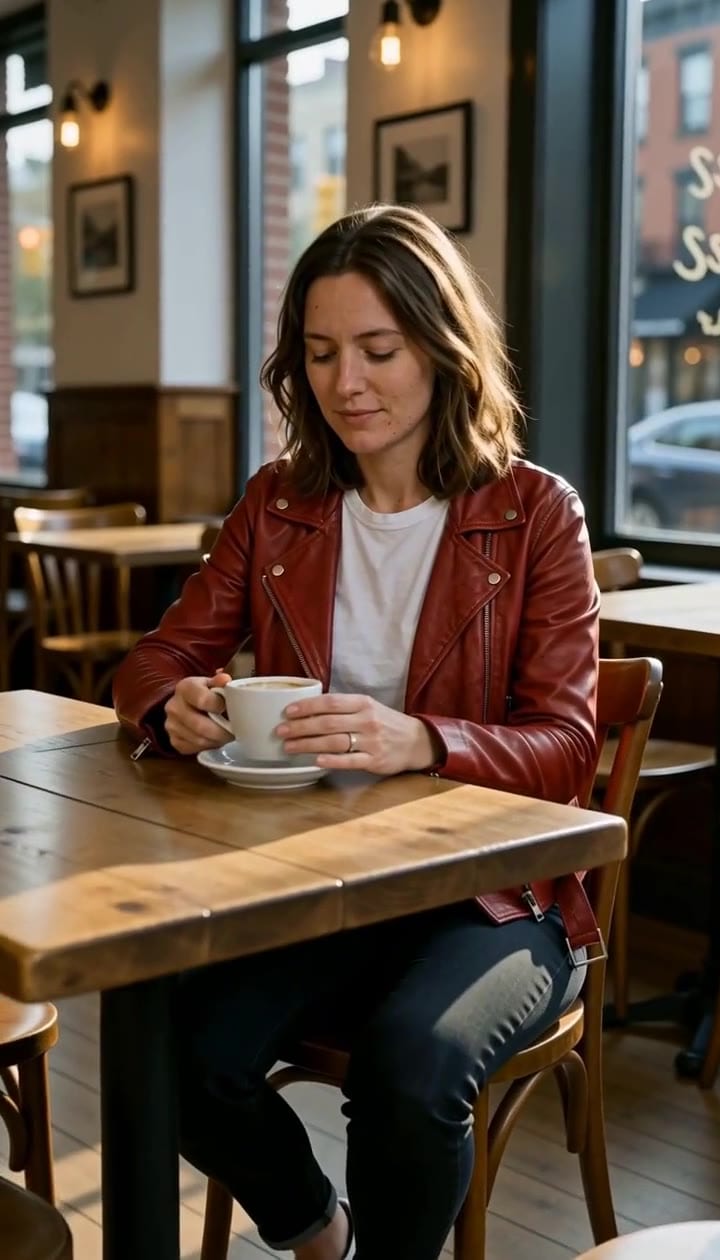
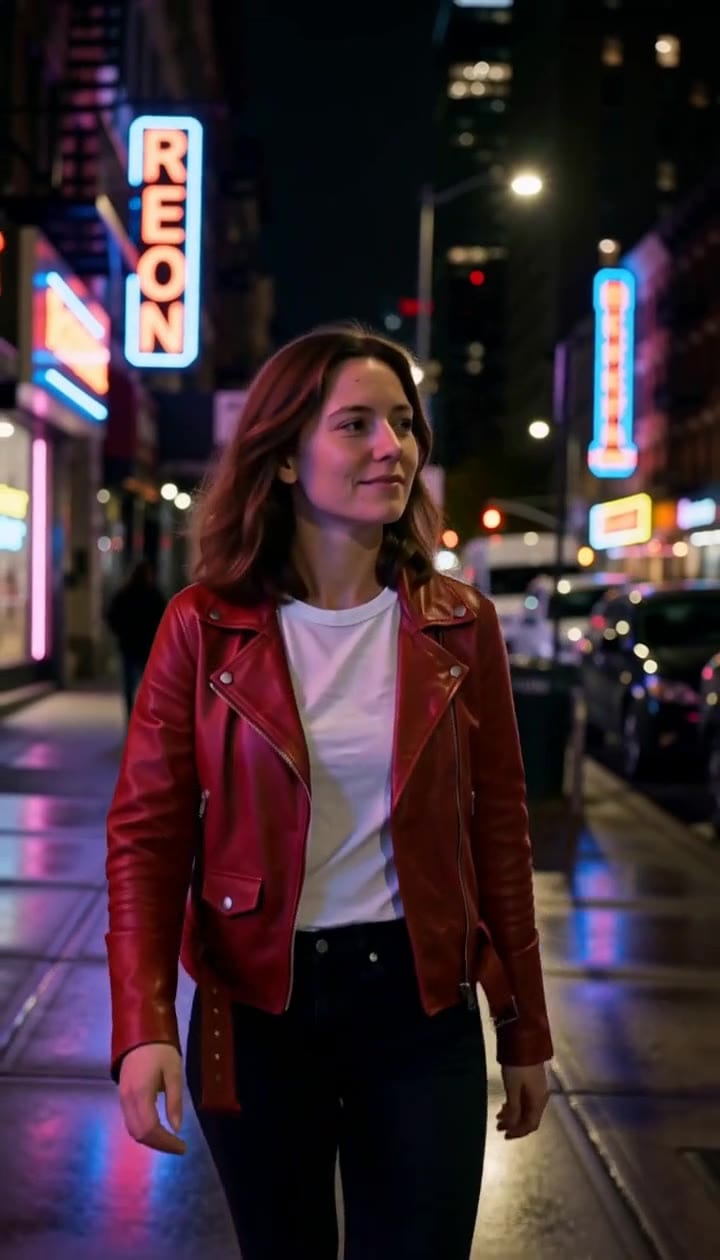
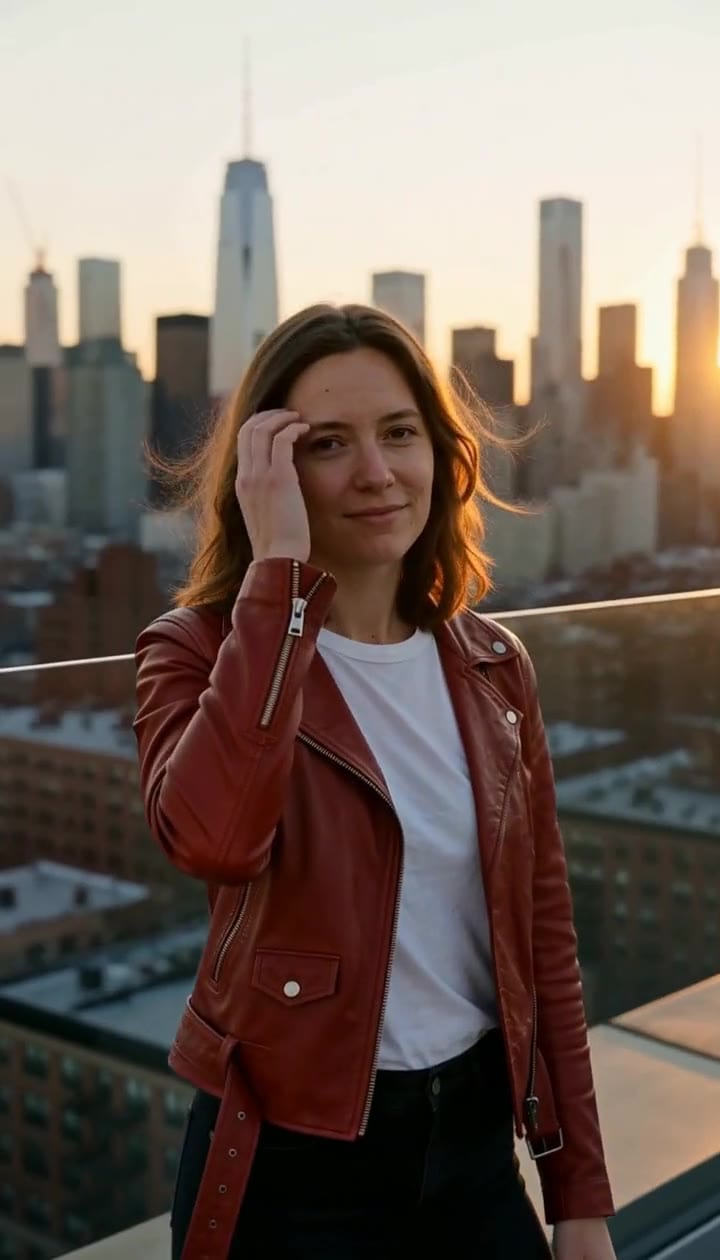
A single photo as the reference, three scenes, the same face and jacket in every one. More on holding a face across shots: consistent characters in AI video.
Is MiniMax H3 open source?
It is open weights with conditions. MiniMax published the H3 base checkpoints on Hugging Face (MiniMaxAI/MiniMax-H3): a 33B transformer for text, first and last frame, and reference video. The instruction stage (H3-Context-IR) is not in the release and the top-tier regenerator is not open yet, so a local run stays at the base tier.
The MiniMax H3 Community License is the catch. It excludes the European Union, the United Kingdom, South Korea and the United States (MiniMax calls that “not yet”, not “not ever”, and organizations there can apply). It requires written authorization above $20 million in yearly revenue, bars training other models on outputs, and asks commercial products to show “MiniMax H3” in their interface.
On quality it holds up: on the Artificial Analysis text-to-video leaderboard (16 November 2026), H3 ranks third overall, behind Wan 3.0 and Utopai X, and is the top open-weights model.
If you only want clips, skip all of this: on OpenClips you run hosted H3 in the browser, no GPU or ComfyUI.
Copy-paste MiniMax H3 ad prompts
In the composer, pick an H3 version, add your photo, choose first frame or references, set length and quality, and paste a prompt.
Watch: MiniMax H3 Tutorial: Product Video Ads Without ComfyUI From 0:19 it opens OpenClips and picks H3, sets the product photo as first frame at 0:40 and writes the second-by-second prompt with its sound from 0:50.
Each prompt follows one build: what Image 1 is and what must not change, one camera move, one action per beat, an end state, then the sound. A hand moves every product. Replace the brackets and keep the timings. More in the video prompt formula.
Image 1 is the first frame: [PRODUCT JAR] on a pale stone bathroom shelf in soft morning light. Keep the jar, lid and label exactly as in Image 1. One continuous shot, the camera pushes in slowly the whole time.
0-2 s: The jar rests on the shelf beside a folded white towel.
2-5 s: A woman's right hand enters from frame right and slowly unscrews the lid.
5-6 s: The hand sets the lid down on the shelf beside the jar.
6-7 s: Her index finger lifts a little cream from the jar.
7-8 s: The hand leaves frame right.
End state: the open jar in the center, label facing the lens, in sharp focus.
Sound: a quiet bathroom, a soft ceramic tap as the lid touches the stone, birds far outside.
Run this prompt →
Image 1 is the first frame: [DRINK BOTTLE] on a wooden café table next to an empty glass with ice. Keep the bottle shape and label exactly as in Image 1. One continuous shot, a slow push-in toward the glass.
0-2 s: The bottle and the glass rest on the table in warm afternoon light.
2-4 s: A man's right hand wraps around the bottle and lifts it.
4-7 s: The hand tilts the bottle and pours slowly over the ice.
7-9 s: The hand sets the bottle back on the table, label facing the lens.
9-10 s: The camera holds on the glass and the bottle side by side.
End state: full glass on the left, bottle on the right, label sharp.
Sound: café murmur, the pour, ice cracking softly, one clink as the bottle meets the table.
Run this prompt →
Image 1 is the woman. Image 2 is the product, [PRODUCT]. Keep her face and hair from Image 1 and the product shape, colour and label from Image 2.
Vertical selfie video. Her left hand holds the phone at arm's length, out of frame. She stands in a bright kitchen with window light from frame left and plain white cabinets behind her, framed from mid-chest up, camera at her eye level.
0-3 s: She looks into the lens and says in English, relaxed: "Okay, this is the one I keep reaching for."
3-7 s: Her right hand raises the product beside her face, label toward the lens.
7-11 s: She smiles and says: "It lives on my counter now."
11-12 s: She gives a small nod.
End state: she smiles into the lens, the product held still beside her cheek.
Sound: her voice close to the phone microphone, a quiet kitchen hum, a kettle ticking in the background.
Run this prompt →
Image 1 is the woman. Image 2 is the dress. She wears the dress from Image 2, same colour, fabric and cut, with the face and hair from Image 1.
One continuous shot, the camera pushes in slowly from a full-length shot to a medium shot. A sunlit stone terrace above the sea, late afternoon.
0-3 s: She walks slowly toward the camera, the hem moving with each step.
3-5 s: She stops and her right hand smooths the fabric at her waist.
5-8 s: She turns her head to the lens and smiles.
End state: medium shot, she faces the lens, the dress in full light.
Sound: waves below, a light wind, her footsteps on stone.
Run this prompt →
Image 1 is the first frame: [PRODUCT BOX] on a white desk next to a closed laptop. Keep the box and its print exactly as in Image 1. Static camera at desk height.
0-2 s: A hand enters from frame left and rests on top of the box.
2-4 s: The hand slides the box slowly across the desk toward the lens.
4-6 s: The hand lifts away and leaves frame left.
End state: the box fills the lower half of the frame, print facing the lens.
Sound: a quiet office, the soft scrape of cardboard on the desk, distant keyboard clicks.
Run this prompt →
Run the winning Lite draft on H3 with the same photo and prompt for the final. Add text, prices and the CTA in the edit.
Watch: How to Prompt MiniMax H3 (Second by Second) At 0:08 a flat first take gets rewritten one event per second, and the new take plays from 0:23.
Common MiniMax H3 mistakes and fixes
- Drafting at the top tier. The sharper tier costs noticeably more than the standard one. Draft at the standard tier or on Lite, and save the top tier for the one cut that needs it.
- Picking Highspeed to save credits. On OpenClips today it costs more than H3 at the same tier. Pick it when you need the clip in under a minute.
- Mixing a first frame with references. One render takes one or the other. For an exact label, use first frame; to hold a face and a product, use references.
- Letting the product move by itself. Bottles that tilt alone read as fake. Give every move to a hand, one slow action per beat.
- Leaving the sound to chance. Sound is always on, so a prompt without a line for the sound gets whatever the model invents.
- Asking for exact words in the frame. Small background text came out garbled in our caption test. Put copy on in the edit.
- Attaching every photo you have. Past five images the price steps up. Attach only what the shot needs.
Pick your version and put your own product in the first frame: try MiniMax H3 on OpenClips. For a longer ad, render several clips and join them; see how to make longer AI videos.
New to OpenClips? Start free, ⚡30 on signup, no card.
Sources
- MiniMax, “MiniMax H3” launch post, 31 July 2026
- MiniMax API docs, video generation
- MiniMax API docs, pay-as-you-go pricing
- MiniMax H3 model card on Hugging Face
- MiniMax H3 Community License
- MiniMax H3 licence Q&A
- fal, “Introducing H3 Max by fal”, 27 August 2026
- fal, H3 Max Turbo model page
- Artificial Analysis, text-to-video leaderboard (checked 16 November 2026)
- OpenClips model pages: MiniMax H3, H3 Highspeed, H3 Lite, H3 Max
- OpenClips pricing
- OpenClips credit quotes for each version and setting, read 16 November 2026