Best AI Reel Maker in 2026: Which Tools Finish the Reel?
We build OpenClips, so read this with that bias in mind. What a finished Reel takes, which AI reel makers handle which part of it, and three real Reels our platform made start to finish.
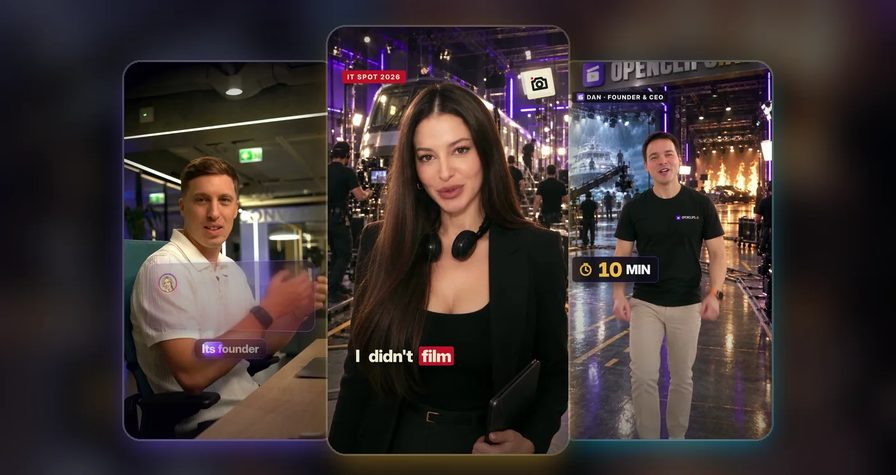
Scene select — 7 scenes
Search for the best AI reel maker and you get a page of tools that all say “Reels” and mean different things. One lays your clips into a template. One cuts a long video into short ones. Some write a Reel from a single sentence and put a presenter in it. Each leaves a different part of the Reel to you.
We build OpenClips, and that is the bias to read this with. We set out to build an AI reel maker that starts from whatever you already have: raw takes, a script, or one photo and a voice note. It hands back the finished Reel, in your own face and your own voice. This guide lays out what “finished” takes, which tools cover which part of it, and three Reels our platform made from three very different starting points. Watch them before you believe a word of it.
What does a finished Reel actually take?
A Reel you can post today is eight jobs stacked on top of each other. Skip one and you are back in an editor at midnight.
- A hook and a script. The opening line has to earn the second one, and the script has to sell, not just describe.
- A face. Yours, a presenter’s, or a character who stays the same person from shot to shot.
- A voice. Ideally the one your audience already knows.
- The edit. Best takes kept, stumbles dropped, a pace built for a thumb that never stops scrolling.
- Graphics on the word. Cards, counters and callouts that land when the line lands.
- Captions. Word-timed, readable with the sound off, in your brand’s style.
- Sound. A score cut to the picture, with the voice sitting clean on top.
- The file. Vertical 9:16, a cover frame, and a version for every language you sell in.
The last item is not a nice-to-have anymore. On Meta’s April 2026 earnings call, Susan Li said that “over half a billion users on each of Facebook and Instagram are now watching AI-translated videos weekly” (Meta Q1 2026 earnings call transcript, April 29, 2026). The audience for a Reel in a second language is already there.
So before you call a tool the best AI reel maker, count how many of the eight it does and how many it leaves to you. If the format itself is new to you, our aspect ratio cheat sheet covers why vertical wins on Instagram.
Four kinds of AI reel maker, and where each one stops
Every tool below makes something it calls a Reel. The difference is what you walk in with and what you still do afterwards. Everything here is read from each vendor’s own page on September 30, 2026, and quoted where it matters. Pricing moves too often to summarise, so check each vendor’s own plans page.
| Tool | You bring | You get back |
|---|---|---|
| Canva | Three or more of your own clips and a prompt | A template edit of your footage, which you trim and post |
| OpusClip | One long video | Short captioned clips its AI picks from it |
| HeyGen | A prompt, script, URL, photo or audio clip | A Reel it scripts itself, with an AI presenter or your photo as the avatar |
| Fliki | A prompt, blog URL or product link | A Reel it scripts itself, from AI visuals, stock footage and your uploads |
| OpenClips (ours) | Raw takes, a script, or a photo, a voice note and a brief | The finished Reel from your best takes or from scenes generated around you, remade in other languages |
Template editors: Canva
Canva’s AI reel maker starts from footage you already shot. Its page asks you to “choose or upload at least three videos”, describe the Reel you want, and generate, which opens Magic Design, marked Pro, to lay the clips into a template. You can add a narrator with Canva’s AI Voice and turn speech into captions. Then you trim, change the music, swap fonts and download the MP4 to post yourself.
Pick it when you have good clips and want a designed edit in minutes. Skip it when nothing is filmed yet, or you need someone to write the words.
Clip cutters: OpusClip
OpusClip is built for recycling. Step one on its Instagram Reels page is “Upload your long form content”, and its AI looks for the sections most likely to trend on social, then cuts them into captioned clips with optional B-roll. The page says its free plan processes up to 60 minutes of video a month.
Pick it when you run a podcast, a webinar or a long YouTube video and want a week of clips from it. Skip it when there is no long video to start from.
Prompt-to-Reel generators: HeyGen, Fliki, invideo and Makereels
This is the crowded middle of the market. HeyGen’s page puts it plainly: “Describe your idea in one sentence and HeyGen generates a script, picks visuals, and builds a full reel.” Its presenters are AI avatars, it can bring a photo to life with Avatar IV, it clones a voice from a 30-second sample on paid plans, and it translates into more than 175 languages.
Fliki makes the same promise from a prompt, a blog URL or a product link: “Fliki writes the script”, fills each scene with AI visuals, stock footage or your uploads, and offers talking avatars, voice cloning from a 30-second sample and dubbing for multilingual Reels.
invideo generates from a prompt with the major video models, Veo 3.1 and Sora 2 among them, and offers real people or AI actors for testimonial-style Reels. Makereels turns a topic into a list-style Reel with a preset face or a clone of yours.
Pick it when you want a Reel from an idea, and an AI presenter, a voice clone or your photo brought to life suits the message. Skip it when the Reel has to be built around a shoot you already did, keeping the best take of every line. These tools are designed around the prompt, not around your raw footage.
End-to-end production from what you have: OpenClips
This is the category we built. You bring whatever you have: raw takes, a script, or one photo, a voice note and a short brief. AI does all eight jobs from there. From footage you shot, it keeps the best take of every line. From a photo and a clip of you talking, it takes your face and your voice and generates the sets around you. It writes the sales script if you want it to, lands graphics on the word, captions and scores the cut. Then it remakes the Reel in other languages in your own voice and hands back the 9:16 file and a cover.
Pick it when you want the finished Reel built from your own material, in a set you could never book, in every language you sell in. Skip it when all you need is highlight clips from a podcast. A clip cutter does that job directly.
Three Reels, three starting points
Claims are cheap in this category, so here is the proof. Every Reel below was made by AI on OpenClips from what each person sent, and everyone in them agreed to be in them.
7m 58s
of Marko’s raw takes in
0
minutes Tamara filmed
11
script beats from my brief
3
languages, Marko’s own voice
Raw takes: eight minutes became one Reel in three languages
Marko filmed the way most people film: three full passes at the same talking-head script, plus retakes, almost eight minutes in one file. He sent the file.
AI kept the best take of every line and dropped the stumbles. One line he says twice, and the Reel keeps the warmer take. It reframed and graded the footage for vertical and cleaned and levelled his voice. Cards, charts and counters land on the exact word, captions follow him word by word, and the score is cut to the picture, with no stock sound packs. Then AI remade the whole Reel in English and Spanish, with his face and his own voice.
The original is in Serbian. The English remake is above, and all three languages sit side by side on the AI Reel Maker page.
A script and an old clip: Tamara never filmed hers
Tamara was sick the week her event promo was due. She sent her script and one 20-second phone clip she had filmed for something else. That clip was the entire shoot.
From it, AI took her face and her voice. It dressed her for the set in a blazer, headphones and gold hoops, generated a studio with a train, lights and a crew that moves, and spoke her script in her own voice. Midway through, the Reel switches to Spanish, then Mandarin. The last shot is the twist: the real Tamara, still in bed.
Behind every Reel is a character sheet that keeps face, build and wardrobe locked from shot to shot. Tamara’s, built from her face and her approved film look, shows all five views.
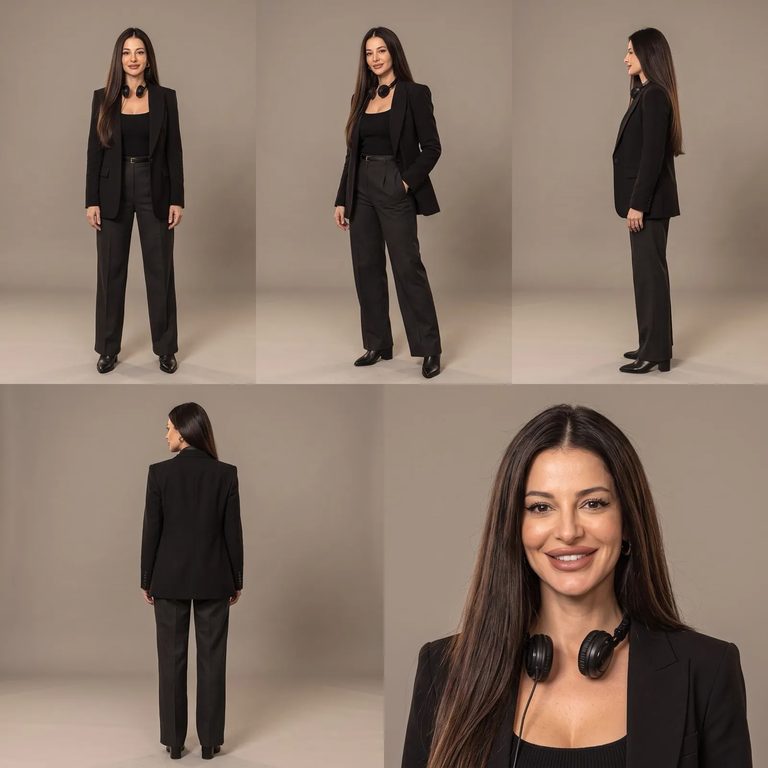
If you want a character who comes back Reel after Reel rather than for one promo, Character Studio is where you build one.
A photo, a voice note and a brief: my own Reel
This one is mine. I sent one photo, 21 seconds of my voice and one paragraph about why people should come to IT SPOT in Podgorica. I asked for a huge film studio with a storm ship, fire and a car, and a power cut halfway through with Santa riding past on a horse.
AI wrote the sales script from that paragraph, 11 beats of it. It took my face from the photo and my voice from the recording, put me in a new outfit, built the studio, staged the power cut, and added the event sting, captions and sound. The film runs 75 seconds.
Brief in, sales script out
Plenty of tools will read your script out loud. The harder job is writing one that sells, and that is where a short brief earns its keep. Here is my brief, the way you would type it into OpenClips:
And here are eight of the eleven beats the AI wrote back, verbatim:
- Hook: “Ten minutes. Twenty languages. Zero cameras. That’s how you make an ad now.”
- Objection: “No crew. No studio. No thousand-dollar shoot. Just your idea.”
- Proof: “Oh — and this video? Made exactly like that.”
- Benefit: “And you get back the most valuable thing you’ve got: time. To think. To build. To create.”
- Story: “We built OpenClips right here in Montenegro — a country of six hundred thousand people.”
- Pattern break: ”…Even Santa agrees.”
- Offer: “Bring your product — we’ll make its ad together, right there.”
- Call to action: “See you at I.T. SPOT!”
You can still write every word yourself, and Tamara did. The brief route is for when you know what you want people to do and not yet how to say it. A shorter cut of the same structure, hook, problem, proof and one call to action, is our 15-second UGC ad formula.
How to make a Reel with AI on OpenClips
The whole run is four steps, and nothing renders until you approve the plan.
- Bring what you have. Raw footage, a finished script, or a photo, a voice note and a short brief.
- Write the brief, or paste your script. Say what should happen on screen and what viewers should do at the end.
- Approve the plan. You see the script, the scenes and the languages. The price is on the button before you press it.
- Post the Reel. You get a 9:16 file with captions and a cover, ready for Instagram, TikTok or YouTube Shorts.
Or run it from Claude over MCP
OpenClips is available as an MCP server, so the same production runs from a chat. Connect it once, attach the photo and the voice, paste the brief, read the script and the price, then approve. It works with Claude, ChatGPT and Cursor, and we recommend Claude Opus 5.5 for it. The steps are on the Claude connect page, and directing ads from a chat shows the pattern end to end.
Behind the chat are the same skills the platform runs: impossible-studio for films staged on the OpenClips soundstage, ad-video-craft for keeping one face across shots and finishing the cut with captions, an end card and music, enhance-asset for fixes such as lip-sync, and the marketplace skills for images and video. For brands and agencies with many Reels to make, we set the workflow up with you once and it runs on its own after that. Talk to us about setup.
What our AI reel maker will not do
- It does not post for you. You get the file and the cover. Publishing stays in your hands and on your schedule.
- It will not use a face without consent. Your own, or one belonging to someone who agreed to it. Everyone in these Reels did.
- It is not free. Video costs real compute to render. OpenClips is self-serve: pick a plan after sign-up on the pricing page, and every render shows its price before it runs.
- It will not guess your offer. The brief still has to say who the Reel is for and what you want them to do next.
So which AI reel maker should you pick?
Pick by what you walk in with, not by whose landing page shouts loudest.
- A long video to recycle: a clip cutter such as OpusClip.
- Your own clips and a template look: Canva.
- An idea, no footage, and an AI presenter or voice clone to carry it: HeyGen or Fliki.
- A finished Reel built from your own footage, script or photo, with generated sets and language remakes: the OpenClips AI Reel Maker.
The three Reels above started as a file, a script and a photo. Yours is probably already on your phone.