What Is Quiver Arrow 2? The Vector Model That Outranked Every Frontier LLM
Quiver shipped Arrow 2 and Arrow 2 Telos, and a public leaderboard now ranks them first and second at SVG generation, ahead of every frontier model in the field. Here is what that means, where the crown slips, and why anyone making ads should care about a file format.
Scene select — 12 scenes
On 17 September 2026, a16z partner Justine Moore posted that she had been feeding random products to a new model and watching it turn them into vector graphics. Per the platform’s public counters, read the next day, her post had been seen 137.9 thousand times and the launch it quoted — Quiver AI’s Arrow 2 — 1.4 million.
Then the coverage arrived, and almost all of it repeated the launch post back at itself. So this page does the other thing. It opens the public scoreboard that tested the claim, reads the categories nobody filtered, does the pricing arithmetic nobody did, and says what a vector model is actually for if your job is making advertising.
Two disclosures first, because both are material. We build OpenClips.AI, a studio that resells image and video models on one balance; Arrow 2 is not in our catalog, and the vector models we do serve are not the ones at the top of the table below. And the post that put this launch in front of a hundred thousand people came from a partner at the firm that led Quiver’s seed round in February 2026 — a16z, in a round Quiver puts at $8.3 million. She is not listed as a personal investor, and this is not a scandal; it is how the industry works. You should simply know it before you read an enthusiasm metric as a verdict.
What Arrow 2 actually is
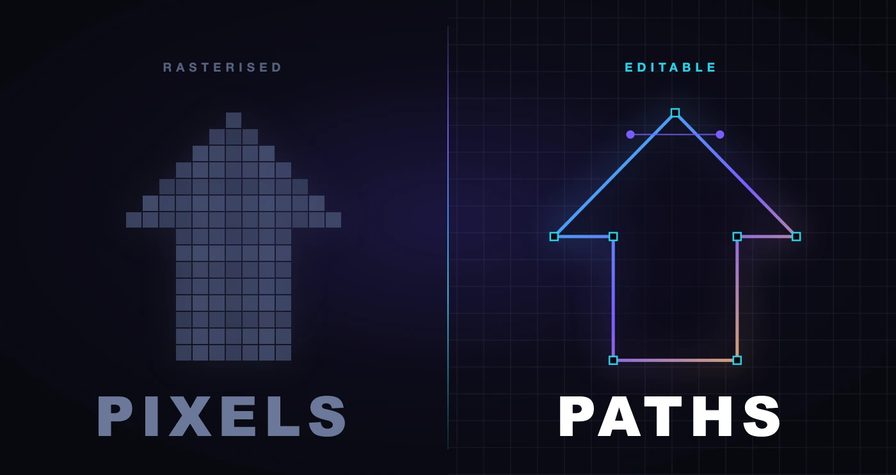
Quiver AI makes models that generate vector graphics: SVG files, where a shape is a mathematical path with movable control points rather than a grid of coloured squares. Arrow 2 and a second model, Arrow 2 Telos, are the current generation.
The company’s framing of its own work is the most useful sentence in the launch post, and it is a design philosophy rather than a feature:
Vectors should be intentionally crafted through code.
That is the whole distinction. Most AI art arrives as pixels, and turning pixels into a vector afterwards means tracing — an automated guess at where the edges were, which produces a file technically made of paths and practically impossible to edit. Arrow writes the paths in the first place.
Quiver lists five jobs for the model: illustrations, illustrative diagrams, technical drawings and line work, vectorization of raster images, and micro animations. On quality it makes two specific claims worth holding on to:
- Cleaner geometry. SVGs use “fewer, more precise control points, reducing unnecessary nodes and messy, overlapping paths.”
- Stronger composition. Elements “naturally respect spacing, padding, and alignment without exhaustive prompt engineering.”
Both are claims about the file, not the picture. That is the tell that this is built for people who open the file afterwards.
The other half of the release is micro animations: Arrow 2 animates the shapes and groups already present in an SVG, which Quiver positions for logo reveals, loading states and animated icons. Note the constraint in its own description — it animates structure that already exists, so it suits flat, organised artwork rather than anything painterly.
Where it came from
This one has a paper trail, which is rarer than it should be.
Quiver’s CEO is Joan Rodríguez — Juan A. Rodriguez on the byline — first author of StarVector, the CVPR 2025 paper on generating SVG code directly from images and text. a16z’s investment note names that work explicitly. The paper’s diagnosis of the field it was entering reads like a description of every “vectorize” button you have ever been disappointed by:
Previous SVG generation methods have focused on curve-based vectorization, lacking semantic understanding, often producing artifacts, and struggling with SVG primitives beyond path curves.
So Arrow is not a wrapper on somebody else’s image model. It is a research line — StarVector, then rendering-aware reinforcement learning, then a product — commercialised by the people who wrote it. That matters mainly because it predicts what the model will be good at: structure, not surface.
The scoreboard nobody opened
Quiver’s launch post contains a section headed “A massive leap in speed” and not one number underneath it. No seconds, no multiplier, no percentage, no benchmark. Worth noting because the company is capable of precision when it wants to be: the Arrow 1.1 announcement in April quoted exact cost reductions, 33.3% and 50%. This one quotes adjectives.
Here is somebody else’s measurement. Rapidata runs a public human-preference leaderboard for SVG generation. Models are compared in pairs on the same fixed prompts, scored by human annotators, and fitted with a Bradley-Terry model rescaled onto the familiar Elo range. The data and the judgments are published.
Read on 18 September 2026, the overall standings ran:
| # | Model | Organisation | Elo |
|---|---|---|---|
| 1 | quiver-arrow-2-telos | Quiver AI | 1508.5 ±12.7 |
| 2 | quiver-arrow-2 | Quiver AI | 1495.0 ±12.7 |
| 3 | gpt-6-astra | OpenAI | 1409.0 ±12.1 |
| 4 | quiver-arrow-1.1-max | Quiver AI | 1263.0 ±9.6 |
| 5 | claude-fable-5.1 | Anthropic | 1240.6 ±11.4 |
In plainer terms: Arrow 2 Telos won 71.0% of the pairings it was entered into, and Arrow 2 70.3%, against 65.7% for the best OpenAI entry and 56.2% for the best Anthropic one.
1508.5
top Elo, Arrow 2 Telos
86
point gap to third place
2.8M
human votes in the pool
54
entries in the field
Three things there are worth more than the headline.
The gap is not marginal. Eighty-six Elo points between second and third, against confidence intervals of about thirteen, is a real separation rather than a coin flip. A specialist beat the generalists at their own output format, and the generalists here are the current frontier: OpenAI’s Astra, Anthropic’s Fable and Opus versions, Google’s Gemini versions, Moonshot, Zhipu, Meta.
The previous generation was already winning. Arrow 1.1-Max at 1263.0 sits fourth, ahead of every frontier model in the field. Arrow 2 did not arrive from nowhere; it widened an existing lead by more than 230 points.
Having “vector” in the product name is not the same as being good at it. Recraft’s two vector entries sit 23rd and 28th overall, below general-purpose language models that were never sold as design tools.
Where the crown slips
Now the part the coverage skipped, and the reason this page exists.
That leaderboard has category filters. Switch it to Logos & Branding — the category an advertiser cares about most — and the order changes completely:
| # | Model | Organisation | Elo |
|---|---|---|---|
| 1 | gpt-6-astra | OpenAI | 1296.6 ±62.2 |
| 2 | glm-5.3-flash | Zhipu AI | 1296.3 ±59.7 |
| 3 | claude-opus-5-thinking | Anthropic | 1252.7 ±51.1 |
| 4 | sakana-fugu | Sakana AI | 1244.0 ±55.5 |
| 5 | claude-fable-5.1 | Anthropic | 1220.7 ±59.5 |
| 6 | quiver-arrow-2-telos | Quiver AI | 1219.8 ±61.5 |
Sixth. And read the confidence intervals before you conclude anything dramatic: that slice rests on seventeen prompts, the intervals run to ±62, and the spread from first to sixth is about 77 points. This is a statistical tie, not a defeat. The honest reading is that on logo and branding prompts the leading models are indistinguishable on the evidence available, and Arrow 2’s overall dominance does not carry into that corner.
Switch to Icons & UI, built on sixty-one prompts rather than seventeen, and it inverts:
| # | Model | Organisation | Elo |
|---|---|---|---|
| 1 | quiver-arrow-2 | Quiver AI | 1330.0 ±33.5 |
| 2 | quiver-arrow-2-telos | Quiver AI | 1293.2 ±33.5 |
| 3 | gpt-6-astra | OpenAI | 1240.5 ±32.4 |
Look at the top two rows. The cheaper model beats the expensive one — Arrow 2 over Telos by 37 points, wider than either interval. Quiver tells you to reach for Telos on harder briefs, and that is sound advice, but “harder” is not a synonym for “all”. On structured, flat, repeatable artwork the base model is not the compromise option. It is the better one.
“Editable” means three different things
Every vector tool on the market says its output is editable. The word is doing three completely different jobs, and knowing which one you have been sold is the single most useful thing in this article.
- Traced blobs. A rasteriser run backwards. Paths exist, but they describe colour regions rather than objects — hundreds of nodes, no grouping, and any lettering is outlines rather than text. Technically an SVG. Practically a photograph in a costume.
- Optimised paths. Methods that push a set of curves around until the render matches a prompt. The research literature on these is blunt about the result: “fragmented paths with limited semantic meaning,” in Chat2SVG’s description of its predecessors.
- Generated code. The model writes the markup. This is the only class that can give you named groups, real text elements, primitives like circles and rectangles instead of paths, and gradients you can edit as gradients. It is what Arrow does, and what a frontier LLM does when you ask it for an SVG.
The sixty-second test on any tool, including ours: open the file, count the nodes on one simple shape, look for a text element, and try to recolour one group. If lettering has become outlines and a circle has become a path with forty points, you were sold class one.
Why a file format belongs in an ad conversation
If you make video ads, a vector model can look like somebody else’s tool. It is not, and two numbers explain why.
SVG is used by 67.7% of all websites, according to W3Techs’ September 2026 survey. But in the 2024 Web Almanac’s scan of more than ten million pages, SVG was only 6.4% of image requests — against 32.4% for JPEG and 28.4% for PNG.
Those are not in conflict. They are the whole argument. Vector is nearly universal and almost entirely confined to the furniture: logos, icons, glyphs, rules, badges. It is not the format of the picture. It is the format of everything around the picture.
Now look at a finished spot and count what is drawn rather than shot. The logo on the end card. The icon beside each bullet on a feature frame. The badge that says NEW. The rule under a headline. The animated tick when the voiceover lands the guarantee. None of that is photography, and all of it has requirements raster output cannot meet:
- It has to scale. The same mark goes on a phone frame, a thumbnail and a printed sheet. A vector is one file at every size.
- It has to recolour without a re-render. A fill is an attribute. Changing a brand colour across a set is an edit, not a new generation and a new bill.
- It has to survive the brand team. “Move the mark two pixels left, lighten the stroke” is a two-second change in a vector and a full re-prompt in a raster — with everything else in the frame free to drift while you do it.
- It has to weigh nothing. An icon that ships as markup is text, and text compresses.
And where vector stops
Being fair about the boundary matters more than being enthusiastic about the tool.
A vector model will not make your product hero. It will not make a face, a fabric, a reflection, a plume of steam, or anything whose whole value is that it reads as photographed. SVG describes shapes and fills; photorealism is not a shape problem. Ask for a leather jacket in golden-hour light and you get an illustration of one — sometimes a beautiful illustration, never a product shot.
It will not make your UGC spot either. The talking creator, the car mount, the unboxing — that is video, and video models make it.
So the working split is simple, and it is not a competition:
- Raster and video models make the things a camera would have shot.
- Vector models make the things a designer would have drawn.
An ad usually needs both. The mistake is asking one to do the other’s job.
What it costs, and the arithmetic nobody did
Quiver runs two separate meters, and the interesting one is not the headline.
The app. Plans start at $8 a month, with Basic at $20 and Pro at $40, plus a custom Enterprise tier and a 20% discount for paying yearly. Each carries an included weekly allowance — $5, $15 and $40 of usage respectively — which resets every Monday UTC and does not roll over. That punishes lumpy work: if your design load arrives in a two-day burst once a month, three weeks of allowance evaporate unused.
The API, billed separately against a prepaid balance, and this is where the release quietly changed shape. Quiver’s docs price Arrow 2 at $4.00 per million input tokens and $20.00 per million output, and Telos at $6.00 and $30.00 — Telos is exactly 50% more expensive, which is the clearest statement of the trade anywhere in the launch. Both cap a single output at 65,536 tokens.
$8
entry app plan, per month
$20
per 1M output tokens, Arrow 2
$30
per 1M output tokens, Telos
0
rollover on unused weekly usage
Here is the part worth an afternoon before you commit a pipeline to it. Arrow 1.1 was priced flat, at twenty cents per SVG. Arrow 2 is priced per token, and at the output ceiling a single dense illustration can reach roughly $1.31. Most assets will cost a fraction of that — an icon is not a technical drawing — but you no longer know what an asset costs before you brief it, and complexity now maps directly onto invoice. For comparison, Recraft’s API prices its vector generation flat, at $0.0550 an image.
What we serve today
We are not going to pretend Arrow 2 is in our composer. It is not in our catalog, so there is no id to dispatch and no button to press.
What we do serve is Recraft’s true-SVG output — models that return an editable vector file rather than a picture of one. Here are its facts, read off our catalog rather than out of memory:
| Modality | Image |
|---|---|
| References | Up to 1 |
| Price | ⚡17 (from $0.11) |
And here is the honest footnote, because the leaderboard above is unkind to that vendor. Rapidata scored Recraft’s v4.1 vector models, 23rd and 28th overall. The versions in our catalog are the v4 and v3 vector engines, which the benchmark does not cover — so we cannot tell you those exact versions were tested, and we are not going to borrow a rank that was measured on something else. What we can tell you is that they emit real SVG, on the same balance as everything else, at a price shown on the button before you spend.
A set of six flat line icons on one artboard: a shipping box, a shield, a clock, a headset, a leaf, and a refresh arrow. Single consistent stroke weight, rounded caps, no fills, no text, generous even spacing, aligned on a shared baseline.Run this prompt →
That brief is shaped the way vector briefs want to be shaped, which brings us to the last useful thing here.
How to brief a vector model
The habits that get good raster renders are not the habits that get good vectors. Six that transfer to any SVG model, Arrow included:
- Ask for the structure, not the mood. “Rounded caps, single stroke weight, no fills” is a vector brief. “Cinematic, moody, volumetric light” is a raster brief that a vector model will answer with a flat shape and a shrug.
- Name the geometry you want repeated. Consistency across a set is the entire value of an icon system. Say “one consistent stroke weight across all six” rather than hoping.
- Say no to what you do not want in the file. No gradients, no drop shadows, no text on paths — each is a class of node that makes the result harder to edit downstream, and models add them unprompted.
- Put the set on one artboard. Briefing six icons at once gives the model the chance to make them match. Briefing them one at a time guarantees they will not.
- Open the file, not the preview. The preview tells you whether it looks right. Only the file tells you whether the paths are sane, the groups are named and the node count is human. That is the whole reason you chose a vector model.
- Keep type out of it. Set headlines in your editor over the artwork. Letterforms as generated paths are the most common thing to look correct at thumbnail size and fall apart at full size.
What to still watch for
Vendor claims, including the ones quoted here. Every Arrow 2 capability on this page is what Quiver states. We have not benchmarked a model we cannot dispatch, and we will say so rather than dress a press release as a test.
One leaderboard is one leaderboard. Rapidata’s is transparent, public and large, which is more than most. It is still 500 prompts, judged by people, at one moment. It moved substantially in the week we read it and it will move again.
Two launch dates, not one. Quiver announced the models on 7 September 2026. The app switched to Arrow 2 and the API platform went generally available on 16 September — which is also when the older Arrow versions were retired from the app while staying on the API. Coverage that gives you a single date has flattened two events.
The testimonials are not real until you can click them. Searching this launch turns up identical designer raves — the same “best vector AI I’ve used” sentence — across four affiliate sites, none with a named author or a link to an original post. Meanwhile the launch’s Hacker News submission sat at one point with zero comments. Enthusiasm is cheap to manufacture and expensive to verify; the verifiable third-party response in the first 48 hours was a merged pull request in the Vercel AI SDK adding support for the animation endpoint.
Animation is not motion design. Animating existing shapes and groups is genuinely useful and a very different thing from a motion-graphics tool. Expect a logo reveal, not a title sequence.
The short version
- Arrow 2 and Arrow 2 Telos are vector models from Quiver AI, announced 7 September 2026. They write SVG as code rather than tracing it from pixels.
- A public human-preference leaderboard ranks them first and second, ahead of every frontier model tested, by a margin wider than the error bars.
- The categories complicate it. On logos and branding they sit sixth in a statistical tie; on icons and interface work the cheaper Arrow 2 beats the expensive Telos.
- Pricing moved from flat to per-token, so an asset’s cost now depends on how complicated it turns out to be.
- Vector is a real layer of an ad — the drawn half, nearly universal on the web and almost never the picture itself.
- It is not in our composer, and we will not fake it. Recraft’s SVG models take a vector brief today on ⚡50 of signup credit, with the price on the button.
Run a vector brief on Recraft, line the image models up on the models hub, or read what a credit actually buys before you spend one.