Sign up and save up to 50% on a yearly plan.Sign up free →Black Friday: up to 50% off yearly plans.See the deal →

Built for detailed work.

GPT Image 2.6 Sunburst AI image generator

Build rich, layered scenes and precise edits. Use reference images and masks, and export PNG, JPEG, WebP or an animated GIF.

From $0.0083 per image on MAX yearly

  • Up to 16 references
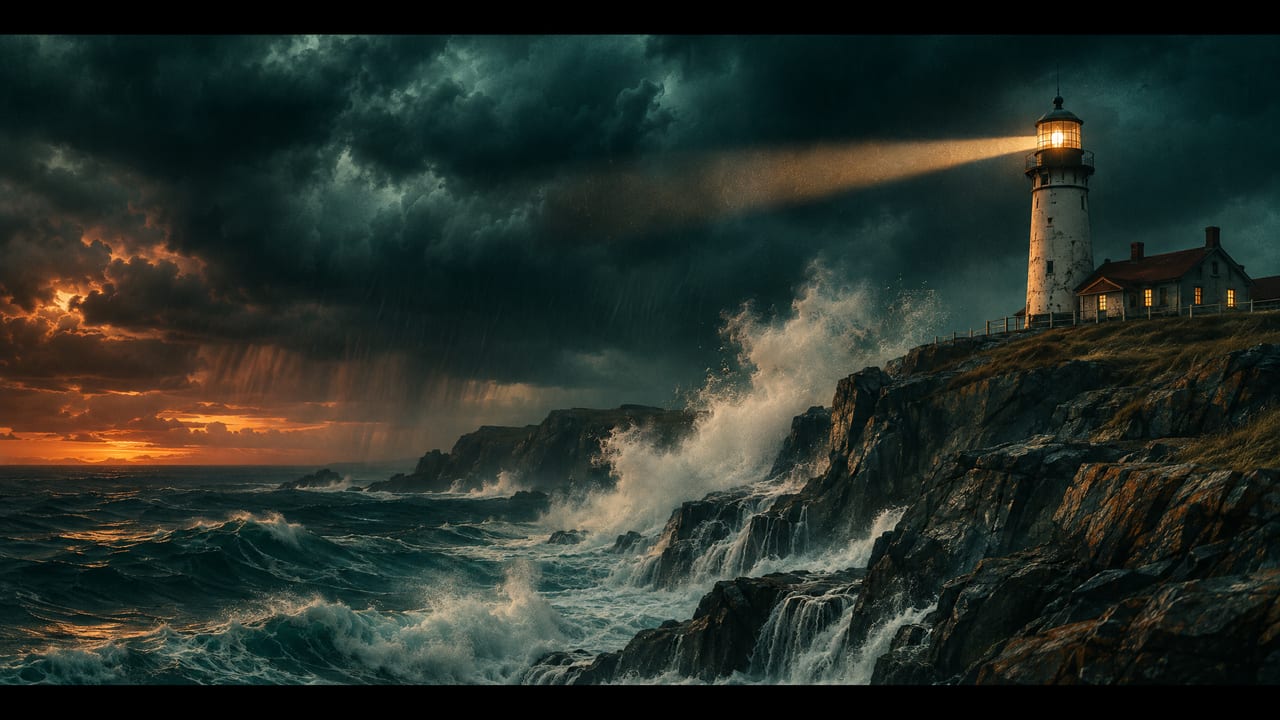
Cinematic wide shot of a lighthouse on a rocky…
Hero take
  • Up to 16 references

● Made with GPT Image 2.6 Sunburst

Straight off the model

Every example is one render, with the prompt that made it.

  • GPT Image 2.6 Sunburst example 1Image

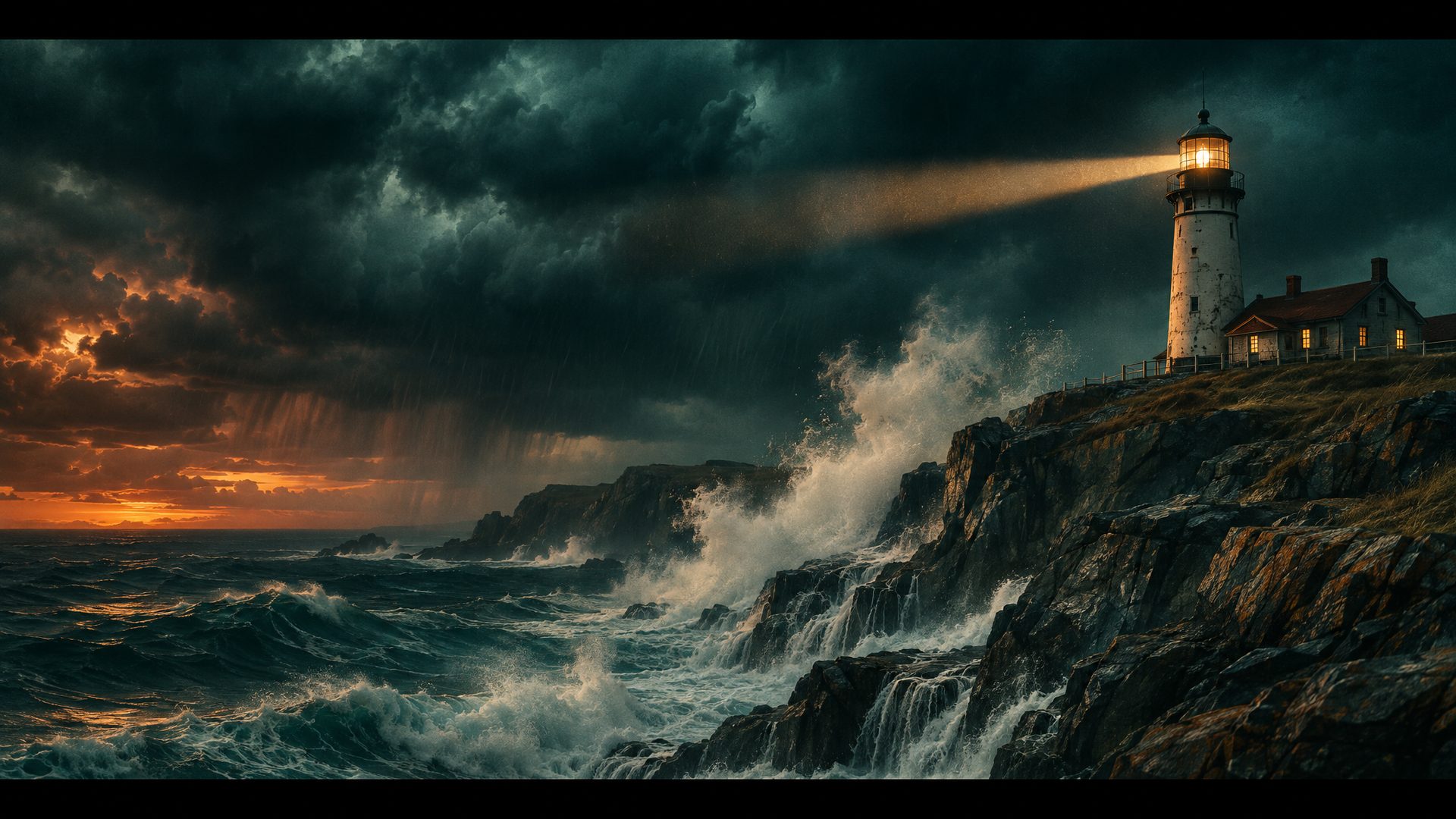
    Cinematic wide shot of a lighthouse on a rocky…

    Cinematic wide shot of a lighthouse on a rocky cliff at dusk during a storm. The lighthouse beam cuts across the dark sky, waves crash against the rocks and white spray rises, heavy clouds overhead. Moody teal and amber color grade, anamorphic film look, fine film grain.

    Verbatim prompt
    Cinematic wide shot of a lighthouse on a rocky cliff at dusk during a storm. The lighthouse beam cuts across the dark sky, waves crash against the rocks and white spray rises, heavy clouds overhead. Moody teal and amber color grade, anamorphic film look, fine film grain.
  • GPT Image 2.6 Sunburst example 2Image

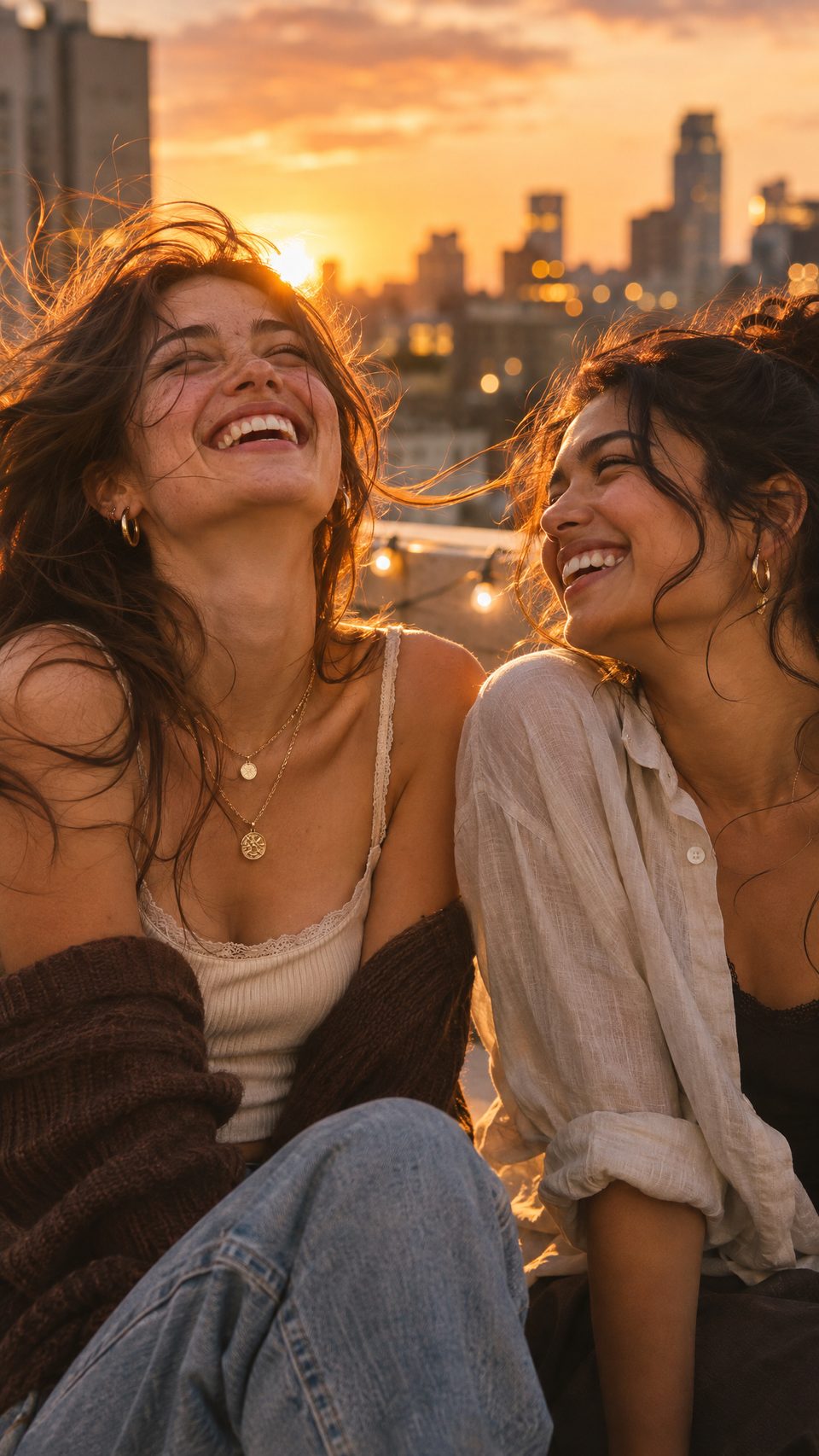
    Vertical portrait of two friends laughing toget…

    Vertical portrait of two friends laughing together on a city rooftop at golden hour. The wind lifts their hair, one of them turns toward the other and smiles, warm sunlight from behind, soft bokeh of city lights in the background, shallow depth of field, natural editorial photography.

    Verbatim prompt
    Vertical portrait of two friends laughing together on a city rooftop at golden hour. The wind lifts their hair, one of them turns toward the other and smiles, warm sunlight from behind, soft bokeh of city lights in the background, shallow depth of field, natural editorial photography.
  • GPT Image 2.6 Sunburst example 3Image

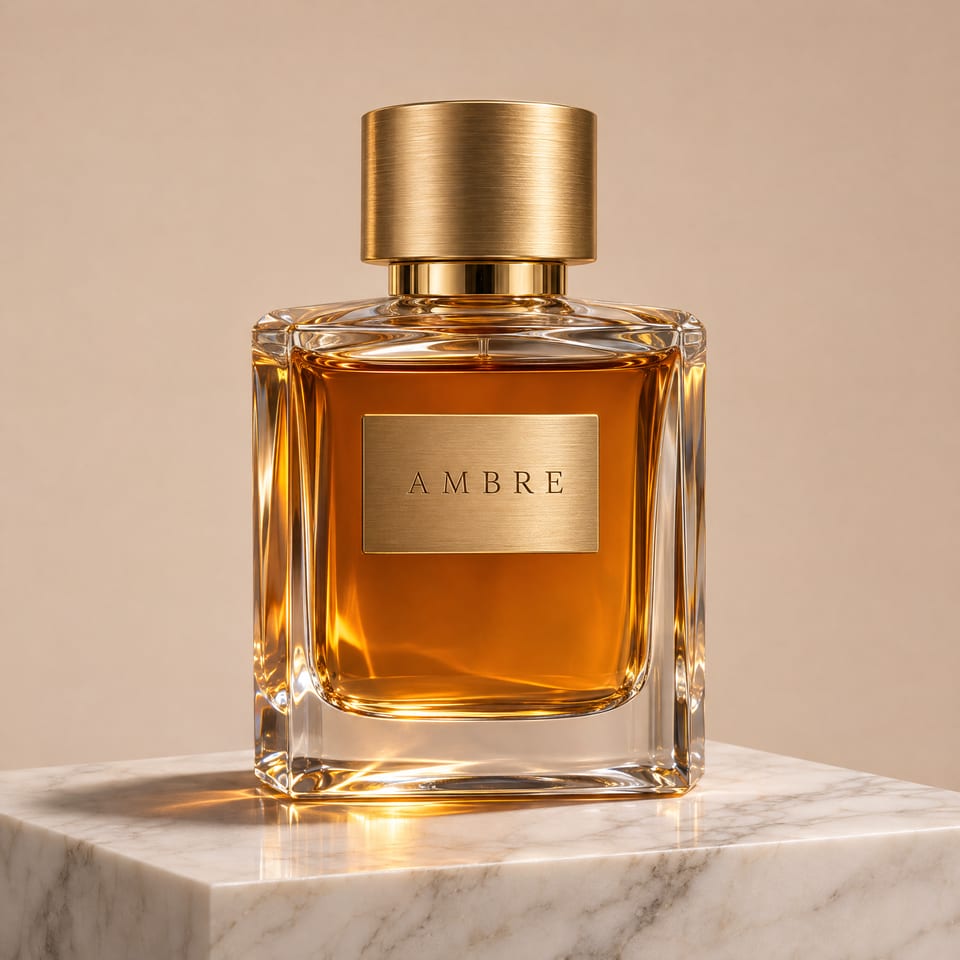
    A premium glass perfume bottle with amber liquid

    A premium glass perfume bottle with amber liquid, a brushed gold cap and a minimal engraved label that reads "AMBRE", standing on a white marble pedestal. Soft studio light, caustic reflections from the glass on a clean beige backdrop, gentle shadow under the bottle, high-end commercial product photography.

    Verbatim prompt
    A premium glass perfume bottle with amber liquid, a brushed gold cap and a minimal engraved label that reads "AMBRE", standing on a white marble pedestal. Soft studio light, caustic reflections from the glass on a clean beige backdrop, gentle shadow under the bottle, high-end commercial product photography.

● Use cases

What people make with GPT Image 2.6 Sunburst

OpenAI's GPT Image 2.6 for detailed compositions and edits: up to 4K, masks, transparent PNGs and animated GIFs.

GPT Image 2.6 Sunburst example 1
Image

Cinematic key art

Verbatim prompt
Cinematic wide shot of a lighthouse on a rocky cliff at dusk during a storm. The lighthouse beam cuts across the dark sky, waves crash against the rocks and white spray rises, heavy clouds overhead. Moody teal and amber color grade, anamorphic film look, fine film grain.
GPT Image 2.6 Sunburst example 2
Image

Lifestyle portraits

Verbatim prompt
Vertical portrait of two friends laughing together on a city rooftop at golden hour. The wind lifts their hair, one of them turns toward the other and smiles, warm sunlight from behind, soft bokeh of city lights in the background, shallow depth of field, natural editorial photography.
GPT Image 2.6 Sunburst example 3
Image

Product photography

Verbatim prompt
A premium glass perfume bottle with amber liquid, a brushed gold cap and a minimal engraved label that reads "AMBRE", standing on a white marble pedestal. Soft studio light, caustic reflections from the glass on a clean beige backdrop, gentle shadow under the bottle, high-end commercial product photography.

● Why people pick it

What is GPT Image 2.6 Sunburst good at?

01

Up to 4K canvases

Pick a preset from 1024×1024 to 3840×2160, or any custom size with a long side of up to 3840 px and a ratio of up to 3:1.

02

Edit with references and masks

Attach up to 16 reference images, and add a mask to repaint one area while the rest of the picture stays as it is.

03

Transparent backgrounds

Export a cut-out with a transparent background as PNG or WebP, ready to drop onto an ad or a page.

04

Animated GIFs

Set the output format to GIF for a short loop of 2 to 16 frames, and set how long each frame shows.

05

Complexity control

Low suits small edits. High helps with dense text and complex layouts.

06

Quality on a dial

Go from low for quick drafts up to max for the final render. Auto picks a level for you.

● Use cases

What people make with GPT Image 2.6 Sunburst

Animated GIFs

Short looping animations, such as a turning product or drifting clouds, from one prompt.

● Side by side

How does GPT Image 2.6 Sunburst compare?

The closest image models on OpenClips, on the same credits.

SpecGPT Image 2.6 SunburstGPT Image 2.6 FlareSeedream 5.5
Made byGPT Image 2.6 SunburstOpenAIGPT Image 2.6 FlareOpenAISeedream 5.5BytePlus
PriceGPT Image 2.6 Sunburstfrom 2 credits per renderGPT Image 2.6 Flarefrom 2 credits per renderSeedream 5.5from 5 credits per render
OutputGPT Image 2.6 SunburstPNGGPT Image 2.6 FlareRASTERSeedream 5.5RASTER

Prices are the catalog's, quoted before every render.

● Specs

GPT Image 2.6 Sunburst specs

StatusLive in the app, the API and the MCP
Made byOpenAI
ModalityImage
InputsText prompt, up to 16 reference images
Backgroundtransparent · opaque · auto
Complexitylow · medium · high
Frame count2–16
Frame duration ms20–655350
Moderationauto · low
N1–10
Output compression0–100
Output formatpng · jpeg · webp · gif
Qualitylow · medium · high · xhigh · max · auto
OpenAI model IDgpt-image-2.6-sunburst
Made forImage generation and editing for detailed visual work
OutputPNG
Pricefrom 2 credits per render · $0.0083 per image on MAX yearly

● How it works

How do you use GPT Image 2.6 Sunburst on OpenClips?

01

Describe the image

Write what you want to see: the subject, the setting, the light and the style. Put any text that must appear in quotes.

02

Pick the settings

Choose the size, the quality and the output format. Add reference images or a mask to edit an existing picture.

03

Generate and refine

The price shows before you generate. Every image lands in your library, ready to edit again or to download.

● Tips

Tips for better results with GPT Image 2.6 Sunburst

  • Quote the words you need

    Put the exact text in quotes, for example a label that reads "AMBRE", and set Complexity to High for text-heavy layouts.

  • Describe every layer

    Name the foreground, the subject and the background, and the light on each. Detailed prompts get detailed compositions.

  • Describe the motion for a GIF

    Say what moves and that the loop is seamless. Smaller frames allow more frames, because all frames share one sheet.

  • Use a mask for local edits

    Mask only the area to change. The model repaints that area and leaves the rest as it is.

● Made for

What can you make with GPT Image 2.6 Sunburst?

Ad creativesProduct photosKey artPostersEditorial imagesMockupsAnimated loops

● Questions

GPT Image 2.6 Sunburst FAQ

GPT Image 2.6 Sunburst is an image generation and editing model from OpenAI, made for detailed visual work. On OpenClips you can use it from the app, the REST API and the MCP.

Both take the same inputs and settings and have the same token rates. OpenAI positions Sunburst for detailed compositions and image editing, and Flare for fast, interactive iteration. Run the same prompt on both to compare.

Yes. Set the output format to GIF and pick 2 to 16 frames. All frames are drawn on one sheet, so a large frame size allows fewer frames. With size Auto, any frame count works.

Yes. Attach up to 16 reference images, and add a mask to repaint a single area. Choose PNG or WebP to keep a transparent background.

Auto, presets from 1024×1024 up to 3840×2160 and 2160×3840, or a custom size: both sides a multiple of 16, the long side up to 3840 px and a ratio of up to 3:1.

It sets how much the model plans the picture before it draws. Low suits small edits. High helps with dense text and complex layouts, and can take longer. Empty means High.

In credits per image. The price moves with the size, the quality, the number of reference images and, for a GIF, the number of frames. You see the exact price before you generate.

GPT Image 2.6 Sunburst opens with your first purchase: any plan or credit pack. A new account still gets ⚡30 on signup with no card, for the models the free plan runs.

Yes. GPT Image 2.6 Sunburst runs from the OpenClips app, the REST API and the MCP server, with the same settings and the same price.

● The receipts

Where do these GPT Image 2.6 Sunburst facts come from?

Every link goes to the vendor's own page.

Try GPT Image 2.6 Sunburst

Generate your first image in seconds. The price shows before you press Generate.

Generate with Sunburst

GPT Image 2.6 Sunburst: OpenAI's image model for detailed work

GPT Image 2.6 Sunburst is OpenAI's image generation and editing model for detailed compositions. Use it for layered scenes, precise edits and finished visuals. On OpenClips it runs from the app, the REST API and the MCP, priced in credits, and every image lands in your library.

What you can do with it

  • Generate images from text at up to 4K (3840×2160), in square, landscape or portrait frames.
  • Edit a picture with up to 16 reference images, or repaint one area with a mask.
  • Export PNG, JPEG, WebP or an animated GIF, with a transparent background on PNG and WebP.
  • Control the detail with the quality level (low to max) and the Complexity setting.

Sunburst or Flare?

Both GPT Image 2.6 models take the same prompts, references and settings at the same token rates. OpenAI positions Sunburst for detailed visual work and Flare for fast iteration. Draft with Flare, and render the final on Sunburst.
● Where to go next

Related models