AI UGC Ads: How to Make Ones That Last (2026 Data)
AI UGC ads work when AI multiplies a real proof moment and flop when an AI person becomes the whole ad. Here is what 3,941 ads say, a six-step workflow on OpenClips with three real renders, a hook table and five prompts to paste today.
Scene select — 7 scenes
AI UGC ads are short, phone-style video ads where an AI creator, AI voice or AI footage does the job a paid creator used to do. They work when AI multiplies a real proof moment and flop when an AI person becomes the whole ad. In the largest public dataset this quarter (3,941 ads), demo hooks lasted longest (43.2% still running after 90 days) and AI cartoon or animated characters lasted shortest (7.3%).
Below: the data with its caveats, the 6-step workflow on OpenClips with three real renders, a hook table and 5 prompts you can paste today.
Watch: AI UGC Ads Without Paying Creators (Step by Step). One serum photo becomes two finished ads with two AI creators: watch how the template choice (Problem → solution vs Get ready with me) changes the whole ad.
Do AI UGC ads work? What 3,941 ads say
UGC Factory’s “State of UGC Ads Q4 2026” studied 3,941 video ads from 193 DTC brands, launched between 1 January 2025 and 15 June 2026 and pulled from public ad libraries such as the Meta Ad Library. Its metric is survival: the share of ads still running 90 days or more after launch. The average was 26.7%.
Read it with three caveats the report states itself:
- Survival is a proxy, not ROAS. Brands kill losing ads fast, so a long-running ad is probably paying its way.
- The sample leans health. About 60% of the brands sell health, wellness or supplements.
- It is a vendor report. UGC Factory sells UGC production, and an AI model tagged the creatives against human-reviewed definitions.
Lightreel’s October reports add a qualitative view of TikTok and Instagram. The author says plainly that public posts cannot prove AI beat humans on sales, so use them for patterns, not percentages.
Here is how the formats compared (survival to 90 days, average 26.7%):
| Format or pattern | Survival | What it tells you |
|---|---|---|
| Live unboxing / first use | 45.4% | Highest format in the report |
| Comparison vs what you use now | 44.4% | 142 ads |
| AI voiceover over real b-roll | 38.9% | AI does the voice, real footage does the proof |
| Several quick hooks before the payoff | 35.3% | Best story structure |
| Voiceover over footage | 35.0% | Less face, more product |
| Creator talking to camera | 24.5% | 64% of all ads, still below average |
| AI cartoon or animated characters | 7.3% | Lowest of anything measured |
The format that flops, and what it does not mean
The 7.3% bar is the number people will screenshot. The report’s summary of its AI findings is blunt: “They reject AI that replaces the human.” AI voiceover over real footage, meanwhile, sits well above average.
Two things to keep straight:
- The 7.3% is labelled cartoon or animated characters. The report does not measure realistic AI avatars as a separate group.
- Lightreel reaches the same place from another angle. Ads fail when AI is passed off as a real customer, when generated footage is shown as proof of a result, or when a generic talking head has nothing to show.
So the lesson is not “never use AI creators”. It is: do not make the AI person the whole ad. An avatar talking about a product it never touches gives the viewer nothing to believe. The same avatar opening the jar, pouring the coffee or tapping the app is a different ad.
5 rules for AI UGC ads that last
The report’s own advice is to keep real product on screen and use AI to multiply hooks, voiceovers and b-roll. Lightreel calls a human host plus AI evidence the strongest hybrid, and says synthetic actors are useful for testing personas, hooks and angles. In practice:
- Product working in the first second. Not a face saying “OK so”.
- Product in hand. Every creator shot touches, opens or uses it.
- Less face, more product. Voice over footage outlasts a talking head for the whole ad.
- Many hooks, one body. Test the first 2 seconds, not the whole ad.
- One winner, many languages. Scale what works instead of starting over.
For the second-by-second structure, see our 15-second UGC ad formula.
How to make an AI UGC ad on OpenClips, step by step
Step 1: give it your product link or one photo
On OpenClips, click An ad for my product, open Marketing Studio, paste your product link and click Find my templates. OpenClips reads the name, brand, price and photos from the page and ranks the templates that fit your product. No link? Upload one clear product photo instead. A clean, front-facing shot of the label matters more than anything else you add.
Shortcut: on the UGC Ads page you can type # plus the product URL and @ plus a creator straight into the composer.
Watch: How to Make AI UGC Ads From a Product Link (Testimonial Video). It starts at the link paste: watch the product card fill in by itself, then the Testimonial template, the settings and the finished kettle ad.
Here is what one product link returned for a handbag. Watch where the product is: in her hand for most of the clip, first the “before” bag, then the one being sold. That is rule 2 above in practice.
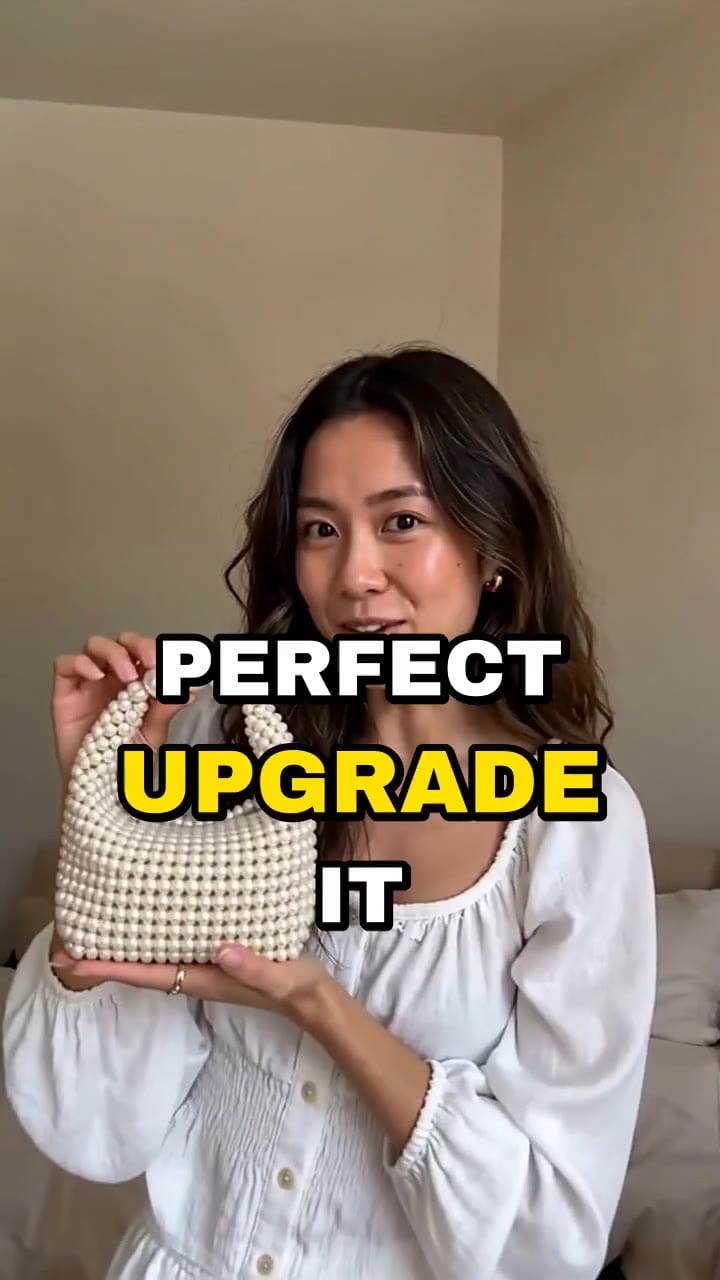
Problem, then solution: she holds a plain beige clutch, then a white faux pearl beaded mini handbag up close to the lens. Kinetic captions are burned in.
Step 2: pick a template
Marketing Studio holds over 90 ad templates (93 in our 9 October walkthrough), grouped by occasion. The UGC Ads page lists 13 UGC formats, including UGC ad (15, 30 or 40 s), unboxing, before/after, POV, street interview, podcast clip and UGC Multilingual. Each template comes with its shots, pacing and script built in.
Match the template to the data. Unboxing maps to the 45.4% first-use format. Testimonial suits a trust buy, where one buyer talking to camera beats a feature list. Problem → solution names the problem and shows the fix.
Step 3: add the product and a creator
Pick your product from the library (it stays there for every later ad) and add a creator: one of 305 stock creators or your own trained avatar. To keep one face across a whole campaign, see consistent characters.
Prefer to write every shot yourself? In Generate, Seedance 2.5 takes a reference image of your creator plus a shot-by-shot brief with the spoken lines in quotes. The clip below came from a 4-shot brief with 3 dialogue lines, rendered in one pass. We attached only the woman, so the plain jar came from the prompt. For your own product, attach its photo as a second reference so the real label stays on screen.
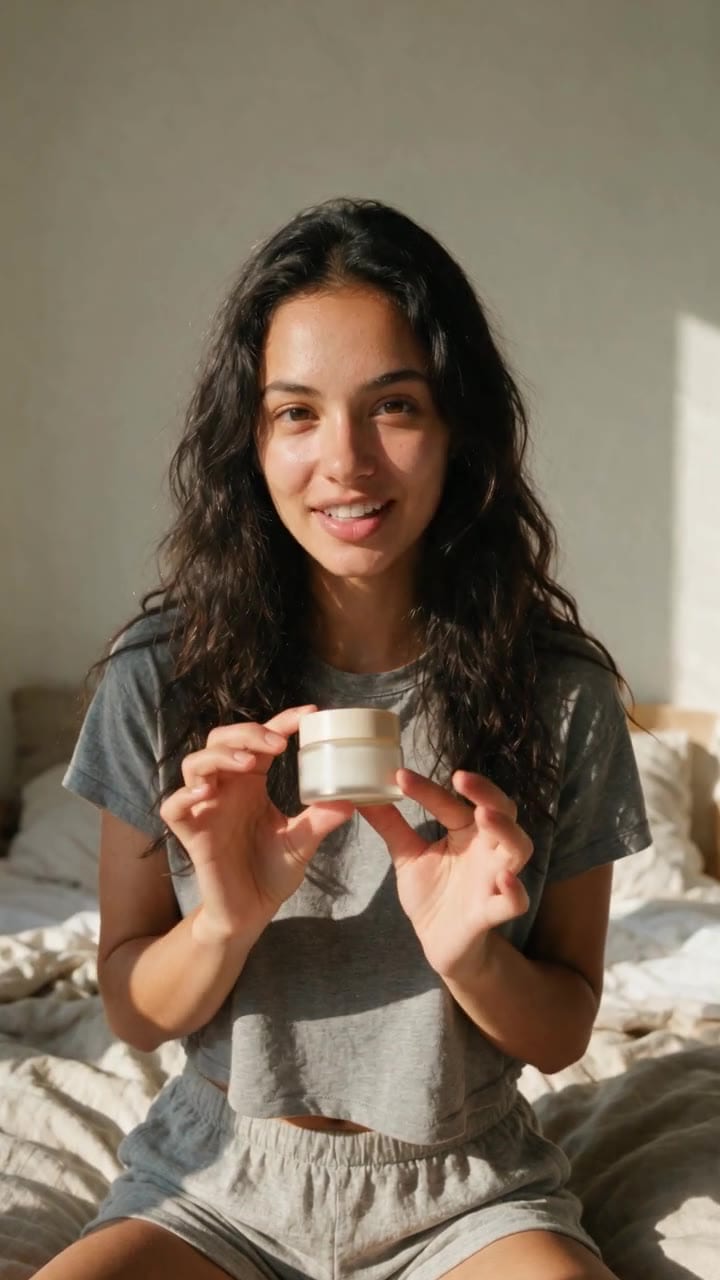
Selfie-style: she opens a small unlabeled cream jar, dips a fingertip in, applies it to her cheek and ends on a wink and a thumbs-up with the jar.
| Modality | Video |
|---|---|
| Length | 4s to 30s |
| Resolutions | 480p, 720p, 1080p |
| Audio | Available |
| References | Up to 30 |
| Price | from ⚡51 per render (from $0.052/s) |
Step 4: write the first 2 seconds as a demo
The template gives you the structure. You write what happens. Write the opening as an action, not a line: “She squeezes the cream onto the back of her hand and it sinks in” beats “Guys, I need to tell you about this cream”. Keep actions slow and ordinary: a hand opening, pouring, pressing, tapping. Products that move on their own read as fake.
Then pick a hook family for each variant (UGC Factory survival rates; one ad can carry several tags):
| Hook family | Survival | What the first 2 seconds look like |
|---|---|---|
| Demo / proof | 43.2% | The product doing its job, no talking |
| Authority anchor | 35.8% | A credential or a number on screen |
| Pattern interrupt | 33.7% | Something unexpected happens to the product |
| Payoff promise | 27.9% | The end result shown first |
| Curiosity gap | 23.5% | A question only the ad answers |
| Pain-point callout | 20.2% | “If your X keeps doing Y…” (most common: 1,453 ads) |
| Open loop | 14.9% | “Wait for the end” |
| Confession | 14.2% | “I was wrong about…” |
The most used hook sits near the bottom. Swapping a pain-point opener for a demo is the cheapest fix in this post.
Step 5: set the format and generate 3 to 5 variants
For Reels and TikTok, set 9:16 and your language. Keep the body and CTA identical and change only the first 2 seconds: one demo, one authority anchor, one pattern interrupt. Then you know which hook made the difference.
The price of each render is on the Generate button before you click it; our credits guide maps credits to plans. In our walkthroughs one ad took a few minutes and the testimonial about ten.
Step 6: check the product, then disclose
Before any variant goes live, pause on every frame where the product is visible:
- Logo: same shape and colour as the real one, not a near miss.
- Label: readable or cleanly out of focus. Never invented words.
- Hand: five fingers, a natural grip, the product the right size.
- Proof: no generated “result” shown as evidence (skin cleared, stain gone). Lightreel names this as a failing pattern, and it can mislead buyers.
Close-ups are where these faults show first, so start there. In our own renders, the frames to pause on are the extreme close-up of the fingertip in the cream (the Seedance clip in Step 3) and the close-up of the gold arm in the sunglasses ad below. Check the grip, the finger count and whether the hinge and metal match the real product.
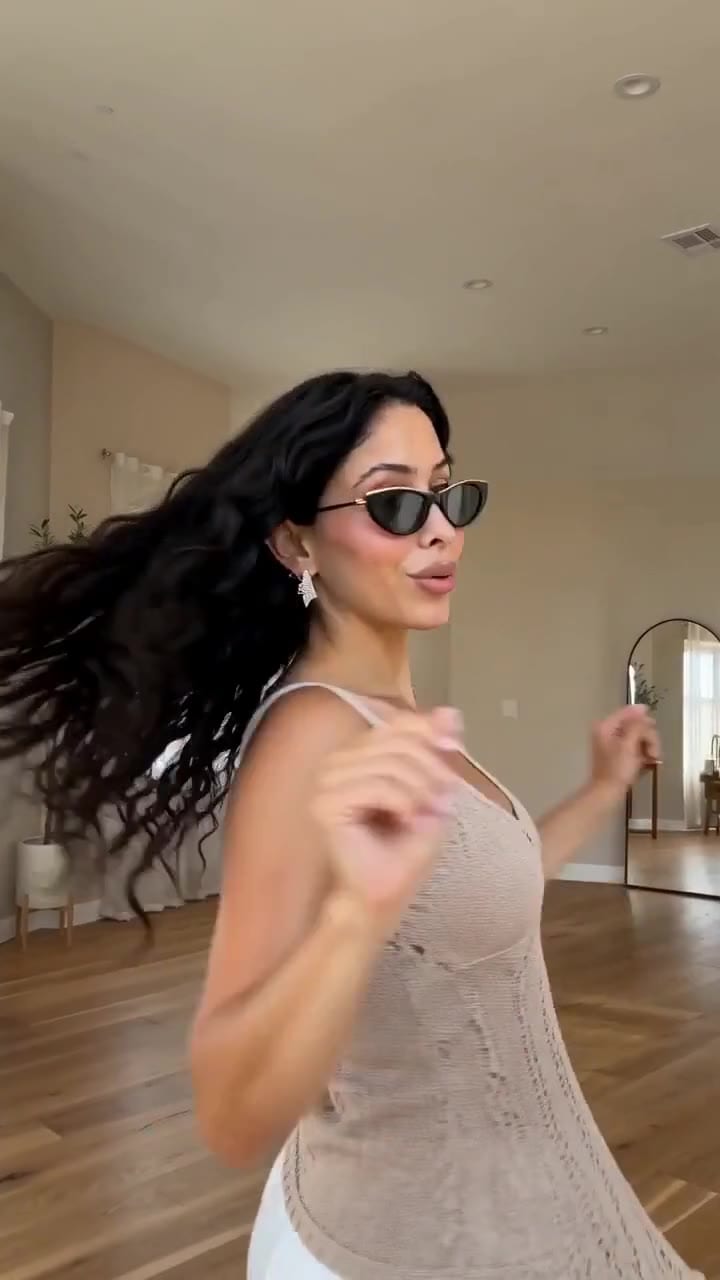
She takes the black cat-eye sunglasses off and puts them back on, with a close-up of the gold metal arm. Kinetic captions are burned in.
If a frame fails, re-render that variant instead of shipping it. Then check Meta’s and TikTok’s current rules on AI-generated people and endorsements, and label AI creators where they require it. Lightreel recommends labelling synthetic content in any case.
Scale a winner: more hooks, more languages
Once one ad survives, multiply it rather than replacing it. Lightreel’s trend report describes turning a repeatable demo into a series by swapping one variable: a new creator, a new setting, a new opening line. With AI, each swap is one more render, not one more shoot.
Languages are the other multiplier. The UGC Multilingual template makes one film per language. If you work from your own footage, the video below shows one raw Serbian take turned into new English and Spanish reels with the same face and the speaker’s own cloned voice, made through the OpenClips connector in Claude (setup in our MCP guide).
Watch: AI Video Translation in Your Own Voice: Serbian to English & Spanish. It starts at the Spanish version: listen for the same voice carrying over from the English reel.
5 AI UGC prompts to paste
Each prompt is the “what happens” text for the template named above it. The examples use a made-up face serum and coffee kettle, so every number, credential and offer in them is a sample: replace each with your own true ones. Keep the product in frame and the demo up front.
1. The silent demo (UGC ad). Built on the report’s “silent demo” brief: no voiceover, music only, one bold bottom-third caption with the outcome.
0-2 s: close-up, her hand presses the dropper and two drops of serum land on her fingertip.
2-8 s: @creator pats it onto her cheek in a bright bathroom, bottle label facing the camera.
8-13 s: close-up of the bottle in her hand, calm smile.
13-15 s: bottle on the white counter next to a towel.
No voiceover, upbeat music only. Bold caption, bottom third: "Awake skin in 2 drops".
2. Unboxing / first use (Unboxing). The 45.4% format.
Opens with the box already in her hands; she lifts the lid in the first second.
She takes out the kettle, turns it so the logo faces the camera, fills it and sets the dial.
Line: "Okay, first impression: the dial clicks to the exact degree."
End: "20% off until Sunday." Kettle held next to her face.
3. Comparison (UGC ad). The 44.4% claim style. State only differences you can verify, and never name a rival brand.
0-2 s: two kettles on a kitchen counter; her hand picks up ours.
Line: "My old kettle just boiled. This one holds 93 degrees for my pour-over."
On screen: the dial set to 93.
CTA: "Free shipping this week, link below."
4. Authority anchor (Testimonial). Use a real, checkable credential.
0-2 s: on-screen text "Barista for 8 years", kettle in his hand at a coffee stand.
Line: "I tested this at my stand for a month. Here is how I use it."
Three quick steps: fill, set the dial, pour. Kettle in every shot.
CTA: "Launch price ends Friday."
5. Multi-hook opener (UGC ad). The 35.3% structure: three fast hooks, then the same body.
0-1 s: serum drop landing on a fingertip, macro.
1-2 s: @creator holds the bottle up: "Two drops. That's the routine."
2-3 s: on-screen "30-second morning".
3-30 s: her morning routine with the serum in the middle, bottle in hand in every shot,
ending with "Bundle price until 3 November."
On CTAs, time-bound offers survived at 33.3% against 11.6% for money-back guarantees, so give the offer a date.
Mistakes that kill AI UGC ads
| Mistake | Why it fails | Fix |
|---|---|---|
| Avatar talks the whole ad, never touches the product | Nothing to believe | Product in hand in every creator shot |
| Opening on “Hey guys” | Wastes the 2 seconds that decide the scroll | Open on the demo |
| One version of the ad | You never learn which hook works | 3 to 5 hook variants, same body |
| Generated “results” as proof | Misleading, and a failing pattern | Show use, not invented outcomes |
| Melted logo or label | Viewers spot it, trust drops | Run the Step 6 check |
| AI creator presented as a real customer | Highest trust risk | Label it per platform rules |
| Clinical claims in the script | Clinically referenced claims survived at 15.1% | Say how it feels or what it does |
Product link in, demo in the first second, five hooks out. New to OpenClips? Start free with ⚡50 on signup, no card.
Sources, read on 29 October 2026: UGC Factory’s “State of UGC Ads Q4 2026”, Lightreel’s “AI-generated UGC videos” and “What is going viral in UGC” (updated 24 October 2026), the OpenClips UGC Ads page, and our own YouTube walkthroughs.