How to Keep the Same Character in AI Video: Every Shot, Every Scene
Your first shot is perfect. The second uses the same character description, and a different person walks in. New jaw, new hair, a jacket that was not there before. It is fixable, and the fix works on almost every model.
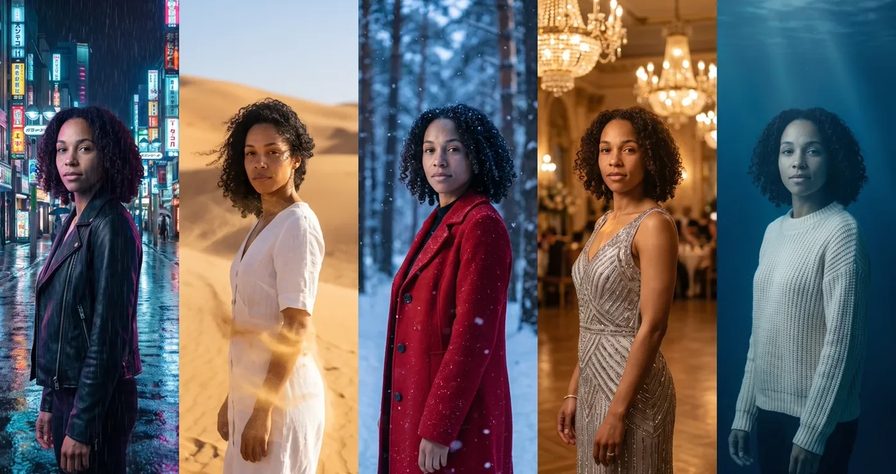
Scene select — 12 scenes
Your first shot is perfect. The second uses the same character description, and a different person walks in. New jaw, new hair, a jacket that was not there before. It is fixable, and the fix works on almost every model.
Why characters drift
A text description fits millions of faces, so every render picks a new one. We made two separate clips that share this exact character line, with no reference image:
“A woman in her late twenties with shoulder-length wavy dark-brown hair, wearing a cream linen shirt and light-blue jeans, walks toward the camera along a sunny seaside promenade …”
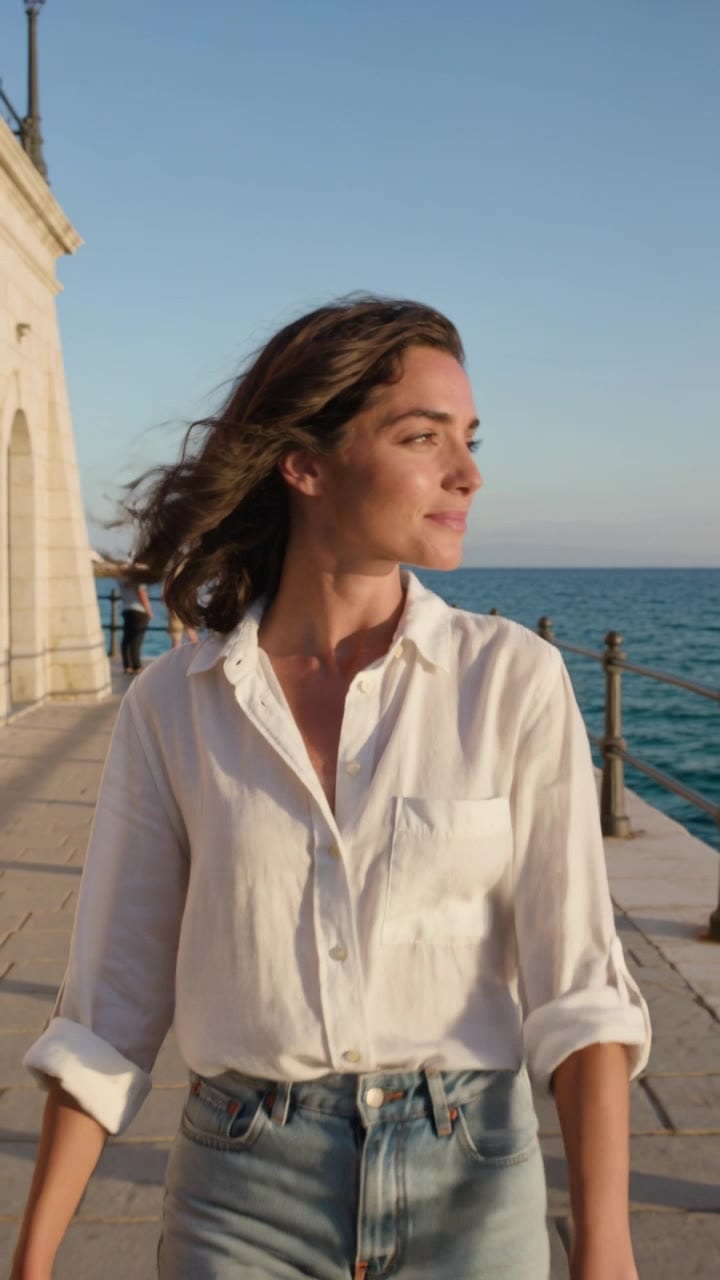
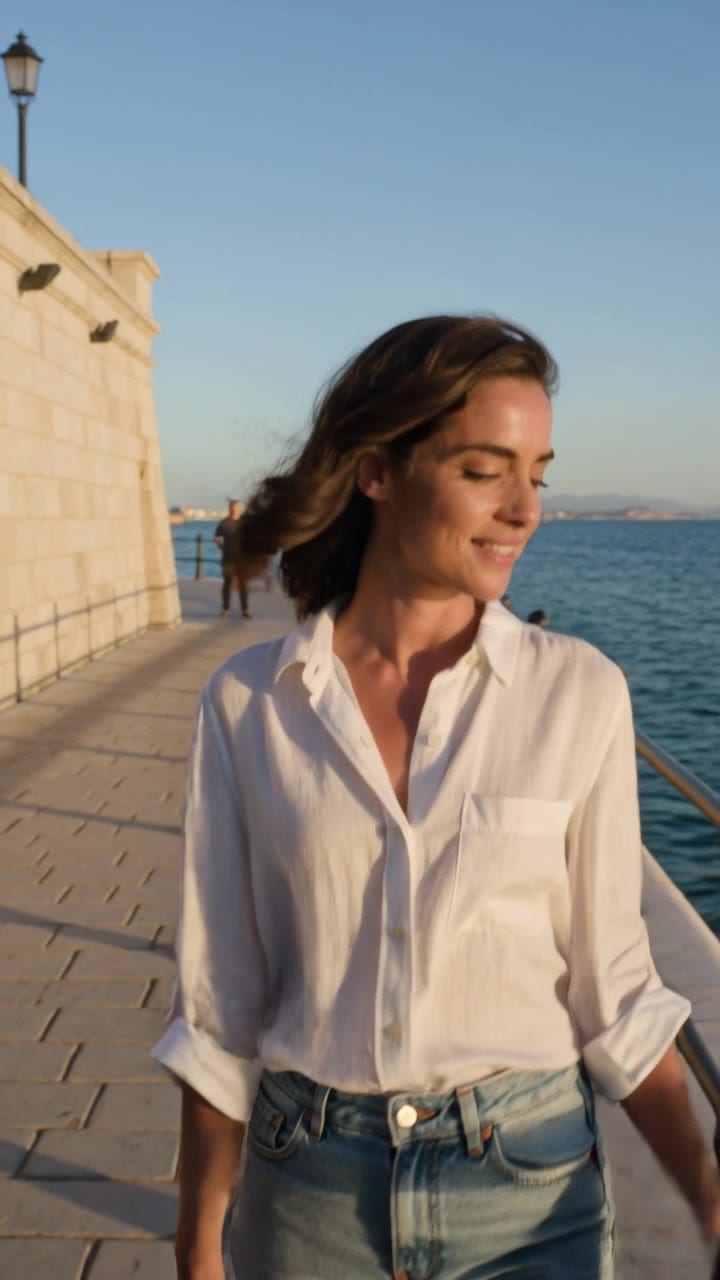
Same character line, different action in each clip, no reference. Two different faces and hairlines: a viewer would never read them as one person.
Drift has four usual causes:
- No reference. Text describes a type, not a person.
- The description changes. Reword it and the face follows.
- Unseen angles. From one front photo, the model guesses the profile.
- Broken chains. A clip continued from a faceless frame has nothing to hold on to.
A fixed seed does not solve any of these. The steps below do.
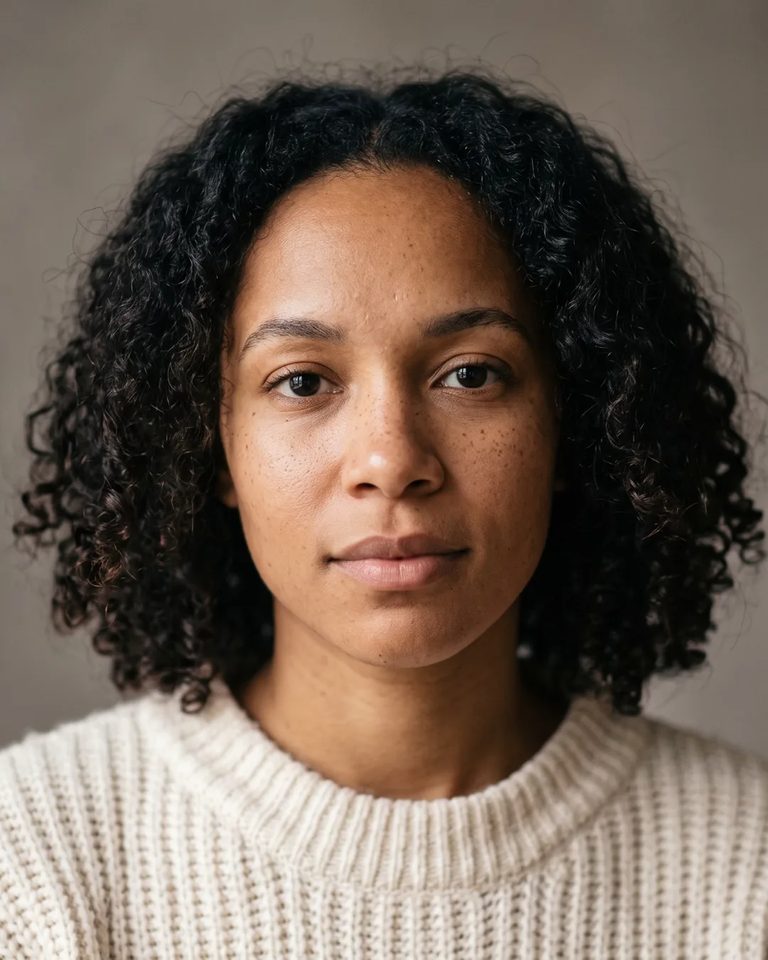
Step 1: make one hero portrait
The master image: face fully visible, even soft light, plain background, neutral expression, the outfit you plan to use.
Step 2: turn it into a character sheet
A sheet shows the model the angles it would otherwise invent. Attach your portrait and paste this into an image model:
Character reference sheet of the exact same person from the reference image:
same face, same hair, same skin tone and skin marks, same outfit.
Four views side by side on one plain light grey background, even soft studio light:

front view, full body  2) three-quarter view, full bodyside profile, full body  4) large head-and-shoulders close-up of the face.
Neutral standing pose, arms relaxed, hands empty.
The outfit is identical in every view. No text, no labels, no props, no other people.
Hands empty stops a random prop becoming part of the character. No labels matters because models misread names written inside an image. Check the sheet against your portrait before using it: every later shot inherits its mistakes.
Step 3: write a CHARACTER block and never reword it
Write the person down once and paste the block word for word into every prompt. Change the scene, action and camera, never the block.
Image 1 defines [the person]'s face, hair, skin and clothing. Do not use the image background.
CHARACTER: the exact [person] from the reference image: same face,
same [hair colour, length, texture], same skin tone and [freckles / marks],
same [outfit in one line].
“The exact … from the reference image” does the heavy lifting: it makes the image the authority, not a loose inspiration. The first line follows Seedance’s own prompt guide: one line per image, saying what to take and what to ignore.
Building a reusable template, like a community workflow? Write “the exact person from the reference image” with no gender, hair or age, so any face can be swapped in.
Step 4: attach the reference to every single shot
The step people skip. Attach the reference only to shot one and shot four has a stranger. These are the two real prompts we ran with the portrait above attached (trimmed where marked):
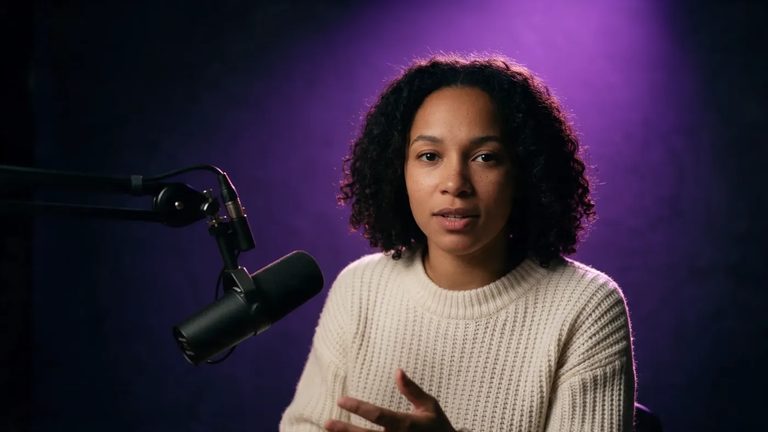
Scene A: “The exact same woman from the reference image: same face, same curly dark shoulder-length hair, same skin tone and freckles, same cream chunky knit sweater. Cinematic editorial photograph, wide. She sits in a dark studio and speaks straight to the camera mid-sentence … Deep violet top light … a black podcast microphone on a boom arm …”
Scene B: “The exact same woman from the reference image: same face, same curly dark shoulder-length hair, same skin tone and freckles, same cream chunky knit sweater. … a large framed still portrait photograph of this same woman hangs on the wall on the left … the real woman stands beside her own portrait and talks warmly toward the camera …”
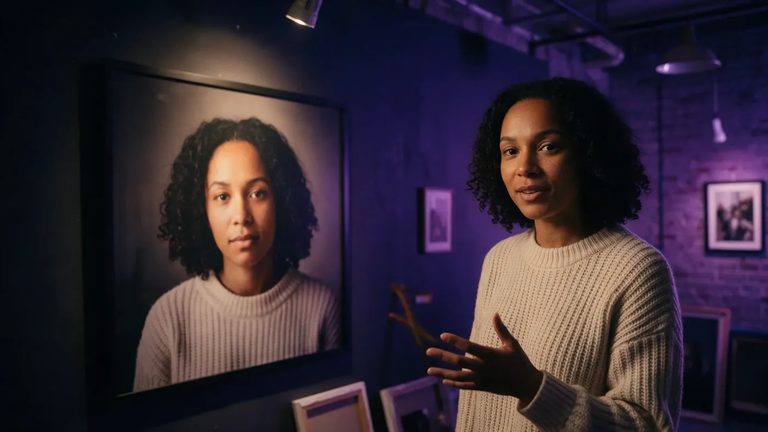
A hard test: the same face twice in one frame. Same curls, freckles and sweater, new room, new light. No training, one portrait. Between A and B only the scene changed; the character sentence is identical.
Props, outfits and permanent changes
Props. A product described only in words gets redrawn in every shot. If an object matters, give it its own clean still and attach it to every shot it appears in.
Outfit changes. Describe the new outfit in the shot where it starts, and update the CHARACTER block for every shot after it.
Permanent changes. Wet hair, a removed jacket, a stain: from that moment they are part of the character. Add them to every later block, or the next shot quietly resets them:
CHARACTER: the exact woman from the reference image: same face, same curly dark
shoulder-length hair, now wet from the rain, same skin tone and freckles,
same cream chunky knit sweater, now darker and soaked at the shoulders.
Two or more characters in one scene
Group scenes are where faces swap. Three rules:
- One reference per person, bound by order: “Image 1 defines the woman’s face and clothing. Image 2 defines the man’s face and clothing.” Never “Images 1 and 2 are the two characters.”
- A full CHARACTER block for each person, and say who does what.
- A guard line from ByteDance’s Seedance guide: “Do not interchange the characters’ appearances, clothing, actions or positions.”
Keep the cast small: ByteDance’s own Seedance guide calls small casts the most stable. If a busy shot keeps failing, film people separately and cut between them.
Longer videos: one pass, or a chain done right
The surest way to keep a face is to never cut. A single long generation holds one person from the first frame to the last:

One Seedance 2.5 generation: she walks, leans on the railing, ends in a close-up. One woman throughout.
When you do need several clips:
- Continue from the last frame of the previous clip, and make sure that frame shows the face. An empty street or the back of a head loses the identity.
- Keep the reference attached to every clip.
- Every few clips, compare the face to your original portrait, not the last clip, so errors do not stack.
- Keep light direction and camera distance similar between cuts.
Running a character across a whole series or campaign
For a brand face or a weekly series, keep the kit in one folder: hero portrait, character sheet, CHARACTER block as a text file, prop stills, voice. Every episode starts from the same files, and anyone on the team gets the same person.
For the tightest lock, train the character. On OpenClips, Character Studio turns three photos of one person (front, three-quarter, profile), plus their consent, into a trained custom avatar.
| Approach | Best for | Trade-off |
|---|---|---|
| Reference + character sheet | Most projects, fast tests | Re-attach every time, small drift possible |
| Trained avatar or LoRA | One face across a long series | Needs good photos and setup time |
Troubleshooting: symptom, cause, fix
| Symptom | Likely cause | Fix |
|---|---|---|
| New person every render | Text only | Attach the reference, use “the exact … from the reference image” |
| Fine in shot 1, a stranger by shot 4 | Block reworded, or reference only on shot 1 | Paste the identical block, attach the reference every time |
| Face warps when she turns | One front photo, fast camera move | Use the character sheet, slow the move down |
| Outfit changes or snaps back | Wardrobe not described per shot | Describe it in every shot, update the block |
| Wet hair or removed jacket returns | Change written only where it happened | Add it to the block of every later shot |
| Product looks different each shot | Prop described in words only | Give it its own still, attach it everywhere it appears |
| Two people swap faces or clothes | References not bound one by one | Bind Image 1, Image 2 separately, add the “do not interchange” line |
| Identity lost after a chained cut | Chain frame had no face | Chain from a frame with a clear face, re-attach the reference |
Which models hold a face
| On OpenClips | How it holds identity |
|---|---|
| Seedance 2.5 | Reference images or a saved avatar, held through one long take |
| MiniMax H3 | Reference images; in our work it held an avatar and a product through a whole clip |
| OmniHuman 2.0 | Animates your exact photo as a talking clip |
| FLUX 3 | Uses images as frames, not references |
How many references each model takes, from the catalog:
| Modality | Video |
|---|---|
| Length | 4s to 30s |
| Resolutions | 480p, 720p, 1080p |
| Audio | Available |
| References | Up to 30 |
| Price | from ⚡51 per render (from $0.052/s) |
| Modality | Video |
|---|---|
| Length | 4s to 15s |
| Resolutions | 768P, 2K |
| Audio | Available |
| References | Up to 9 |
| Price | from ⚡39 (from $0.161) |
Working in Kling’s own app? Its Elements feature and Kling 4.0’s Omni Reference follow the same logic: register the character once from several angles, then bind it to every shot.
Quick checklist
- Hero portrait: clear face, even light, plain background
- Character sheet: four views, outfit locked, hands empty
- One CHARACTER block, pasted word for word everywhere
- Reference attached to every shot
- A still for every important prop
- Outfit and permanent changes in every later block
- Group scenes: one bound reference per person
- Long takes, or chains continued from a frame with a face
One portrait, one sheet, one locked description, every shot. New to OpenClips? Start free with ⚡50 on signup, no card.
Sources, read on 22 October 2026: BytePlus and ByteDance Seedance 2.5 prompt guides, Kling’s 3.0 subject binding post and Element Library guide, Magic Hour’s 2026 consistency guide, Scenario’s Seedance 2.0 guide, RunComfy’s WAN LoRA guide, and OpenClips Character Studio.