Black Friday Video Ads 2026: 10 AI Ads From One Photo
Black Friday 2026 is Friday 27 November. Start from one clean product photo, make 10 variations across four hook families, test them on full price in early November, then re-cut the winners with your offer.

Scene select — 10 scenes
Black Friday 2026 is Friday 27 November, and Cyber Monday is Monday 30 November. To make Black Friday video ads that sell, have them built and tested by mid November: Yotpo reports that about 75% of shoppers research deals before then. The method: start from one clean product photo, make 10 variations across four hook families (demo, comparison, unboxing and a dated offer), test them on full price in early November, then re-cut the winners with your offer. In UGC Factory’s study of 3,941 video ads, demo hooks and unboxing videos ran longest, and “last day” offers outlasted money-back guarantees nearly 3 to 1.
Below: a dated countdown, the hook data, a 10-variant plan with two ways to build it, eight copy-paste prompts, real renders, funnel scripts and a Meta test plan.
Watch: How to Make Meta Ads With AI: 10 Ad Creatives in 10 Minutes. One product link and one message to Claude return 5 Facebook ads, 5 Instagram posts and a UGC video: watch how each ad gets its own angle, and the price appears before anything runs. Setup is in our guide to making ads from chat.
The Black Friday 2026 countdown
Work back from the dates in Yotpo’s guide.
| Dates | Job | Output |
|---|---|---|
| 29 Oct to 2 Nov | Pick one clean product photo, write the offer, make the statics | 4 static ads |
| 3 to 9 Nov | Make the video and UGC variants, launch test round 1 on full price | 6 video ads, 10 live tests |
| 10 to 16 Nov | Pause losers, rebuild winners with new hooks | Round 2 tests |
| 17 to 23 Nov | Make offer versions of the winners | Offer cuts, scheduled |
| 24 to 26 Nov | Early access for existing customers, swap cold ads to offer cuts | Preview ads live |
| 27 to 29 Nov | Black Friday weekend: winners only, watch frequency | Daily checks |
| 30 Nov | Cyber Monday: “last day” cuts of the same winners | Last-day cuts |
Yotpo also advises treating Black Friday and Cyber Monday as one campaign with one message. That keeps the work to one set of ads, re-cut twice.
Which Black Friday ad ideas last: the hook data
UGC Factory’s Q4 2026 report tagged 3,941 video ads from 193 DTC brands and measured how many were still running 90 days after launch. Brands switch off losing ads fast, so survival is a fair proxy for “this ad paid”. The average was 26.7%.
| Creative choice | Still running at 90 days |
|---|---|
| Live unboxing or first use | 45.4% |
| Comparative claim (142 ads) | 44.4% |
| Demo or proof hook (451 ads) | 43.2% |
| AI voiceover over real b-roll | 38.9% |
| Time-bound offer CTA | 33.3% |
| Creator talking to camera (64% of all ads) | 24.5% |
| Pain-point callout hook (1,453 ads, the most common) | 20.2% |
| Money-back guarantee CTA | 11.6% |
| AI cartoon or animated characters | 7.3% |
What that means for BFCM ad creative:
- Show the product working first. Demo and proof hooks lasted more than twice as often as “Tired of…?” openers.
- Compare. Your product next to “the usual way” was one of the strongest formats. Keep every comparative claim true and provable.
- Close on a date, not on risk. A deadline (“ends Monday”) beat a guarantee (33.3% vs 11.6%).
The caveats: it is a vendor report, survival is not ROAS, and about 60% of the brands sell health and wellness. Treat it as your opening bet and let your own test decide.
One product photo, 10 Black Friday ad variations
Use one sharp photo: product on a plain background, front-facing, label readable. Every variant uses it as the reference, so the product looks identical across all ten.
| # | Variant | Hook family | Route A: Marketing Studio template | Route B: model | Format |
|---|---|---|---|---|---|
| 1 | Offer static: hero shot + offer | Dated offer | Offer / Promo | Nano Banana Pro | 4:5 + 9:16 |
| 2 | “The usual vs us” split | Comparison | Comparison / Versus | Nano Banana Pro | 4:5 |
| 3 | Gift-ready static | Payoff | Gift & Occasion | Nano Banana Pro | 4:5 + 9:16 |
| 4 | Review-quote static (real quote only) | Proof | Route B only | Nano Banana Pro | 4:5 |
| 5 | First-use demo, hands only | Demo | How-to / Steps | Seedance 2.5 | 9:16 + 1:1 |
| 6 | Unboxing at a kitchen table | Unboxing | Unboxing | Seedance 2.5 | 9:16 |
| 7 | Side-by-side comparison clip | Comparison | Comparison / Versus | Seedance 2.5 | 9:16 |
| 8 | “Last day” packshot | Dated offer | Product Hero (video) | Seedance 2.5 | 9:16 + 1:1 |
| 9 | Creator testimonial | Demo + offer | Testimonial | UGC Ads | 9:16 |
| 10 | Unboxing or before/after by a creator | Unboxing or proof | Unboxing, Before / After | UGC Ads | 9:16 |
Sizes. Use 4:5 for feed statics and 9:16 for Stories and Reels. Seedance 2.5 has no 4:5 setting, so render feed video in 1:1. Every placement is in our aspect ratio cheat sheet.
Route A: Marketing Studio templates (no prompt writing)
Marketing Studio holds ready-made ad templates, and it has an occasion group called Black Friday & Cyber Monday. You bring the product, the template brings the shots and pacing, and you see an example before you pay.
- Open Marketing Studio, click Photo (or paste your product link) and add a few words about the product.
- Click Find My Templates. It reads the product and ranks the templates that fit.
- Filter by Video or Image, by ad size, or by the Black Friday occasion.
- Pick a template, choose where the ad will play, type your offer or the mood in one line, and generate.
- Go back, click Change, pick the next template. The product stays in.
Watch: How to Make Instagram Ads With AI (Feed, Stories & Reels From One Product). One bottle photo becomes four ads: watch the Offer / Promo story at 1:17 (variant 1) and the Product Hero video reel at 1:30 (variant 8).
Route B: copy-paste prompts for every variant
Want full control of each shot? Write the prompt yourself in Generate. These eight are templates written for this post, built on the reference rules in our consistent character guide. We have not rendered these exact prompts, so treat them as starting points. Attach your product photo as Image 1 every time.
Image 1 defines the product: keep its exact shape, label, colours and proportions.
Studio product photo of the product from Image 1, centred on a matte black surface,
one warm spotlight from the upper left, a soft reflection below it.
Large clean white text at the top: "BLACK FRIDAY". Below it: "[OFFER, e.g. 30% OFF]".
Small text at the bottom: "Ends 30 November". Plenty of empty space, no other objects.
Run this prompt →
Image 1 defines the product: keep its exact shape, label and colours.
Split image, two equal halves. Left half, flat grey light: [the usual way, e.g. a
tangle of cheap charging cables on a desk]. Label "THE USUAL". Right half, warm light:
the product from Image 1 in use, [the result, e.g. one neat cable, phone charging].
Label "[YOUR BRAND]". Bold sans-serif labels, no other text.
Run this prompt →
Image 1 defines the product: keep its exact shape, label and colours.
The product from Image 1 stands upright beside a gift box wrapped in matte black paper
with one gold ribbon, on a dark wooden table. A few out-of-focus warm lights in the
background. Soft side light on the label. Small white text at the bottom:
"The gift, sorted. [OFFER] until 30 November." No people, no other products.
Run this prompt →
Image 1 defines the product: keep its exact shape, label and colours.
The product from Image 1 on a light linen surface, morning window light, lower third
of the frame. Upper two thirds: plain off-white space with this quote in large dark
serif text: "[A REAL CUSTOMER QUOTE, under 15 words]". Under it in small text:
"[First name], verified buyer". Five small gold stars above the quote.
Run this prompt →
Use only a quote a real customer wrote, with their permission. A made-up review is a liability, not an ad.
The four Seedance prompts below use a four-part structure: what it is, what must stay locked, a shot list with timings, then style and sound.
What it is: a handheld phone video of someone using [product] for the first time.Lock: Image 1 defines the product. Keep its exact shape, label and colours in every frame.Shots:
0 to 3 s: close-up, two hands pick up the product from Image 1 and [first action, e.g. twist the cap].
3 to 10 s: slow ordinary gestures showing [the result]; the camera moves in a little.
10 to 15 s: the hands set the product down, label facing the camera; it holds still.Style and sound: natural window light, wooden kitchen table, slight handheld shake.
Quiet room sound and the soft click of [action]. No background music.
Run this prompt →
Keep the gestures slow and ordinary. Products that move by themselves, or results that appear with no hand doing anything, read as fake.
What it is: an overhead phone video of an unboxing at home.Lock: Image 1 defines the product. Keep its exact shape, label and colours.Shots:
0 to 3 s: a plain cardboard box on a kitchen table, two hands open the flaps.
3 to 7 s: the hands lift out the product from Image 1 and turn it once to show the label.
7 to 10 s: the hands hold it close to the lens, label sharp.Style and sound: natural daylight, slight handheld shake. Cardboard and tissue paper sounds, no music.
Run this prompt →
What it is: a split-screen phone video comparing the usual way with [product].Lock: Image 1 defines the product. Keep its exact shape, label and colours.Shots:
0 to 4 s: left half only, flat grey light, a hand struggles with [the usual way].
4 to 9 s: right half lights up warm, a hand uses the product from Image 1 and [result] happens at once.
9 to 12 s: both halves side by side, the product in the right half, label facing the camera.Style and sound: same kitchen table in both halves, natural light. A soft sigh on the left,
a clean click on the right. No music.
Run this prompt →
What it is: a premium product packshot for the last day of a sale.Lock: Image 1 defines the product. Keep its exact shape, label and colours.Shots:
0 to 5 s: the product from Image 1 stands on a black reflective surface; slow camera push-in.
5 to 8 s: bold white text appears at the top: "LAST DAY". Below it: "[OFFER]". Text stays level.Style and sound: one warm spotlight, the label catches the light. Low soft hum, no music.
Run this prompt →
Two checks for every Seedance clip. The spec card below shows how long a take can run on OpenClips. On-screen text from any video model can misspell, so read every letter, or add the price later as an overlay.
| Modality | Video |
|---|---|
| Length | 4s to 30s |
| Resolutions | 480p, 720p, 1080p |
| Audio | Available |
| References | Up to 30 |
| Price | from ⚡51 per render (from $0.052/s) |
Cheap mood b-roll between variants. Not every clip has to carry the product. A few seconds of Black Friday atmosphere, cut between your product shots, costs far less than a full take. The clip below is one of ours, outside the ten variants.
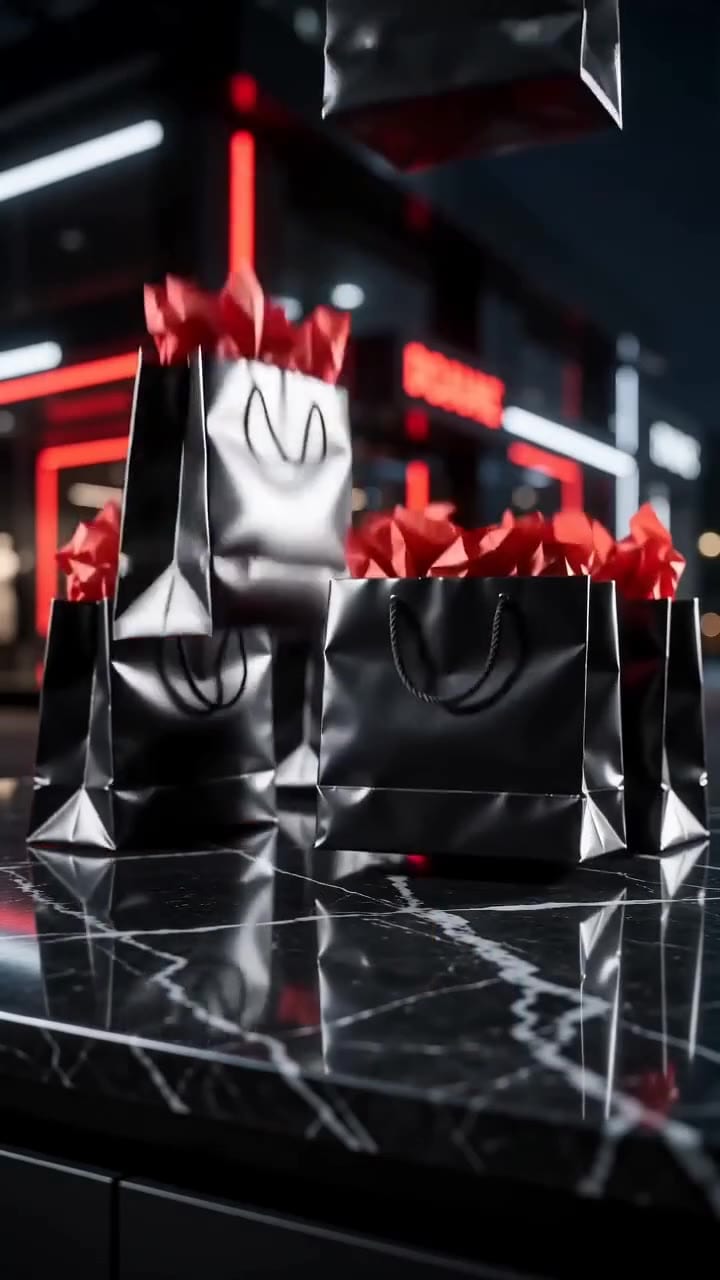
Black glossy shopping bags with red tissue paper drop one after another onto a black marble counter in a dark store lit by red and white neon; no product, no people.
Variants 9 and 10: AI UGC ads from a product link
- Open Marketing Studio, paste your product page link and click Find my templates. It reads the name, brand, price and photos on its own.
- Pick Testimonial for variant 9, and Unboxing or Before / After for variant 10.
- Choose a creator from the stock cast or your own trained avatar.
- Set 9:16 and the language. Write the hook line yourself, using the funnel scripts below.
- Check the price on the Generate button, then generate.
Watch: How to Make AI UGC Ads From a Product Link (Testimonial Video). It starts at the link paste: watch the product card fill in by itself, then the Testimonial template, the settings and the finished kettle ad.
Two real UGC Ads outputs from product links show the formats behind variants 9 and 10. Neither carries a Black Friday offer: that goes into the hook line and the script you write.
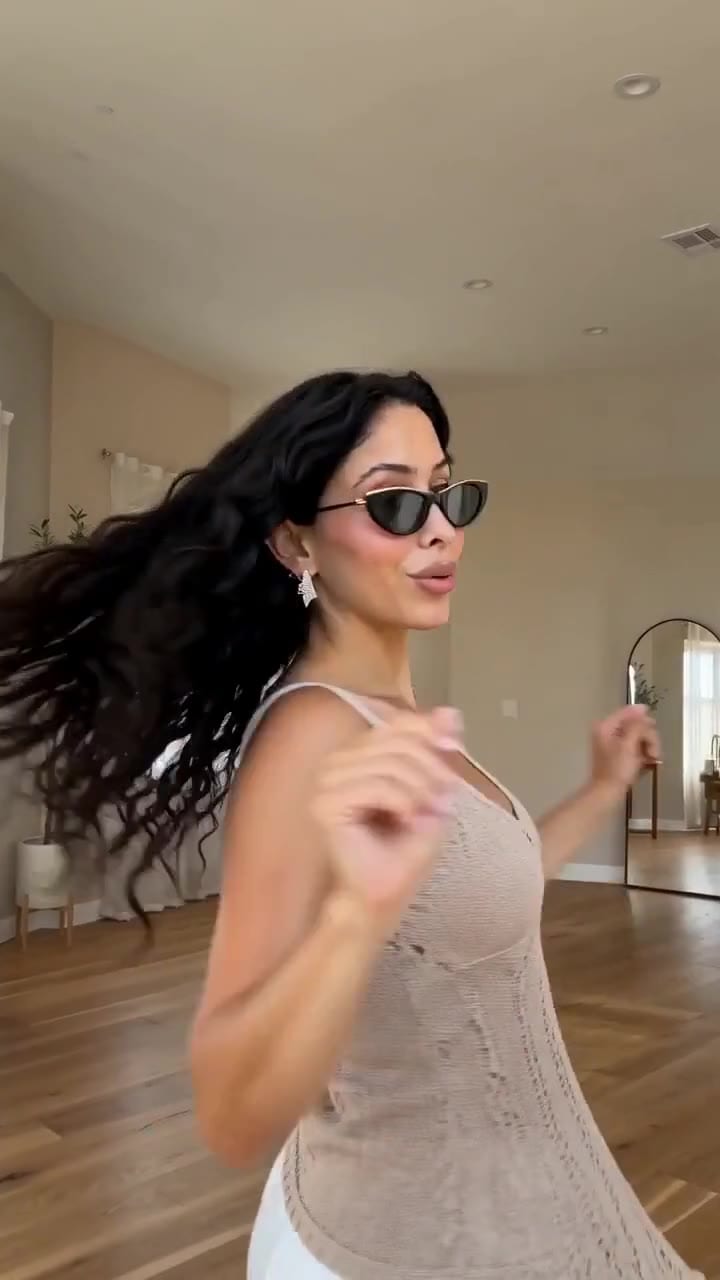
She takes black cat-eye sunglasses off and puts them back on, with a close-up of the gold metal arm. Kinetic captions are burned in.
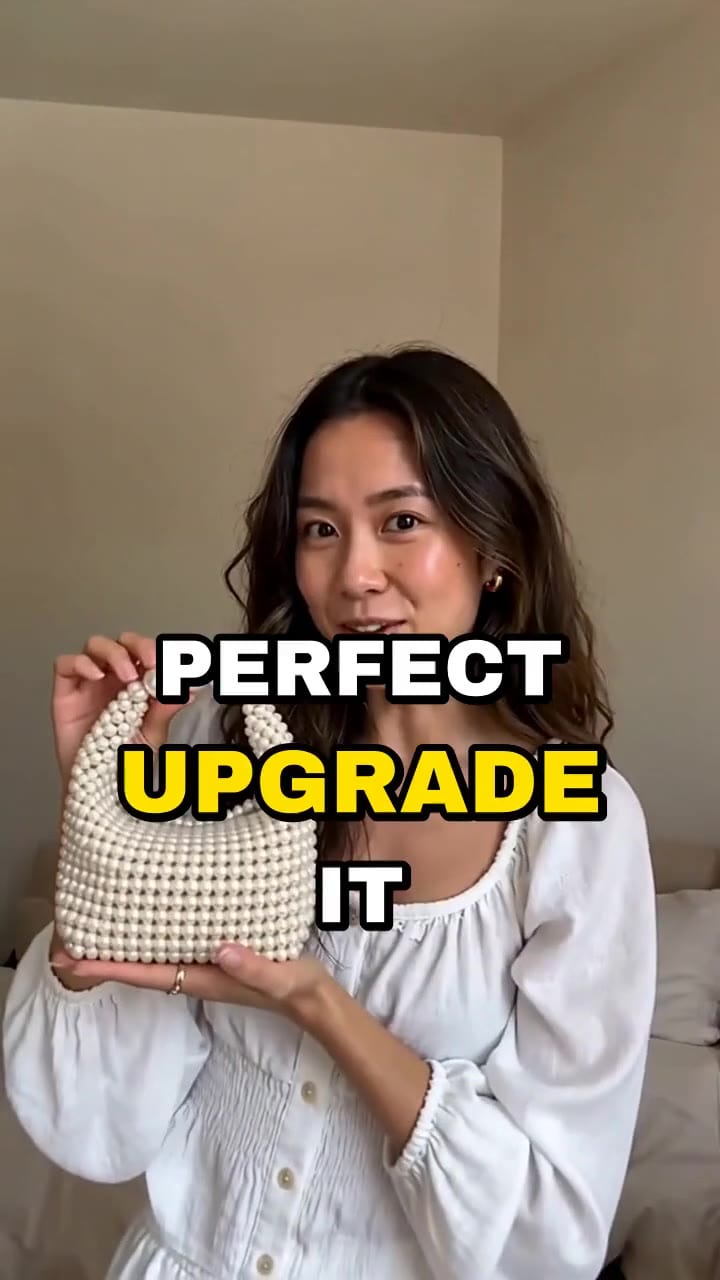
A plain beige clutch first, then a white faux pearl beaded mini handbag held up close to the lens, in her hand for most of the clip.
The second-by-second structure is in our 15-second UGC ad formula, and the full playbook is in AI UGC ads. Platforms may require a label on realistic AI content, so check the current Meta and TikTok rules before launch.
Black Friday Meta ads by funnel stage: three scripts
Same product, three audiences. Use these as the spoken line for variant 9 or as captions over variants 5 to 8.
Cold (never heard of you): lead with proof.
“Watch what happens when I [first action]. [Result in one line]. This is [product], and this Black Friday it is [offer]. Link below.”
Retargeting (visited, did not buy): lead with the comparison and the deadline.
“Still using [the usual way]? Here is [product] next to it. [One concrete difference]. [Offer] ends Monday 30 November.”
Existing customers: lead with early access. Yotpo recommends a preview window for loyalty members and subscribers before the public launch.
“You get it first. [Offer] opens for you on [date], before everyone else. One for you, one as a gift.”
How to test Black Friday video ads on Meta
This is common media-buying practice, not data from the report above. Adjust it to your budget.
- Test early, on full price. Run round 1 in the first week of November, so you know your winners before you need them.
- Fix the test budget. Keep most spend on what already works and a fixed smaller share on new variants, so one variant cannot eat it all.
- Change one thing per variant. Same offer, same audience, different hook. Otherwise you will not know why something won.
- Give each ad time. Meta’s learning phase is commonly summarized as about 50 optimization events in 7 days per ad set. Judge on a fixed spend or a few days, not a few hours.
- Pause, then rebuild. Switch off clear losers, then re-cut the winner into two new hook families: a winning demo becomes a comparison and an unboxing.
- Schedule before the weekend. Upload the offer cuts a few days early, so ad review delays do not cost you Black Friday morning.
OpenClips makes the creative. It does not post or launch campaigns: you upload the files to Ads Manager yourself.
Common Black Friday ad mistakes
| Mistake | Fix |
|---|---|
| Making the ad on 25 November | Follow the countdown, test from early November |
| One ad, one hook | Ten variants across four hook families |
| Opening on the pain point | Open on the product working, the problem comes second |
| Product looks different in every ad | Attach the same photo as Image 1 to every prompt |
| Price misspelled in the video | Read every letter, or add the price as an overlay |
| Only 9:16 | 4:5 statics and 1:1 video for feed |
| A guarantee as the main CTA | A dated deadline: “Ends 30 November” |
What it costs on OpenClips
The Generate button always shows the exact price before you render, and the spec cards carry each model’s starting price. Statics on Nano Banana Pro cost a fraction of a video take, and Seedance prices scale with length and resolution. Commercial use is not included on the Free plan, so you need a paid plan or credit pack before these ads run. Details in how credits work, and for more on the static shots, see AI product photography.
| Modality | Image |
|---|---|
| Resolutions | 1K, 2K, 4K |
| References | Up to 11 |
| Price | from ⚡31 (from $0.128) |
| Modality | Video |
|---|---|
| Length | 4s to 15s |
| Resolutions | 480p, 720p |
| Audio | Available |
| References | Up to 9 |
| Price | from ⚡14 (from $0.058) |
One photo, ten ads, tested before the rush. New to OpenClips? Start free with ⚡50 on signup, no card.
Sources, read on 29 October 2026: Yotpo’s Shopify Black Friday guide, UGC Factory’s “State of UGC Ads Q4 2026”, Meta Business Help Center’s “About the learning phase”, Jetfuel Agency’s “What Is the Meta Ads Learning Phase” (a 2026 summary of Meta guidance), the OpenClips Marketing Studio, UGC Ads, Seedance 2.5 and Nano Banana Pro pages, and our own YouTube walkthroughs.