How to Make an AI Video in 2026: Six Steps, on Our Own Renders
Six steps from an empty box to a finished clip. Every one of them carries a render we actually made, the brief that made it, and the catalog sheet that prices one of your own.
Scene select — 9 scenes
Making an AI video in 2026 is six decisions, in a fixed order, and only one of them is the prompt. Pick the frame. Write the shot. Add beats if one sentence runs out. Say what it should sound like. Watch what came back. Change one clause and go again. That is the whole job.
Disclose the bias first: we build OpenClips.AI, so every clip below is our own render rather than a vendor reel, every brief under it is printed verbatim, and every price renders from the catalog our composer bills against instead of a figure someone typed. Where a step needed a render we did not make, it shows nothing at all.
Before the first step
You need three things and none of them is a camera.
A destination. A feed, a storefront, a landing page, a deck. It decides the frame, and the frame decides the composition.
One sentence you can defend. If you cannot say the shot out loud in a breath, the model cannot draw it either.
A balance you can watch. Renders are priced individually here, so the number on the button is the number you spend. A new account starts with ⚡50 on signup, no card.
6
steps, in order
1
sentence per brief
1
clause changed per pass
Step 1: pick the frame before you write a word
Vertical and wide are not crops of each other. They are different shots. A wide frame has room for a horizon and a subject walking through it; a vertical frame has room for one subject and almost nothing else. Choose it first and the model composes for it. Choose it last and you spend the rest of the day cropping your way out of a composition that was never built for the space.
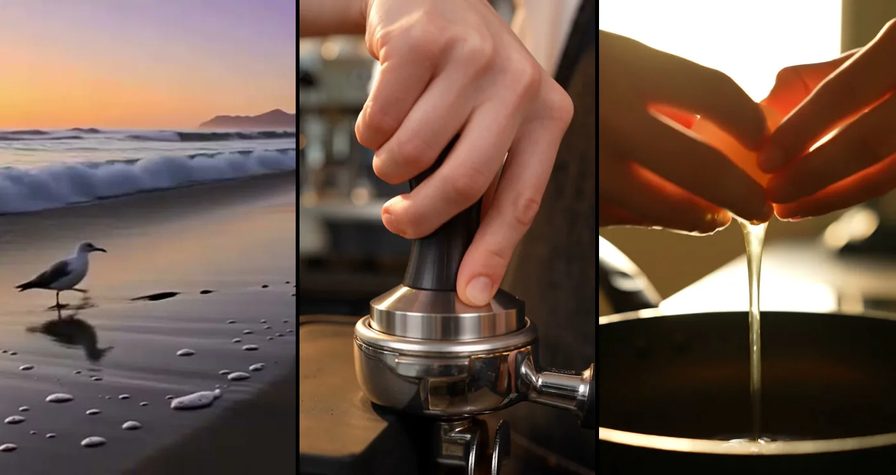
This one was briefed as a wide, and it is a wide: a horizon, a valley of mist, and one figure small enough to read as scale rather than as the subject.

[Zoom in] Wide shot of terraced rice fields at sunrise, mist in the valleys, a farmer walks the ridge with a hoe, fine texture in every terraceRun this prompt →
The settings: 16:9, one written prompt, nothing attached. Note that the camera move is named outright rather than left to the model, which is the one habit every brief in this post shares.
| Modality | Video |
|---|---|
| Length | 4s to 15s |
| Resolutions | 768P, 2K |
| Audio | Available |
| References | Up to 9 |
| Price | from ⚡39 (from $0.16) |
The MiniMax H3 page carries the full grid, and MiniMax publishes the model itself. If you are choosing a frame rather than a model, our aspect ratio cheat sheet is the shorter read.
Step 2: write the shot in one sentence
Subject, then motion, then camera. In that order, in one sentence, and then stop. The instinct to keep typing is the single most expensive habit in this craft: every extra clause is another thing the model has to reconcile, and the first thing it drops when it cannot is usually the thing you cared about.
Google’s own Veo prompting guide lays out the same components from the other side of the fence — shot framing and motion, action, location, lighting, character description — and it is worth reading precisely because it agrees with what the failures teach. Name the camera move. Name the light. Do not name eleven things.
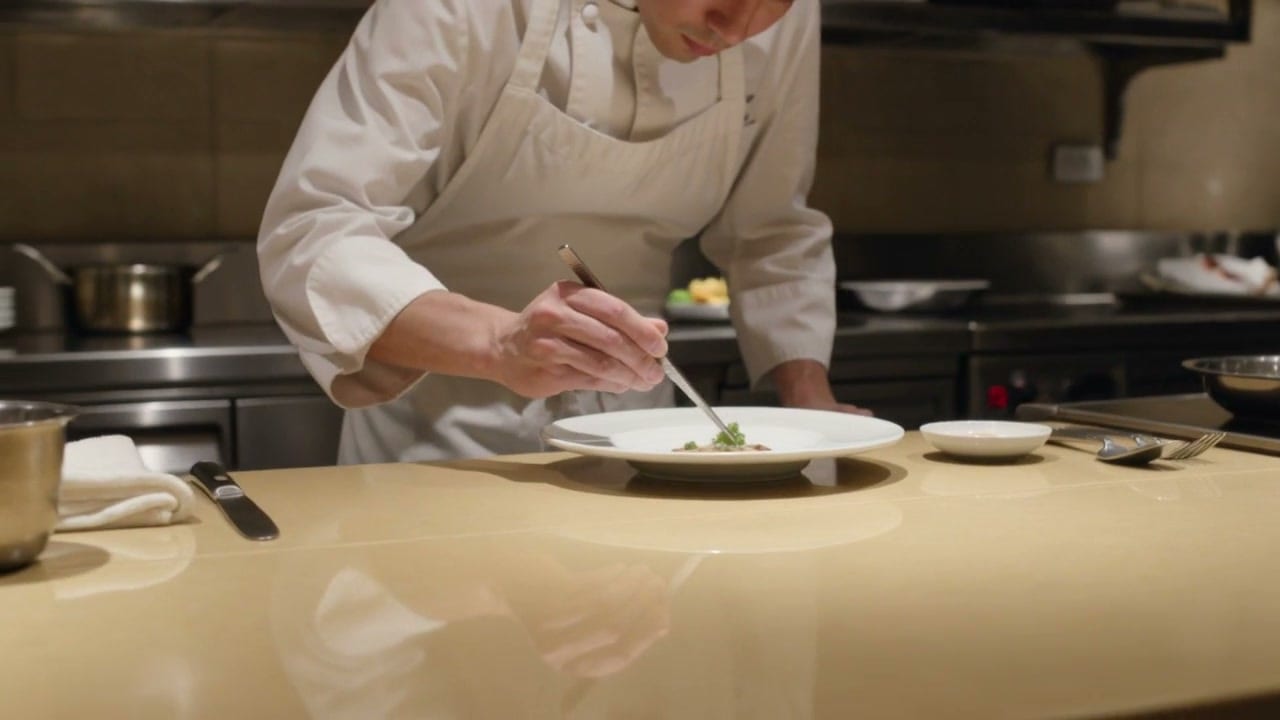
A chef in a white apron plates a dish while the camera orbits half a turn around the counter, his face and apron stay consistent through the move, warm restaurant lightRun this prompt →
Read it back: subject (a chef in a white apron), motion (plates a dish), camera (orbits half a turn), and one condition on top (his face and apron stay consistent). Thirty-one words. The hard part of that shot is the orbit, because a camera that travels gives the model an excuse to redraw the subject from a new angle, and a face that changes halfway through is the tell everybody sees.
The settings: 16:9, one written prompt, nothing attached.
| Modality | Video |
|---|---|
| Length | 3s to 15s |
| Resolutions | 720p, 1080p, 4k |
| Audio | Available |
| References | Up to 1 |
| Price | from ⚡46 per render (from ≈$0.06/s) |
The Kling 3.0 page carries the grid, and Kuaishou’s own product site is kling.ai.
Step 3: when one sentence runs out, give it beats
Some shots are not one move. They are three, in order, and the model has to know which comes first. Write them as beats with their own timings and the take arrives in that order instead of averaging into mush.
ByteDance describes the Seedance family’s design on its Seed site: a model that supports “multi-shot video generation”, holding consistency in “the main subject, visual style, and atmosphere across shot transitions”. Beats are how you actually ask for that.
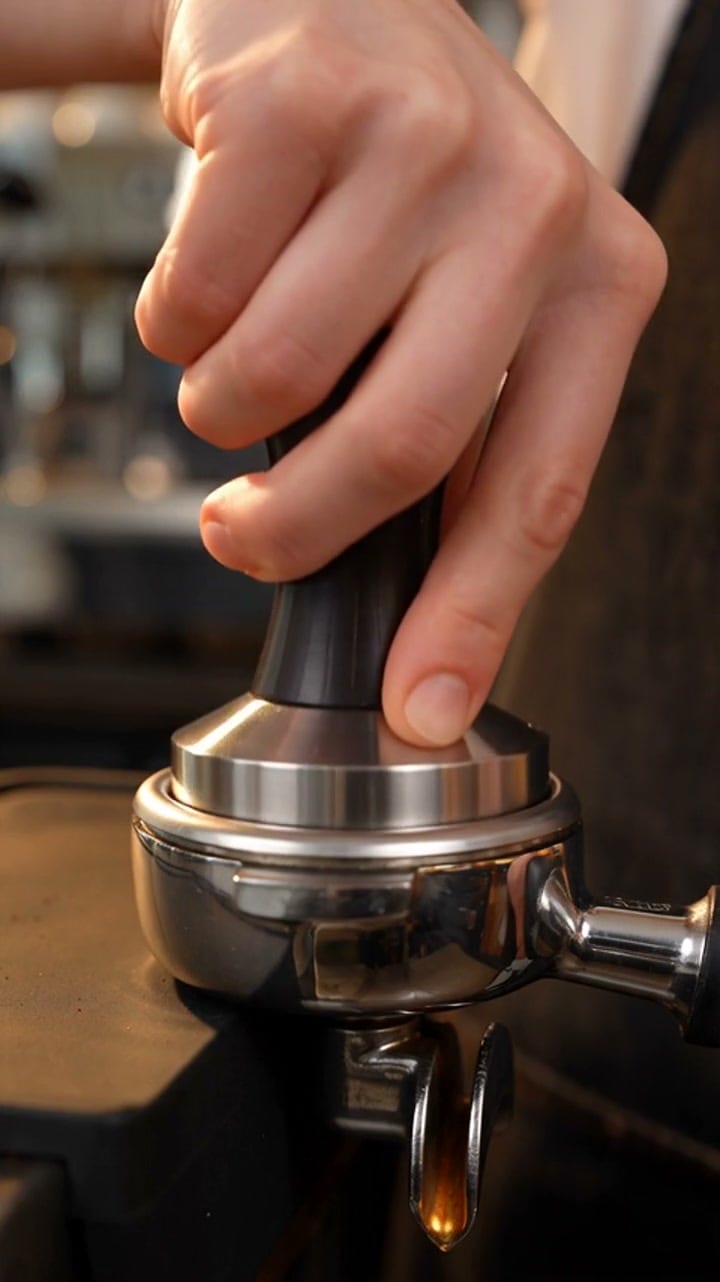
0–2s: close-up of a barista's hands tamping espresso, warm tungsten light. 2–4s: milk pours into the cup, a rosetta forms in slow motion. 4–5s: she slides the cup across the bar toward camera and smiles, shallow depth of fieldRun this prompt →
Three beats, one continuous piece of time, and the last one is the only one that looks at camera. That structure is what makes a clip feel written rather than generated, and it is the difference between a shot and a stock loop.
The settings: 9:16, one written prompt, nothing attached.
| Modality | Video |
|---|---|
| Length | 4s to 30s |
| Resolutions | 480p, 720p, 1080p |
| Audio | Available |
| References | Up to 30 |
| Price | from ⚡51 per render (from ≈$0.05/s) |
The Seedance 2.5 page carries the sheet and the price grid.
Step 4: write the noise on the same line as the picture
The most common mistake in a first AI video is treating the noise as post. It is not post. It is part of the brief, and a clip briefed as a picture that happens to make a sound lands differently from one briefed as a sound that happens to have a picture.
Google’s Veo prompting guide says it plainly: “Explicitly define the sounds you want to hear, to match the audio to your visuals.” So write them into the sentence, in the order the viewer will hear them.
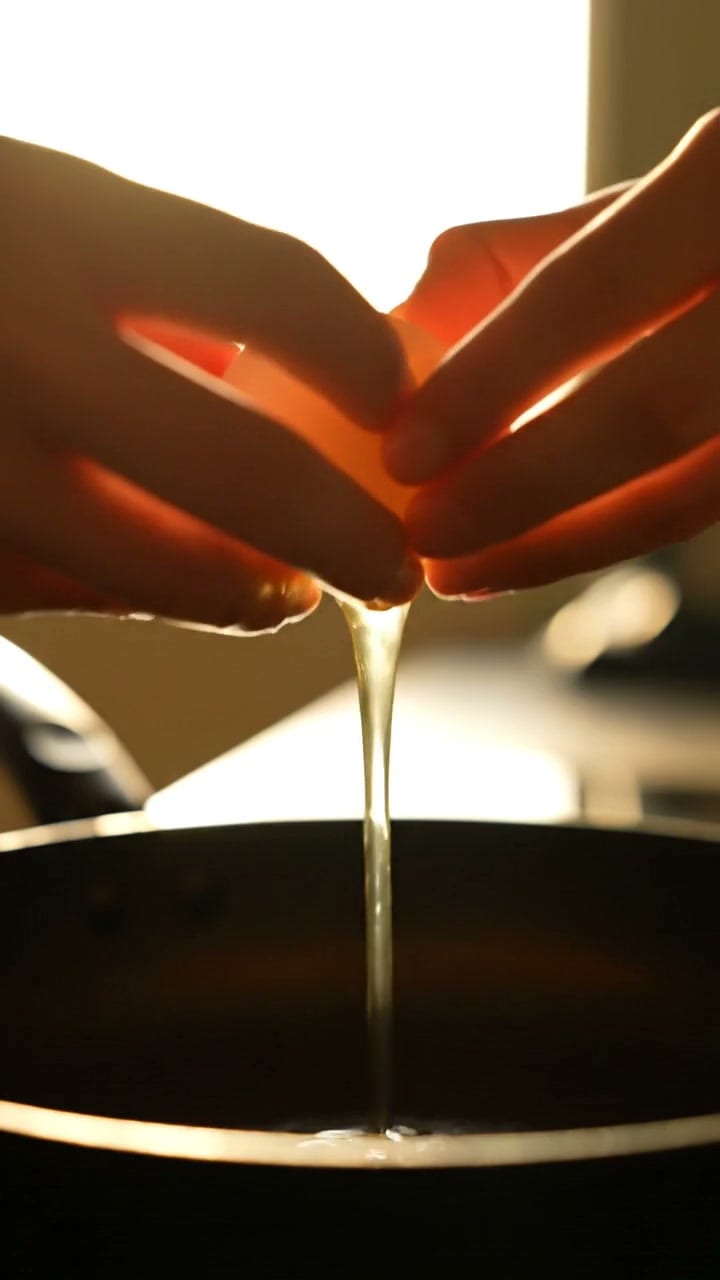
Close-up of a woman's hands cracking an egg into a sizzling pan, the crack and the sizzle land exactly on the picture, morning kitchen light, shallow focus. Audio: a sharp crack, a steady sizzle, quiet kitchen humRun this prompt →
Notice what the brief asks for: not “kitchen ambience” but a crack, a sizzle and a hum, in that order, landing on the frame that causes them. Generated together, the hit sits on the picture. Nudged into place afterwards in an edit, it never quite does, and an audience hears the miss without being able to name it.
The settings: 9:16, one written prompt, nothing attached.
| Modality | Video |
|---|---|
| Length | 4s to 8s |
| Resolutions | 720p, 1080p |
| Audio | Available |
| References | Up to 3 |
| Price | from ⚡326 per render (from ≈$0.34/s) |
The Veo 3.1 page carries the grid, and Google DeepMind documents the model at deepmind.google. Our AI video with audio hub reads the same catalog and lists every model here that can do this.
Step 5: watch the take against the brief, not against your hopes
This is the step people skip, and skipping it is what turns a small bill into a large one. When the take comes back, do not ask whether you like it. Ask, clause by clause, whether it did what you wrote.
Here is one of ours that did not, kept in the post on purpose.
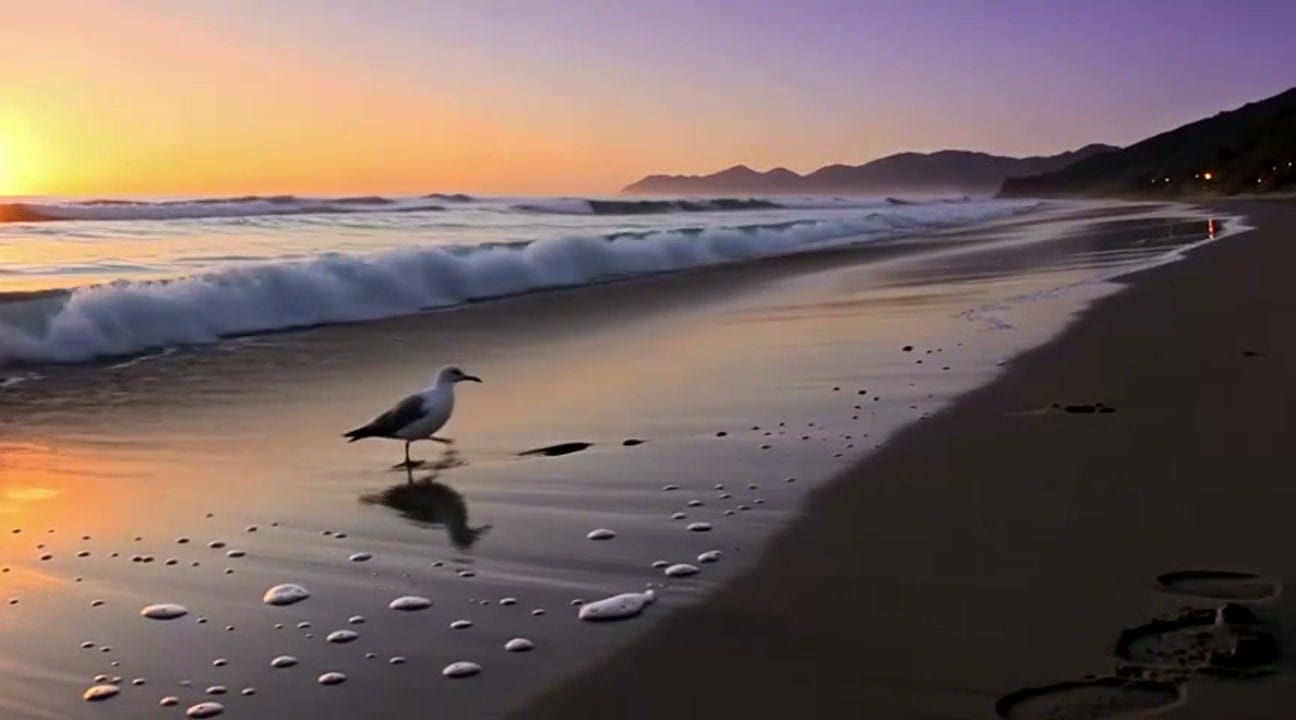
Wide shot of waves breaking on a black sand beach at dusk, foam sliding back over the sand, a single seabird walks the tide line, static tripodRun this prompt →
Go through it. Waves breaking: yes. Foam sliding back: yes. A single seabird on the tide line: yes. Static tripod: yes. Black sand: no. What came back is a pale gold beach at sunset, and it is a lovely frame that answers a brief nobody wrote.
That is the useful shape of a miss. Four clauses landed and one did not, so the fix is one clause and not a new brief. This is also why the frame you publish and the frame you judge should be the same one: we could have cropped the dark wet sand in the foreground and called it black sand, and you would never have known.
The settings: 16:9, one written prompt, nothing attached.
| Modality | Video |
|---|---|
| Length | 2s to 12s |
| Resolutions | 480p, 720p, 1080p |
| Audio | None |
| References | Up to 2 |
| Price | from ⚡10 per render (from ≈$0.02/s) |
The Seedance 1.0 Pro page carries the sheet.
Step 6: change one clause, then finish once
There is no render to show you here, because we did not make one — and inventing a tidy before-and-after would break the only rule that makes the rest of this post worth reading. So take the method instead.
Change one clause per pass. Once a take is close, do not rewrite the brief. Re-run it with a single altered clause, because a rewritten brief gives you a different clip rather than a better one, and you lose the four things that were already working.
Draft cheap, finish once. Compare the price rows in the five sheets above and the strategy writes itself: argue with the idea on the cheapest rung until it stops moving, then spend once on the model whose behaviour the finished clip actually needs. The floors are far enough apart that six drafts and one finish cost less than six attempts at the finish.
Then leave the model alone. Type, logos and lower thirds belong in an editor over a clean plate. Cuts belong on a timeline. A generator is a camera, not a post house, and asking it to be one is how an afternoon disappears.
What still goes wrong
A how-to that lists only wins is an advertisement. These are the failures you will meet in your first afternoon, on any model.
Text in frame. Signage, packaging copy, a caption. It comes back as convincing lettering that is not a word. Set type in an editor afterwards.
Counted things. Fingers, stair treads, bottles on a shelf. Generation is not counting and never has been.
Two heroes in one frame. Ask for a hero product and a hero face in the same clip and one of them loses. Give each its own take and cut them together.
Continuity you did not ask for. Two clips briefed separately will not match on light or lens. If they have to match, say the light and the lens in both briefs and attach the same references to each.
A mid-take rewrite. There is no editing inside a generation. When the third beat is wrong, the fix is a new brief, not a longer one.
The short version
- Pick the frame first. It is a composition decision, not a crop.
- One sentence: subject, then motion, then camera. Stop there.
- Beats when one sentence runs out. Timed, in order, one continuous take.
- Brief the noise with the picture, in the order the viewer hears it.
- Read the take clause by clause, and only then decide it is wrong.
- Change one clause, draft cheap, finish once.
Start from the models roster if you already know the shot, from text to video if you are starting from a sentence, or from image to video if you already own the frame. The brief is the job. Everything else is a setting.