TikTok Ads With AI: Specs, AI Label Rule and 10 Prompts (2026)
Render vertical 9:16 at 720p with sound, show the product and your core message in the first 3 seconds, keep the product away from TikTok’s interface, test 3 to 5 creatives per ad group, and tick the AI-generated content toggle whenever the video is fully or largely AI-made.
Scene select — 7 scenes
To make a TikTok ad with AI in 2026, render a vertical 9:16 video at 720p with sound, show the product and your core message in the first 3 seconds, and keep faces, product and text away from the bottom and right edges where TikTok’s interface sits. Make 3 to 5 clearly different creatives per ad group, and tick “This ad contains AI-generated content” in Ads Manager whenever the video is fully or largely AI-made. On OpenClips the price shows on the Generate button before you render; you download the MP4 and upload it to TikTok yourself.
This is the TikTok layer. For the script itself, pair it with The 15-Second UGC Formula.
TikTok ad specs in 2026, and the settings that meet them
TikTok’s help page for Auction In-Feed Ads (last updated June 2026) splits specs in two. Non-Spark ads are videos you upload to Ads Manager. Spark ads run from an organic TikTok post.
| Spec | Non-Spark in-feed ad | Spark ad |
|---|---|---|
| Aspect ratio | 9:16 (recommended), 16:9, 1:1 | Uses the organic post |
| Minimum size | 540x960 (9:16), 960x540 (16:9), 640x640 (1:1) | Not listed |
| File types | .mp4, .mov, .mpeg, .3gp, .avi | .mp4 or .mov |
| Length | Up to 10 minutes | No restriction |
| File size | 500 MB or less | Not listed |
| Bitrate | 516 kbps or more | Not listed |
| Ad caption | White, fixed font, no links, no @ mentions, no hashtags | From the organic caption, up to 4 lines incl. emojis |
TikTok’s creative best practices page adds three rules: shoot 9:16, at least 720p, and use sound or music.
The safe zone. TikTok does not give one pixel box, because it depends on the ratio, the length of your ad caption and extras such as anchors. It publishes downloadable safe zone templates on the specs page instead (standard, Arabic right-to-left, and versions with anchors). Lay the right one over your edit. In practice: the bottom holds your caption, account name and CTA button, and the right edge holds the like and share column, so keep the product, faces and any text in the middle.
The settings that clear every rule above:
| Setting | Use | Why |
|---|---|---|
| Aspect ratio | 9:16 | Some models default to 16:9, so set it every time |
| Resolution | 720p | 720x1280 clears TikTok’s 540x960 minimum and its 720p advice |
| Sound | On | TikTok lists sound as a basic |
| Length | 10 to 15 s for a first test | Enough for hook, demo and one line; all OpenClips UGC templates offer 15 s |
| Text | Add it in your editor or TikTok, not in the prompt | Video models misspell, and TikTok suggests 5 to 10 words a second |
Seedance 2.5 is one of the models that opens on 16:9, so set 9:16 before you click Generate. Its sound is on by default.
Do you have to label AI TikTok ads?
Usually yes. TikTok has one rule for uploaded ads and another for organic posts, which Spark ads are.
| Your ad | What TikTok asks | Where |
|---|---|---|
| Non-Spark ad, video or audio fully AI-made or significantly modified by AI | Tick “This ad contains AI-generated content” | Ads Manager, ad creation step |
| Non-Spark ad, AI only used for minor touch-ups | The disclaimer criteria are not met | Nothing to tick |
| Spark ad or organic post with realistic AI people or scenes | Label it under the Community Guidelines | The post itself, in the TikTok app |
Two details from TikTok’s disclaimer page catch people out:
- After you submit, you cannot untick the toggle unless you change the video or image.
- A new campaign, including a duplicated one, resets the toggle, even for the same ad. Tick it again every time.
The Community Guidelines also say unlabeled realistic AI content may be removed, restricted or labeled by TikTok, and that a label does not make misleading content acceptable. For an AI UGC ad with a realistic creator, label it, show the real product, and never present an AI creator as a real customer.
Six formats that work on TikTok, and the hook for each
TikTok’s best practices page says to put the hook in the first 6 seconds and your proposition in the first 3. On an AI ad the cheapest way to do both is to open on a physical action with the product, then speak.
| Format | First second on screen | Example first line | Route on OpenClips |
|---|---|---|---|
| UGC demo | A hand lifts the product into frame, label to camera | “I almost skipped this one.” | UGC Ads, “UGC ad” template (15, 30 or 40 s) |
| Unboxing | Both hands lift a box lid | “Okay, the box is nice, but look at this.” | UGC Ads, “Unboxing” (15 s) |
| POV | First-person hands reach for the product | “POV: you finally found one that fits.” | UGC Ads, “POV” (15 s), or Seedance 2.5 |
| Green-screen proof | Creator points at a real review behind her | “Someone wrote this, so I tested it.” | Seedance 2.5 with the review as a reference |
| Comparison | Two versions on one counter, a hand points at one | “Same coffee, two mugs.” | Seedance 2.5 or MiniMax H3 |
| Tutorial | Hands only, step one already in motion | “Three steps, ten seconds.” | Seedance 2.5, timed beats |
Two more UGC Ads templates suit TikTok when you want people talking: Street interview and Podcast clip, 15 or 30 s with two speakers, English only.
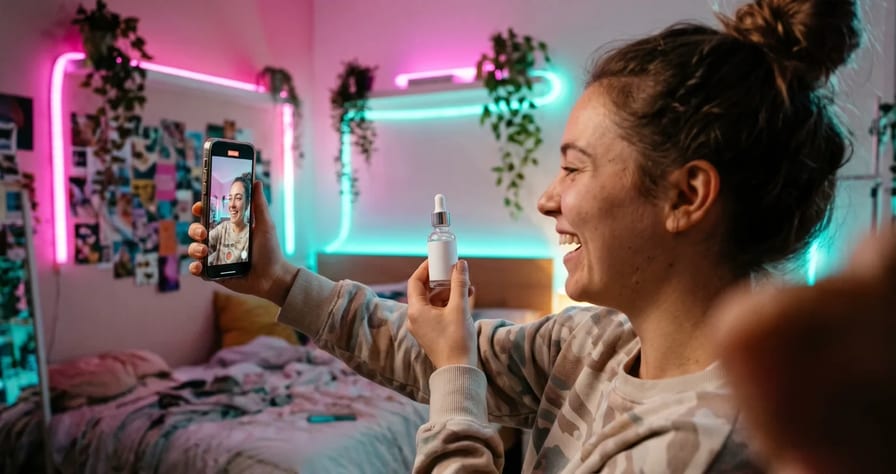
Watch: AI UGC Ads Without Paying Creators (Step by Step). From 0:26, one serum photo becomes a problem/solution UGC ad, the same demo format you would run on TikTok.
For the POV row, here is a TikTok ad made from one product photo with a POV hands template:
Watch: AI Product Video From One Photo (No Studio, No Shoot). One photo of headphones becomes a TikTok ad with the POV hands template, then a store video with Product Hero.
10 copy-paste prompts for TikTok ads
These are templates. We have not rendered them, so treat the first render as a test and fix what the model gets wrong. Replace everything in square brackets. Every setting is 9:16 at the lowest resolution that clears TikTok’s minimum. Keep prices, offers and on-screen text out of the prompt and add them in the edit.
Prompts 1 to 4: UGC Ads templates
On the UGC Ads page you type # plus your product page URL and @ plus a creator, then write what happens.
#[your product page URL] @[creator name]
She sits at a kitchen table in soft morning light, phone propped in front of her.
0-2 s: she lifts the [product] into frame with her right hand, label toward the camera.
2-6 s: she twists the cap open with her left hand and tips it toward the lens to show the texture.
6-11 s: she applies it to the back of her hand and rubs it in slowly.
11-15 s: she looks into the camera, nods once and says: "I almost skipped this one. Now it's the first thing I grab."
Casual handheld feel, room sound, English.
#[your product page URL] @[creator name]
He sits on a sofa with a closed [brand color] box on his knees.
0-3 s: both hands lift the lid and set it down beside him. He says: "Okay, the box is nice, but look at this."
3-7 s: his right hand takes the [product] out and turns it slowly toward the camera.
7-12 s: he holds it next to his face and tilts it so the light catches the [material].
12-15 s: he smiles and holds it still, product sharp in frame.
#[your product page URL]
POV, first person. My two hands, a bathroom counter, morning light.
0-3 s: my right hand reaches for the [product] at the edge of the counter.
3-8 s: my left hand holds it while my right hand opens it.
8-12 s: I use it once, slowly, close to the camera.
12-15 s: my hand sets it back on the counter, label facing the camera.
Sound: a tap running softly, the cap clicking.
#[your product page URL] @[interviewer] @[passer-by]
A busy shopping street in daylight. The interviewer holds a small microphone.
Interviewer: "Quick question, what's in your bag right now?"
The passer-by takes the [product] out of her tote with one hand and holds it up.
Passer-by: "This. I bought it for my sister and kept it."
She turns it in her hand so the label faces the camera, then laughs.
Prompts 5 to 8: Seedance 2.5
Seedance 2.5 makes sound in the same pass and takes a deep stack of reference images. It moves less than Seedance 2.0, so write every beat out. Spoken lines are reliable in English only. In Generate, set 9:16 first: the default is 16:9.
| Modality | Video |
|---|---|
| Length | 4s to 30s |
| Resolutions | 480p, 720p, 1080p |
| Audio | Available |
| References | Up to 30 |
| Price | from ⚡51 per render (from $0.052/s) |
Here is what a finished Seedance 2.5 UGC ad looks like when it runs on a workflow instead of a single prompt. It is the Eyewear UGC Video Ad workflow from the OpenClips community, and you can recreate it with your own product:
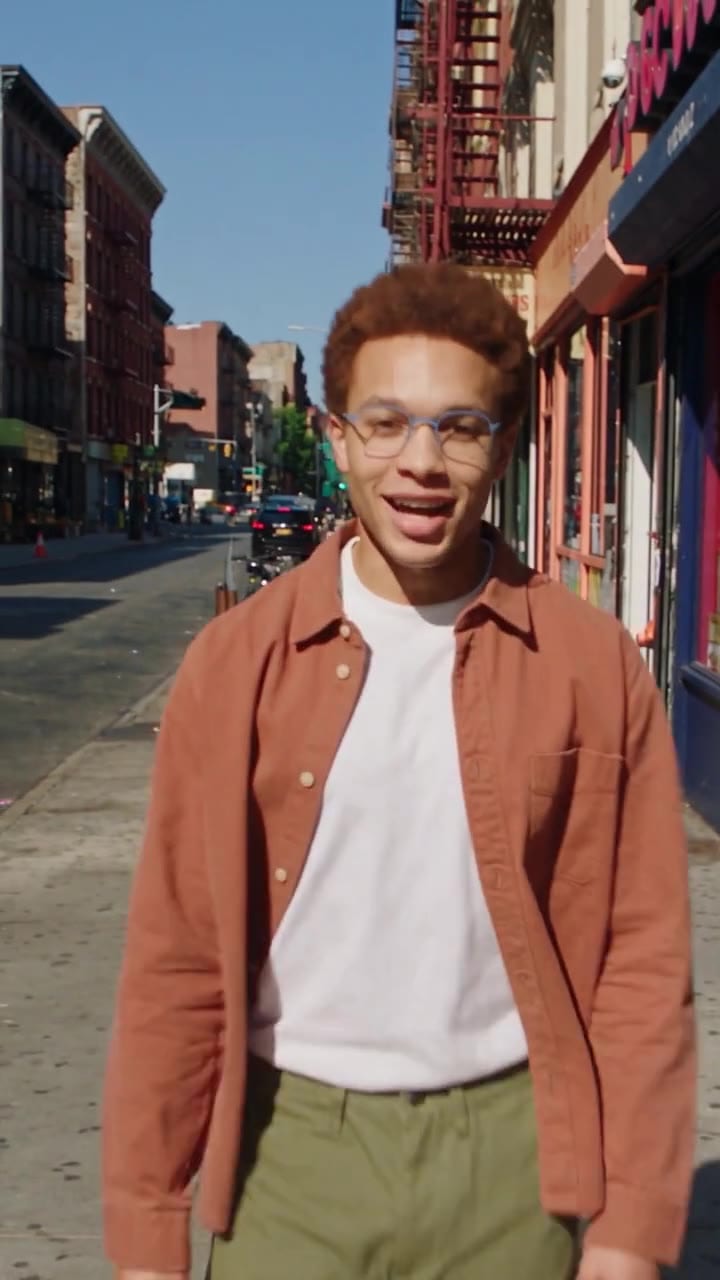
A creator walks a sunny city street in blue metal glasses, talks to camera, shows the light frame in close-up, then swaps to tinted sunglasses at sunset and ends on a smile. The spoken hook opens on the audience (“Okay, glasses people, you need to see this”), the product is in his hands or on his face in almost every shot, and the switch to sunglasses is the payoff. Open the workflow and press Recreate to run it on your own product.
Image 1 is a screenshot of a real customer review. Image 2 is the [product].
A young woman stands in front of a flat backdrop that shows Image 1 large behind her, like a green-screen creator video. She holds Image 2 in her right hand at chest height.
0-3 s: she points over her left shoulder at the review with her left hand.
3-7 s: she lifts the product closer to the camera, label facing out.
7-10 s: she lowers her hand, looks into the lens and says: "Someone wrote this, so I tested it."
Camera locked, medium shot, bright even light, room tone.
Run this prompt →
Use only a real review you have permission to show. A made-up review in an ad is a misleading claim, label or not.
Image 1 is the [product]. A kitchen counter, two mugs side by side: Image 1 on the right, a plain white mug on the left.
0-4 s: a hand pours hot coffee into both mugs, left first, then right.
4-8 s: the hand lifts the white mug, faint steam, and sets it down.
8-12 s: the hand lifts Image 1, steam rising clearly, and holds it toward the camera.
Camera locked at counter height, product sharp, sound of pouring and a ceramic clink.
Run this prompt →
Only run a comparison you can prove with the real product.
Image 1 is the [product]. Top-down view of a wooden desk, only hands in frame.
0-4 s: the left hand holds Image 1 while the right hand opens it.
4-8 s: the right hand [does the main action, for example presses the button once].
8-12 s: both hands set Image 1 down in the center of the desk, label up, and pull away.
Camera locked overhead. Soft daylight. The sound of each action, no music.
Run this prompt →
Image 1 is the [product]. First-person view, my hands, a hallway floor with a delivery box.
0-3 s: my hands pull the tape off the box.
3-6 s: my right hand lifts Image 1 out of the paper.
6-10 s: I turn it slowly in front of the camera, label toward the lens, and hold still.
Natural indoor light, sound of tape and paper.
Run this prompt →
Prompts 9 and 10: MiniMax H3
MiniMax H3 costs less a second than Seedance 2.5, so it is the cheaper pick for product-only shots. If a take comes back without the sound you want, add your voiceover or a TikTok sound in the edit. For the full trade-off, see MiniMax H3 vs Seedance 2.5.
| Modality | Video |
|---|---|
| Length | 4s to 15s |
| Resolutions | 768P, 2K |
| Audio | Available |
| References | Up to 9 |
| Price | from ⚡39 (from $0.161) |
Start from the uploaded product photo. The [product] stands on a pale stone surface.
0-2 s: a fingertip enters from the right and presses gently into the [cream / gel / product surface].
2-4 s: the finger lifts away slowly, leaving a soft peak.
4-6 s: the camera holds still on the product and the mark.
Macro, soft side light, calm.
Run this prompt →
Image 1 is the [product]. A woman's hand holds Image 1 at eye level in front of a sunny window.
0-3 s: she turns her wrist slowly so the front of the product faces the camera.
3-6 s: the camera pushes in gently toward the label.
6-8 s: her hand stays still, product sharp, background soft.
Warm daylight, keep the product's shape, color and label exactly as in Image 1.
Run this prompt →
From OpenClips to TikTok Ads Manager, step by step
OpenClips makes the video. It does not post to TikTok or run your campaign, so the last step is yours.
- Start from your product. Click An ad for my product or open Marketing Studio. Paste your product page link (or upload one clear photo) and click Find my templates. Filter by the “9:16 · TikTok, Reels” size.
- Pick a template, click Use this template. For person-on-camera ads, the UGC Ads page has 13 templates, including UGC ad, POV, Unboxing, Street interview and Podcast clip.
- Add a creator. Type @ and pick one of 305 stock creators, or your own trained avatar.
- Write the brief as actions. Paste prompt 1, 2, 3 or 4 and edit it.
- Set 9:16, the length, 720p and the language. The exact price is on the Generate button before you confirm.
- Check every frame. Product shape, label, hands, and nothing that pretends to be a real customer.
- Download the MP4 and upload it in Ads Manager. Tick “This ad contains AI-generated content”, write your ad caption there without @ mentions or hashtags, and keep it short so it stays out of your safe zone.
Watch: I Made an AI UGC Ad From Just a Product Link (No Real Creator). From 0:10, a product link goes into Marketing Studio and comes out as a vertical testimonial ad, with the price shown on the button at 1:38.
A first test batch: the plan and what it costs
What TikTok says. Run 3 to 5 creatives per ad group and 3 to 5 ad groups per campaign, with big differences between creatives while you test. Refresh when results keep declining, and add the new creatives to the existing ad group rather than starting a new one.
How we would run it (common practice among performance teams, not a TikTok rule):
- Round one, test formats. UGC demo, unboxing, POV, comparison, tutorial. Same product, same offer.
- Round two, test hooks on the winner. Re-make only the first 2 to 3 seconds three ways, keep the body.
- Round three, test face and language. Swap the creator, then make one version per market with the UGC Multilingual template.
- Judge on your goal metric, not views, and give each ad group enough spend to exit learning before you cut it.
What round one costs. The exact price is always on the Generate button, and the spec cards above carry the starting prices. The UGC Ads templates and the MiniMax H3 clips are the cheaper half of the batch; the Seedance 2.5 takes cost more and scale with length. Want a cheap draft first? Render Seedance 2.5 at its lowest resolution and re-render only the takes that work. Check the batch against your plan’s monthly credits; Creator is the first plan the pricing page lists with Marketing Studio. Commercial use is not included on the Free plan, so ads you run need a paid plan.
Common mistakes and fixes
| Mistake | Fix |
|---|---|
| A Seedance 2.5 clip comes out horizontal | Its default is 16:9. Set 9:16 before you click Generate |
| Rendering at the top resolution “for quality” | TikTok’s floor is low (see the specs table); a lower tier costs far less and clears it |
| The prompt asks for the price or offer on screen, and it comes back misspelled | Leave text out of the prompt. Add it in your editor at 5 to 10 words a second |
| The AI label disappeared on a duplicated campaign | Any new or duplicated campaign resets the toggle. Tick it again |
| Ad caption with hashtags or @ mentions | Non-Spark ad captions do not support them. Put them in the organic post for Spark ads |
| A Spanish or Arabic line on Seedance 2.5 comes out as invented words | Native speech is reliable in English only. Use the UGC Creator template (6 lip-sync languages, 82 more voiced) or UGC Multilingual |
| A MiniMax H3 clip comes back without the sound you want | Add a voiceover or a TikTok sound in the edit |
| Product, face or text hidden behind the CTA button | Lay TikTok’s safe zone template over the edit before you export |
Paste your product link into Marketing Studio and have five TikTok creatives ready to test today. New to OpenClips? Start free with ⚡30 on signup, no card.
Sources, read on 4 November 2026: TikTok Business Help Center’s “TikTok Auction In-Feed Ads” (last updated June 2026), “Creative best practices for performance ads” (June 2025) and “Add disclaimers to ads in TikTok Ads Manager” (September 2025), TikTok’s Community Guidelines on integrity and authenticity, the OpenClips UGC Ads, Marketing Studio and pricing pages, the Seedance 2.5 and MiniMax H3 model pages, and the OpenClips price check and model catalog.