
Change or cancel your plan
The short answer
Open Billing and press Change plan to pick another plan, or Cancel plan to stop it. If you cancel, you keep the plan and its credits until the end of the period, and your top-ups stay.
On this page6 sections
Before you start
What you need
- An OpenClips account on a paid plan.
Who can use it
Every plan: Free, Starter, Creator, Pro and MAX.
Models marked with a lock unlock with your first purchase.
Anyone allowed to pay for the workspace can change or cancel its plan.
What it costs
From ⚡2 a clip. See every price
That is what making a video costs. Cancelling costs nothing. A new plan shows its price before you confirm. See Plans and what they include.
Steps

Open Billing
Press your balance in the top bar, then press Usage & billing. Your plan shows your plan, its price and when it renews.
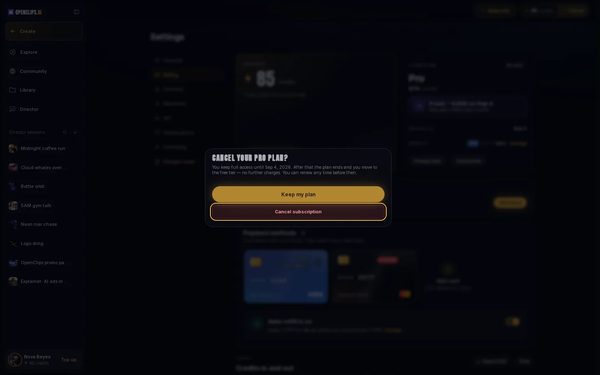
Cancel your plan
To stop your plan, press Cancel plan. The sheet says when your plan ends. Press Cancel subscription to cancel, or Keep my plan to keep it.
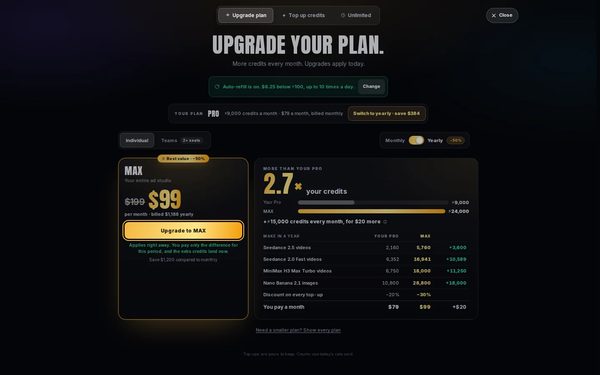
Choose another plan
To change plan instead, press Change plan. The Plans sheet opens on Upgrade plan. Press Upgrade to on the plan you want.
On a phone: To change plan instead, tap Change plan. The Plans sheet opens on Plans. Pick a plan, then tap Upgrade to at the bottom.
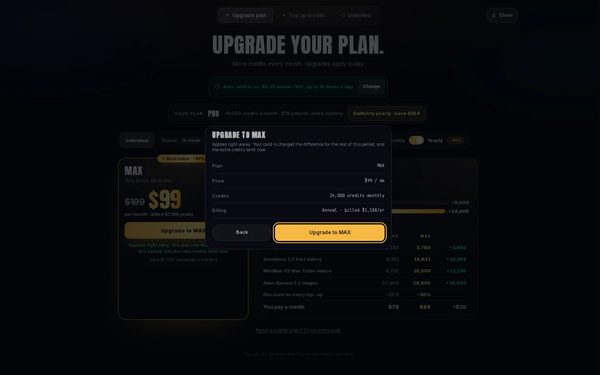
Confirm the change
The sheet shows the new Plan, its Price, its Credits and its Billing. Press the gold button to confirm, or Back to choose again.


What you get
Your new plan in Billing, or, after a cancel, your plan until the end of the period and then the free plan.
Tips and limits
- On a computer, the Plans sheet shows only the plans above yours. To move to a smaller plan, press Need a smaller plan? Show every plan.
- A downgrade waits for the end of the period, and Billing shows the date it starts.
If something goes wrong
- Cancel plan is greyed out: your role can’t manage the plan. Ask an admin of the workspace.
- You cancelled by mistake: press Keep my plan in Billing before the period ends.
Questions
What happens to my credits if I cancel?
You keep the plan and its credits until the end of the period. Then you move to the free plan. Your top-ups and bonuses stay.
When does a new plan start?
An upgrade starts right away, you pay only the difference for this period, and its extra credits land now. A downgrade starts on the date shown, and nothing changes until then.
Can I undo a cancel?
Yes. Until the period ends, Your plan in Billing shows Keep my plan. Press it, then Renew subscription.
Can I switch to yearly billing?
Yes. On the Upgrade plan tab, your plan shows Switch to yearly where it bills yearly too.
Related
Steps checked in the app Updated