
Choose which emails you get
The short answer
To choose your emails, open Manage account from your name in the App menu and go to Notifications. Use the switch beside Newsletter or Getting started, while Account emails like receipts always stay on.
On this page6 sections
Before you start
What you need
- An OpenClips account.
Who can use it
Every plan: Free, Starter, Creator, Pro and MAX.
Models marked with a lock unlock with your first purchase.
That is who can make a video. Everyone with an account chooses their own emails.
What it costs
From ⚡2 a clip. See every price
That is what making a video costs. Choosing your emails costs nothing.
Steps
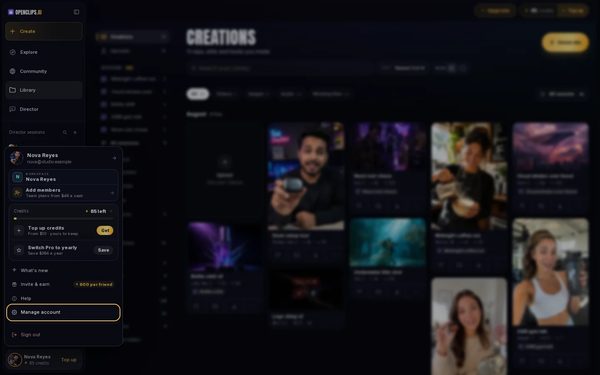
Open your account settings
Press your name at the bottom of the App menu, then Manage account.
On a phone: Open the menu, tap your name at the bottom, then tap Manage account.
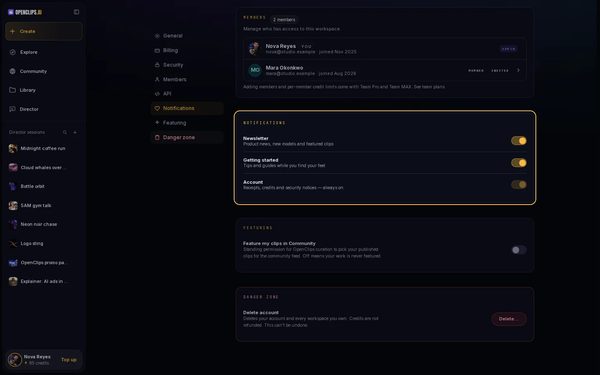
Open Notifications
In the Settings menu, press Notifications. Notifications lists Newsletter, Getting started and Account.
On a phone: In the row of settings at the top, tap Notifications. Notifications lists Newsletter, Getting started and Account.
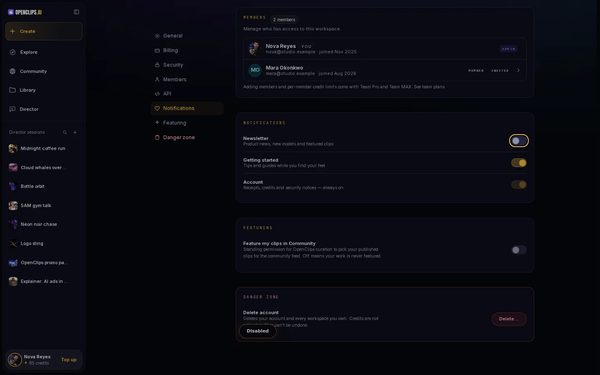
Turn an email off or on
Press the switch beside Newsletter or Getting started. OpenClips says Disabled, and those emails stop. Press the switch again to turn them back on.


What you get
OpenClips sends you only the emails you left on, and always your Account emails.
Tips and limits
- Getting started sends tips and guides while you find your feet. Turn it off once you know your way around.
- The switch beside Account is greyed out: receipts, credits and security notices always reach you.
If something goes wrong
- An error shows instead of Disabled: the change didn’t save. Press the switch again.
- You turned off every switch and still get receipts: those are Account emails, which always stay on.
Questions
Can I stop every email from OpenClips?
You can turn off Newsletter and Getting started. Account emails, such as receipts and security notices, always stay on while you have an account.
What does the newsletter send?
Product news, new models and featured clips.
I turned an email off. Can I turn it back on?
Yes. Press the same switch again, and OpenClips says Enabled.
Related
Steps checked in the app Updated