
Delete your account
The short answer
To delete your account, open Manage account from your name in the App menu, go to Danger zone and press Delete…. Read what goes with it, type DELETE and press Delete account, which can’t be undone.
On this page6 sections
Before you start
What you need
- An OpenClips account, signed in.
- No plan that renews on a workspace you own. Cancel it first.
Who can use it
Every plan: Free, Starter, Creator, Pro and MAX.
Models marked with a lock unlock with your first purchase.
That is who can make a video. Anyone with an account can delete their account.
What it costs
From ⚡2 a clip. See every price
That is what making a video costs. Deleting your account costs nothing, and refunds nothing.
Steps

Open your account settings
Press your name at the bottom of the App menu, then Manage account.
On a phone: Open the menu, tap your name at the bottom, then tap Manage account.
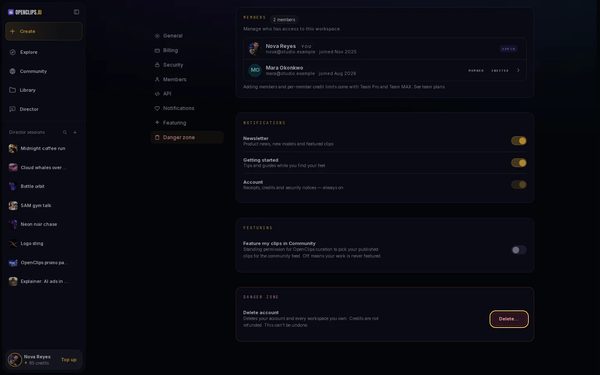
Open Danger zone
In the Settings menu, press Danger zone. Beside Delete account, press Delete….
On a phone: In the row of settings at the top, tap Danger zone. Beside Delete account, tap Delete….
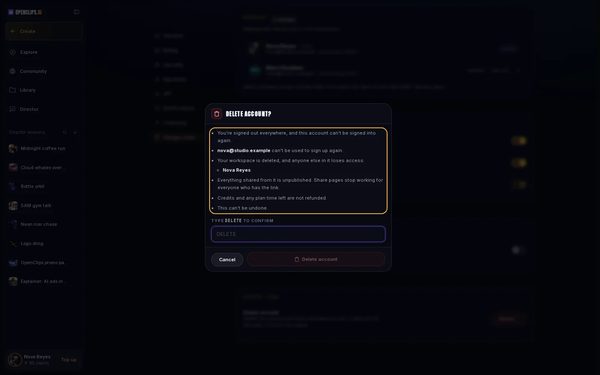
Read what goes with it
Delete account? lists what deleting takes with it: your sign-in, your email address, every workspace you own and everything shared from them, and your credits.
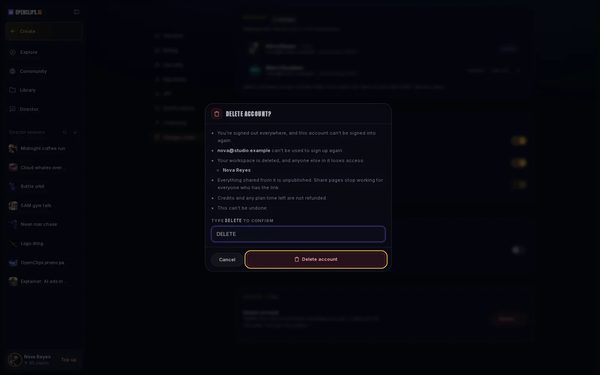
Confirm
Under Type DELETE to confirm, type DELETE in capitals. Press Delete account. OpenClips signs you out everywhere.


What you get
Your account is gone. You are signed out everywhere, and the account can’t be signed into again. To keep it, press Cancel instead of Delete account.
Tips and limits
- Download the videos you want to keep before you delete. See Find and download your videos.
- To stop emails without deleting, choose which emails you get.
If something goes wrong
- You see Go to billing instead of Delete…: a plan you own still renews. Deleting doesn’t stop billing, so cancel your plan first, then come back.
- Delete account stays greyed out: type DELETE exactly, in capitals.
Questions
Can I get my account back after deleting it?
No. This can’t be undone, and the account can’t be signed into again.
Can I sign up again with the same email?
No. The email address of a deleted account can’t be used to sign up again.
Do I get my credits back?
No. Credits and any plan time left are not refunded.
What happens to my team?
Every workspace you own is deleted, and anyone else in it loses access. Delete account? names those workspaces before you confirm.
Related
Steps checked in the app Updated