What Is GPT Image 2.5? What OpenAI Shipped, and What Nobody Published
OpenAI announced ChatGPT Images 2.5 on 8 September. Here is what it changes, how the two API models differ, why every spec table you have read this week was filled in by somebody guessing, and what takes the same brief today.
Scene select — 10 scenes
OpenAI announced ChatGPT Images 2.5 on 8 September 2026, and by the following morning the search results were full of spec tables for a model whose specification has not been published. So this page does the boring thing instead. Everything below traces to OpenAI’s own announcement, and where the announcement says nothing, this page says nothing.
Disclose the bias first: we build OpenClips.AI, a studio that resells image and video models on one balance. GPT Image 2.5 is not in our composer yet, because our catalog does not serve an id for it. We have said so on its page and we are saying it here, because a guide that quietly implies you can run something is worse than no guide.
What GPT Image 2.5 actually is
It is OpenAI’s image model, and 2.5 is a generational step rather than a rename. OpenAI calls it a new state of the art and frames the release around three words: sharper details, more precise editing, faster generation.
The scale it arrives at is worth holding on to. OpenAI says people create more than three billion images a week across ChatGPT Images and the GPT Image models in its API. A model at that volume does not get to be interesting; it has to be predictable. Almost every change in this release is about predictability.
8 Sep
the announcement
50%
lower latency, OpenAI’s figure
2
models in the API
0
published resolutions
The edit that stays an edit
Here is the change that matters, and it is not a picture-quality change.
Ask most image models to alter one element and they re-render the frame. The lighting shifts. The product turns three degrees. The face is nearly the face. You did not ask for any of that, and now you are choosing between a fix you wanted and a frame you had already approved.
OpenAI states 2.5 is better at editing only what you asked for, keeping the rest of the details the same, even with more complex subjects and backgrounds. And it states the same thing holds over a conversation: across a longer run of edits, earlier changes are more likely to stay consistent, each new edit builds on the work already done, and quality does not degrade over time.
If you have ever produced anything commercial, you already know why that is the headline. Creative work is not one prompt. It is a first pass and eleven corrections, and the model that survives correction eleven is the one you can put on a schedule.
The launch quotes Higgsfield AI on exactly this — what impressed them was “how well it understands what not to change” — which is a fair summary of the whole release. We publish our own honest comparison with Higgsfield elsewhere; on this point they are right.
What else OpenAI says changed
The rest of the release notes, stated as OpenAI states them:
- Reference photos hold their subjects. Familiar subjects carry across new settings, styles and compositions, and distinctive features are more likely to survive the render.
- Lighting and texture read as real. More natural lighting, richer textures, without asking for either.
- Complex layouts, transparent backgrounds included. Useful the moment the render has to sit inside another layout rather than be the layout.
- Style adherence is tighter. It reflects a named visual style more closely, and holds the requested direction instead of drifting as the instructions get more specific.
- Real-world content is more accurate. Images that carry real information get that information right more often.
That last pair is the quiet one. Drift-as-you-get-specific is the failure that ruins a campaign set: brief one asset loosely and you get something usable, brief the eighth asset precisely and you get something that no longer matches the first seven.
Flare or Sunburst?
Two models reach the API, and they are not a good tier and a cheap tier. They are two different trades.
GPT-Image-2.5 Flare is the default. OpenAI describes it as bringing the same improvements in quality, editing and speed to the API, delivering higher-quality images than GPT Image 2 at 50% lower latency. It is cast for creator and social content, product experiences, visual search, rapid prototyping and high-volume generation.
GPT-Image-2.5 Sunburst is built for premium visual workflows that benefit from tighter control across edits — production-ready campaign creative, polished product imagery. It buys that control with time: OpenAI says it offers an extra level of precision for detailed creative work with longer generation times.
That trade is the part most coverage of this launch leaves out, and it is the only part that changes what you do on a Tuesday. Draft on the fast one. Move the brief that survived to the slow one, once.
What OpenAI did not publish
No resolutions. No aspect ratios. No image sizes. No prices in the announcement itself — it links out to a pricing page for that.
This is worth being blunt about, because the gap has been filled in loudly. Search “gpt image 2.5 specs” this week and you will be offered tables of dimensions, ratios and per-image prices. Do the one check that settles it: open the announcement, use your browser’s find, and search it for a resolution. It is not there. Whatever a table says, it did not come from OpenAI’s launch post.
We are not going to publish that table either, and not out of modesty. A spec you cannot check is worse than a blank cell: nothing downstream can tell it from a fact, and it will still be on the page long after it stops being true. When our catalog serves the id, the numbers will render onto the GPT Image 2.5 page from the same feed the composer bills against, and the page will be right because it cannot be anything else.
The ChatGPT features that are not the model
The launch bundles app features with the model, and they travel differently. Three landed in ChatGPT itself:
- Sketch lets you draw in ChatGPT and use the drawing as a visual guide for
the final image. Type
@Sketchto reach it. - Templates start you on a common format — Poster, Merch — instead of a blank canvas.
- Comments and shared prompts let you mark up an image for a focused edit, and pass the prompt along with the picture so someone else can run your idea on their own subject.
Images 2.5 itself is rolling out to ChatGPT, ChatGPT Work and Codex users across all tiers, on desktop, mobile and web. But Sketch, Templates and comments are introduced as ChatGPT features, and the API half of the same announcement names two models and nothing else. So do not shop for a reseller on the strength of them, ours included. What travels beyond ChatGPT is the model.
What takes the same brief today
Until the id lands, the OpenAI image model in our composer is GPT Image 2. Here are its facts, read off our catalog rather than out of memory:
| Modality | Image |
|---|---|
| Resolutions | 1024x1024, 1024x1536, 1536x1024, 2048x1152, 2048x2048, 2160x3840, 3840x2160 |
| References | Up to 16 |
| Price | from ⚡1 (from $0.0042) |
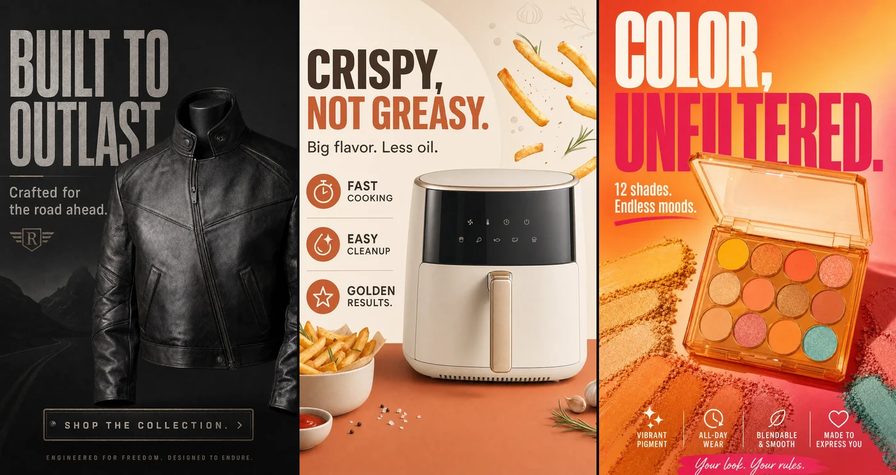
Both of the renders below came off that model, on this platform, from the briefs printed verbatim underneath them.
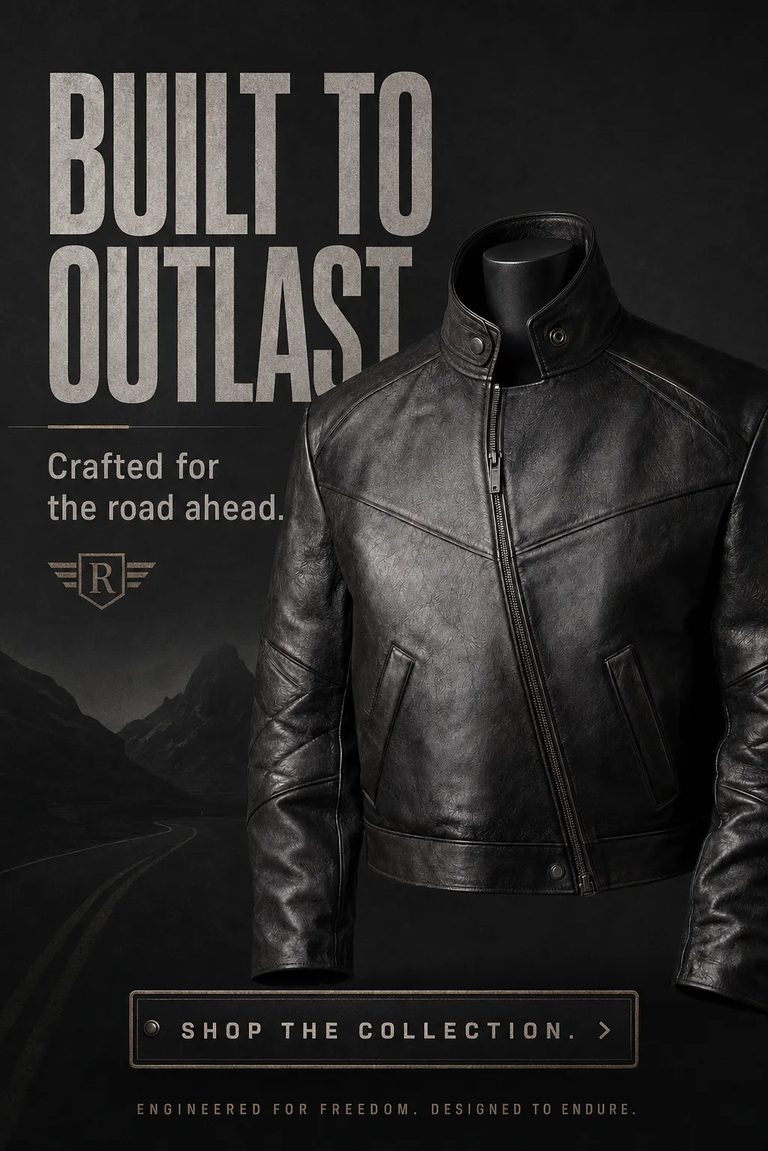
Make a vertical poster of this black leather jacket headlined "BUILT TO OUTLAST" with "Crafted for the road ahead." and a "SHOP THE COLLECTION." button.Run this prompt →
Look at the headline before you look at the jacket. The final T of OUTLAST disappears behind the collar: the type and the product were not resolved into one layout, they were stacked. Nothing in the brief asked for that, and no amount of re-reading the brief fixes it. Layout and precision are exactly what 2.5’s release notes claim to improve, which is why we would rather show you a real render with a real flaw than a vendor reel.

Make a wide banner of this rosé sparkling wine bottle headlined "MAKE IT SPARKLE." above "Rosé for moments worth celebrating." and a "DISCOVER THE COLLECTION." button.Run this prompt →
Same brief shape, and this one lands: type, product, subhead and button all resolve into one layout. That is the honest state of play. The current model gets there often, not always, and “often” is what a precision release is trying to move.
How to brief a model that edits
The habits below work on GPT Image 2 today and are the ones 2.5 is built to reward. None of them depends on a spec nobody has published.
- Say the change, not the frame. One instruction per turn. The model’s job is to hold everything you did not mention; listing what to preserve gives it more to misread, not less.
- Bring the subject that must survive. Attach the photograph whenever the thing in frame has to be your thing — your product, your model, your packaging. Reference-led editing is where this generation put its work.
- Put the words in quotes. Type is the hardest thing on the canvas. Quote the exact headline and the exact button label so there is nothing to paraphrase, then read the render back letter by letter.
- Ask for the transparent plate when the frame is not the deliverable. If the render goes into a layout later, request it that way up front rather than cutting it out afterwards.
- Build across turns instead of rewriting. Once a pass is close, change one clause and re-run. It is faster, it is cheaper, and it is the exact behaviour the multi-turn claim describes.
- Read the price before you press. Ours is on the button, quoted for the settings you actually chose, before anything is spent.
What to still watch for
A launch post is a list of things that got better. These are the things that were hard before and are worth checking on any render, including 2.5’s:
Long or unusual type. Short headlines in quotes land. A paragraph of body copy, a legal line, an unusual brand spelling — check every character. Set critical type in an editor over a clean plate.
Counted things. Shelf facings, buttons on a coat, icons in a row. Generation is not counting and never has been.
Two heroes in one frame. A hero product and a hero face fighting for the same composition means one of them loses. Give each its own render and compose them afterwards.
Consistency you did not ask for. Two assets briefed separately will not match on light or lens. If they have to match, say the light and the lens in both briefs and attach the same reference to each.
Vendor claims, including these. Everything on this page is what OpenAI states, not what we measured — we cannot benchmark a model we cannot dispatch. When we can, we will render our own proof set and this page will link it.
The short version
- GPT Image 2.5 is OpenAI’s image model, announced 8 September 2026.
- The headline is precision editing. It changes what you asked for and leaves the rest of the frame alone, over a long run of edits.
- Flare is the default; Sunburst trades generation time for control. Draft on one, finish on the other.
- Nobody published a spec sheet. Any resolution table you have seen this week is somebody’s guess wearing a fact’s clothes.
- It is not in our composer yet, and we will not fake it. GPT Image 2 takes the same brief today on ⚡50 of signup credit, with the price on the button.
Read the full breakdown on the GPT Image 2.5 page, run a brief on GPT Image 2, or line either of them up against Nano Banana and the rest of the models hub.
The presses in the app, from Create to your Library, are in the Creator Handbook: How to use GPT Image.