
FixVideo
My video failed. Where did my credits go?
The short answer
When a video fails, the credits held for it come back to your balance on their own. You can see it in Billing, where that render is marked Refunded.
On this page5 sections
What you see
- The video’s card in your Library shows a red Failed badge and a short reason.
- The reason is often the AI model’s own sentence, so it can look technical.
- The card offers Retry render, or says Retry won’t fix this one when a retry can’t help.
Where your credits are
When you press Generate, OpenClips holds the price. If the video lands, the hold is charged. If it fails, stalls or times out, the hold comes back to your balance.
If the model is still working on the video, the credits stay held until it lands or fails.
Common reasons
- The card says the render timed out: the model took too long. A retry often works.
- The model refused the input, for example because it may be protected by copyright. Use your own or licensed material.
- The model is busy or down for a while. Try again later, or pick another model.
- A content-policy refusal can’t be fixed by retrying. The card says Retry won’t fix this one.
What puts it right
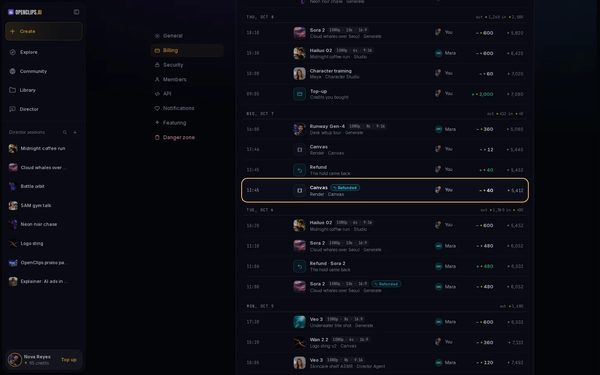
Check that your credits came back
Press your balance and choose Usage & billing. In the usage list, the render shows Refunded.
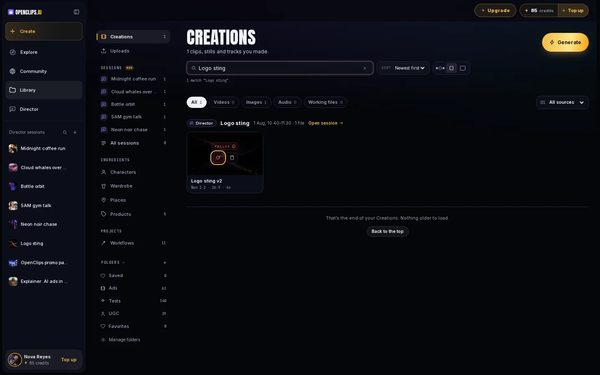
Try again, or change what you sent
Open your Library and find the video, or search for its title. Press Retry render on its card. A retry runs the video again, so it uses credits again. If the card says a retry won’t help, change the photo or the prompt, or pick another model.
Check if OpenClips is working
If several videos fail at once, open the status page. The status page lists every model under AI models, checked every minute.
Still stuck? Write to us
Email support@openclips.ai with the video’s title and the time you made it.


Questions
Do I pay for a failed video?
No. The credits held for it come back to your balance.
Does Retry render cost credits?
Yes. A retry runs your video again with a fresh seed, so it is charged like a new video.
Why does the reason look technical?
OpenClips shows the AI model’s own message, so you see exactly what it said. A few common ones are rewritten in plain words.
Related
Steps checked in the app Updated