
Work with Director
The short answer
To work with Director, press Director in the App menu, start a new session and say what you want in plain words. Director makes the video in the chat, and you change it by saying what to change.
On this page6 sections
Before you start
What you need
- An idea for a video, in your own words.
- A photo, a product or a character to add, if the video needs one.
- An OpenClips account. You can start without one and sign up when you press the button.
Who can use it
Every plan: Free, Starter, Creator, Pro and MAX.
Models marked with a lock unlock with your first purchase.
Director picks from the composer’s models, so these are the plans that can run them.
What it costs
From ⚡2 a clip. See every price
That is the cheapest clip the composer’s models make. When Director offers several takes, its card shows each one’s price before they run.
Steps
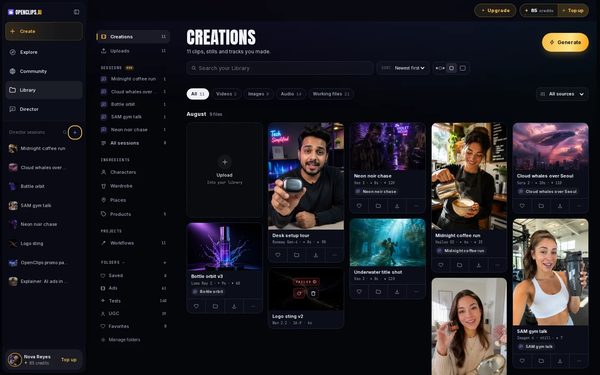
Start a new session
In the App menu, press + beside Director sessions.
On a phone: Open the menu and tap + beside Recent sessions.
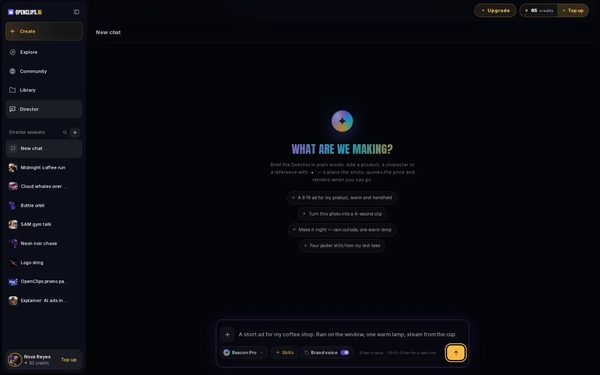
Brief Director
Under What are we making?, say what you want in plain words, or press one of the briefs. To add a photo, a product or a character, press + first. Then press Send.
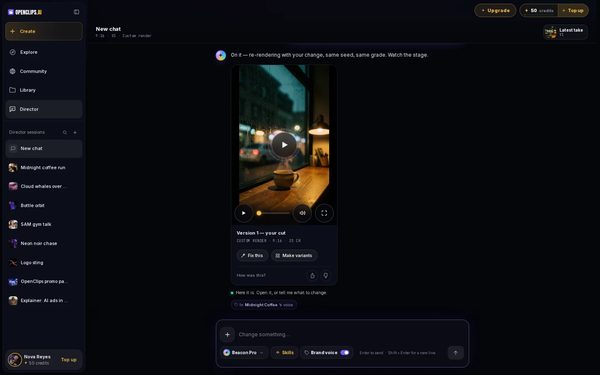
Watch the take
Director answers in the chat, and the video it makes plays under its answer. Latest take at the top opens the newest one.
On a phone: Director answers in the chat, and the video it makes plays under its answer. Under the video, How was this? asks if it worked.
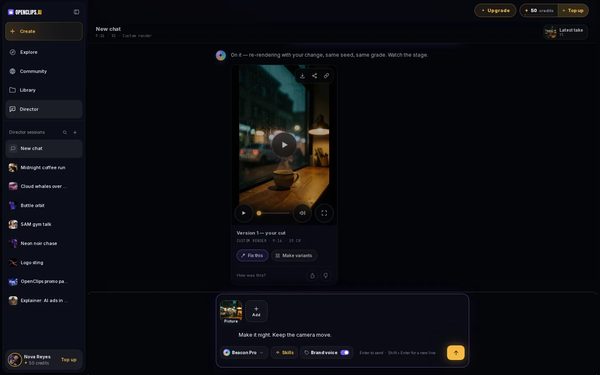
Change what you don't like
Press Fix this under the take. The take is added to the box. Say what to change, like “Make it night”, and press Send.
Ask for variants
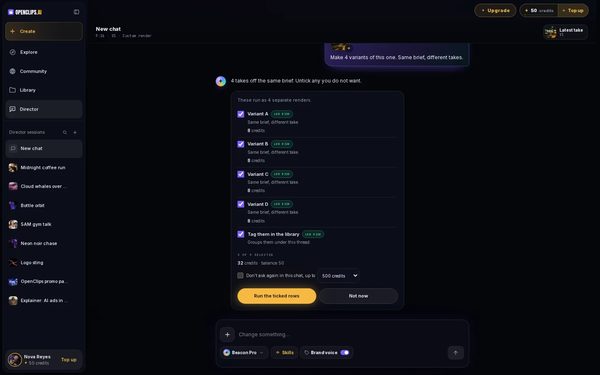
Press Make variants. Director lists the takes it would make, each with its price. Untick any you don’t want, then run the rest. Tick Don’t ask again in this chat, up to and pick a limit, and later cards in this chat run without asking.


What you get
A video made from your brief, in the chat and in your Library under Creations. The session stays in the App menu, so you can come back and change it.
Tips and limits
- One session holds one video. Start a new session for a new idea.
- Say what to keep as well as what to change, like “Make it night. Keep the camera move.”
- To start a Reel with Director, use the AI Reel Maker.
- To use OpenClips from ChatGPT, Claude or Cursor instead, see the OpenClips MCP page.
If something goes wrong
- The card’s total says “not enough”: your balance can’t cover every row. Untick some, or top up.
- A take failed: a failed render gives its credits back.Fix
Questions
Can Director make several versions at once?
Yes. Press Make variants under a take. Director lists the takes it would make with their prices, and you untick any you don’t want before they run.
Where do Director's videos go?
Each take plays in the chat, and the same video is in your Library under Creations with everything else you make.
Can I go back to an old session?
Yes. Your sessions are listed in the App menu, under Director sessions on a computer and Recent sessions on a phone. Press one to open it where you left off.
Related
Steps checked in the app Updated