How to Make an AI Movie Trailer With Claude (One Lead, 6 Genres)
Connect Claude to OpenClips, get a plan and a price for every batch before anything renders, keep one lead across every genre, make something happen in the first half second, fix mistakes with edits, and cut on the beat.
Scene select — 8 scenes
To make an AI movie trailer with Claude, connect Claude to OpenClips and ask for a plan and a price for every batch before anything renders. Keep one lead across every genre with a saved character, a fixed CHARACTER block and a 4-second voice reference. Make each world as a still first, animate it with the model that fits the shot, make something happen in the first half second, fix mistakes with edits, and cut everything on the beat of one track.
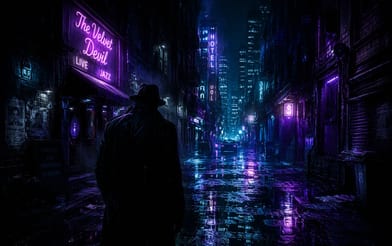
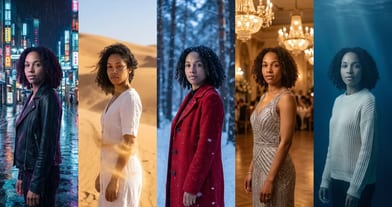
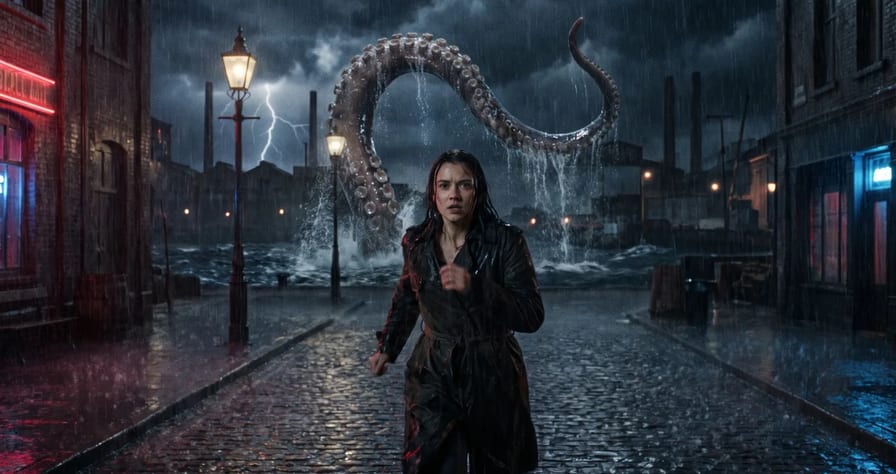
That is the exact workflow from our own making-of video. One conversation with Claude produced “The Premiere”, a one-minute trailer for a film that does not exist: a filmmaker has five days to get her film onto the big screen, and one lead runs through a medieval feast, a noir street in the rain, a Western, a starship corridor, a biplane above the clouds and a ship attacked by a kraken. This post is the checklist, with the prompts and the prices.
Watch: I Made an AI Movie Trailer With Claude (One Character, 6 Genres) The finished trailer plays at 12:11; the workflow starts with the first message at 1:30.
Why most AI movie trailers look the same
A trailer is the friendliest long format for AI video. Each shot only lasts a few seconds, which is what video models do best. The music carries the story, so no single clip has to explain the plot, and audiences already accept a jump from a Western to a starship as a promise.
That ease is also why so much “AI trailer generator” output looks alike. The video names the problem at 0:39: pretty shots, nothing going on, and a slightly different face every time. The first cut of this trailer had all three.
The fix is a plan: one lead to follow, a reason for every shot, a model picked per job, and an edit built on the music. Claude is connected to OpenClips through MCP, so it can price a shot, render it and look at the result itself, and everything it makes lands in your OpenClips library. Connecting is free, and every render costs the same credits as in the app; setup is in our OpenClips MCP guide.
Step 1: brief Claude and get the plan and the price first
The first message at 1:31 is not a script request. It says who the trailer is for, how it should feel, and one rule about money. The full text from the screen:
I want to make a one-minute cinematic trailer for a movie called The Premiere. It's for professional filmmakers, so it has to feel like a real film: proper camera moves, focus pulls, close-up details and a few real wow moments. Not just pretty shots. One lead character should take us through a few completely different genres. Minimum 1080p, ideally 4K. Before you render anything, show me the plan and what each batch will cost.
Claude answered with a plan, not renders (1:51): every genre is one beat of the story, the lead is a saved avatar, every line is five words or fewer, a model with a reason for each kind of shot, a price for batch one (five look-test stills, ⚡218), and three questions about the lead, her voice and the music. Planning costs nothing and renders do, so nothing ran until the answer was yes. Swap in your own film:
I want to make a [length] [genre] trailer for a movie called [title]. It's for [audience], so it has to feel like [your standard: real camera moves, focus pulls, close-up details]. One lead character takes us through [number] different genres: [list]. Every shot needs something happening, not just pretty light. Render at 720p unless I say otherwise. Before you render anything, show me the plan, which model you'd use for each shot and why, and what each batch will cost.
Treat it as a starting point. The 720p line is our default for drafts; the video asked for higher resolutions because it was cut as a 4K master.
Step 2: one lead, the same face and voice in six genres
The lead is one of the creator’s own trained avatars (2:24). You save one in Library, Characters; Character Studio recommends a front, a three-quarter and a profile shot, and someone else’s face needs their written consent. The full method is in our consistent character guide. This trailer added three things.
The model. Every shot with her ran on Seedance 2.5, which locks the face to a saved avatar and handles small reactions, a quick line and a laugh. Its top resolution sits below the trailer’s master, so her shots were upscaled for it.
The CHARACTER block, pasted word for word into every shot. This is the version on screen at 3:21:
CHARACTER: the person in @image1, the same face, the same long straight jet-black hair with a centre parting falling past the shoulders. A plain navy-blue collared shirt, high-waisted charcoal trousers, black leather ankle boots. The same small silver ring in the nostril. No other jewellery. They react like a real person, with quick natural expressions; they are always in motion.
The first version said “No jewellery”, but she wears a small nose ring, so the prompt argued with the avatar (3:09). Describe what the reference really shows, then exclude the rest.
The voice. Seedance invents a new voice on every render. So the first shot where she speaks defines her voice: Claude cut four seconds of it and attached it as a voice reference to every later shot, and the price did not change (3:26).
Working in the app instead of Claude? A character can carry a voice from the start: in Library, Characters, press Upload a photo and voice and add a short voice sample (your own, or the voice of someone who agreed). Then in the composer press +, choose A character, and call the lead by name with @ in the prompt.
Watch: Same AI Character and Same Voice in Every Shot (Seedance 2.5) Listen from 0:23: four lines in four worlds, one voice.
Step 3: build the worlds, with a model for every shot
From 4:11 Claude picks a model per job and says why. The “in the video” column is what the screen showed when it was recorded; the cards below the table carry each model’s price today.
| Model | Job in the trailer | Why | In the video |
|---|---|---|---|
| Gemini 3 Pro Image | A still for every world, first and last frames | Cheap look test; edits keep a place exactly | 16:9 stills, ⚡31 |
| Seedance 2.5 | Every shot with the lead | Face locked to the avatar, good acting | Short shots at a high resolution |
| Kling 3.0 | Horses, the lasso, the cinema | The sharpest tier, fast action, a locked camera that barely moves | Short shots at the top tier, ⚡254 |
| Seedance 2.0 | A raindrop, a candle going out | The sharpest tier for fine detail | Short shots at the top tier, ⚡301 then |
| Kling O1 | The same fight from new angles | Re-films an attached clip | ⚡68 each |
| Modality | Image |
|---|---|
| Resolutions | 1K, 2K, 4K |
| References | Up to 11 |
| Price | from ⚡11 (from $0.046) |
| Modality | Video |
|---|---|
| Length | 4s to 30s |
| Resolutions | 480p, 720p, 1080p, 4K |
| Audio | Available |
| References | Up to 30 |
| Price | from ⚡51 per render (from $0.052/s) |
| Modality | Video |
|---|---|
| Length | 3s to 15s |
| Resolutions | 720p, 1080p, 4k |
| Audio | Available |
| References | Up to 1 |
| Price | from ⚡46 per render (from $0.063/s) |
| Modality | Video |
|---|---|
| Length | 4s to 15s |
| Resolutions | 480p, 720p, 1080p, 4K |
| Audio | Available |
| References | Up to 9 |
| Price | from ⚡33 per render (from $0.034/s) |
| Modality | Video |
|---|---|
| Length | 3s to 10s |
| Resolutions | 720p, 1080p |
| Audio | Available |
| References | Up to 7 |
| Price | from ⚡31 per render (from $0.042/s) |
Prices change, so the exact price is always on the Generate button. Draft at 720p and spend on higher tiers only for shots you already approved.
What a 60-second draft takes. Here is an example plan, about 64 seconds of footage for a one-minute cut; multiply each count by the price on that model’s card:
| Item | Count |
|---|---|
| Gemini 3 Pro Image still (16:9) | 12 |
| Seedance 2.5 shot with the lead (6 s, sound on) | 6 |
| Kling 3.0 action shot (5 s) | 4 |
| Seedance 2.0 detail shot (4 s) | 2 |
Retakes, edits and extra Kling O1 angles come on top. For the cheapest look tests before you commit to a world, use Seedream 5.0 Pro stills; keep Gemini 3 Pro Image for the stills you will edit later.
| Modality | Image |
|---|---|
| Resolutions | 1K, 1.5K, 2K |
| References | Up to 10 |
| Price | from ⚡10 (from $0.042) |
Stills first, every time. Each world started as a Gemini still, and only a still the creator liked became a video (4:47). The one skip cost money: for a return to the red cinema, Claude wrote a new prompt, got a different room and animated it before anyone saw it, about ⚡250 for a room nobody could use.
To get a place back, edit the original image instead of describing it again (5:17). The edit prompt names only the change:
Edit image 1. Keep the room, the seats, the screen, the camera angle, the light and the colours exactly as they are. Change only [the one thing you need].Run this prompt →
Check stills for black bars. Gemini liked adding letterbox bars (5:28). Animate that and the bars stay, so Claude cropped them off first.
Step 4: make something happen, then fix it in post
The first round was beautiful and boring (6:23). The prompts said “slow push”, “an unhurried, quiet moment” and “for the first two seconds they watch the screen”, and “atmospheric haze” made the projector lens smoke. Seedance 2.5’s model notes say it moves far less than 2.0, so motion has to be written beat by beat. Every shot got a new rule (6:52):
New rule for every shot:

something happens in the first half second;one fast camera move;she says her line right away, five words or fewer;haze only inside the light beams.
Now she slams the projector lever down and says “Five days” inside the first second. Two more rewrites to copy: when a car soaks her and she just stands there, describe the reaction (she flinches, pulls her shoulders up, laughs, then says “One pilot!”, 7:07); and when the kraken’s tentacle “just appears”, write the entrance beat by beat on the music hit (7:25). The kraken structure as a template, with more in our video prompt formula:
[CHARACTER block, word for word]

One continuous [6]-second shot, [genre and place], [light].
Beat 1 (0 to 1 s): [the lead does one small thing: grins at the rail].
Beat 2: [the surprise enters behind her with one sound: a tentacle rises as lightning flashes].
Beat 3: [she turns around].
Beat 4: [the big physical moment, on the hit in the music].
Beat 5: [the payoff and her line in quotes, five words or fewer].
Camera: [one fast move]. End on: [the frame the shot holds].
Run this prompt →
Watch: How to Make AI Action Scenes Not Boring (Claude + Seedance 2.5) The beat-by-beat kraken entrance plays from 0:13.
Lock on-screen text with a first and last frame. The clapperboard got random text (7:50). The fix: a Gemini still with the clapper open and “LONDON / TAKE 1” on it, an edit of that still with it shut, and Seedance animating between the two. The text cannot change because it is in both frames.
Fix it in post. The trailer opens on a paper coffee cup at a medieval feast that then vanishes (8:09). First the mistake on purpose: the feast with the cup on Seedance 2.0, at the resolution the edit comes back at, so the takes match. Then Seedance 2.5 in edit mode with one instruction:
Remove the modern white paper coffee cup with the plastic lid from the table. Nothing else changes.Run this prompt →
It came back frame for frame without the cup, and a light sweep in the cut reveals the clean take. A long-haired man got short hair the same way, after a text-only close-up was refused twice and refunded; starting from a Gemini still of him worked. In the app, this kind of change runs from Create with a model that edits a clip: add the clip, then write what to change and what to keep.
Need another angle? Re-film the clip. For the starship fight (9:24), a Seedance edit returned the same shot (edit mode does not move the camera) and stills as references gave a different fight. Kling O1, given the original fight as a feature reference, re-filmed the same moves from the floor and from the ceiling. In the new angles the slam lands about a second later, so each angle starts from a slightly different point to keep the hit on the beat.
Step 5: cut it on the beat, with sound and a title card
The creator never opened an editing app (10:16). Claude wrote the edit as code in HyperFrames, a free, open-source tool: every shot, cut, sound effect and line of text in one file that renders the 4K video.
- Measure the music. The track is 110 beats per minute, so one bar is 2.18 seconds. Cuts sit on the hits: the projector lights on the first, the fight slams on the big impact, the audience jumps on the drop.
- Give every shot its own bar. Squeezing shots in felt rushed, so Claude repeated three bars of music, cut on a hit to hide the join (10:58). Our guide to longer AI videos has more seam tricks.
- Use silence. For the comedy beat the music stops, four men scream in a dark room, a chihuahua in a sweater walks out and barks, and the music returns on the next hit.
- Ask for slow motion in the render. The kraken slowed to half speed in the edit stuttered (11:30); the flying cup Kling rendered as real slow motion did not.
- Lock the camera for anything you composite. The kraken pulls back into a film on a cinema screen because the cinema is a locked-off Kling shot whose screen never moves.
- Add titles in the edit. The end card is a projector beam revealing “The Premiere” (12:05). Keep exact words out of video prompts unless a first and last frame locks them; Kling 3.0’s model notes call it text-hostile.
For dialogue and effects inside a clip, pick a model that makes its own sound and write each line in quotes with its speaker. Sound is made with the video, so plan lines before you render.
How brands can use the trailer format, and the mistakes to skip
A trailer sells anticipation, which makes it a strong ad shape:
- A launch teaser: one lead, three or four genre beats, one benefit per beat, and an end card with the launch date.
- A mascot or founder across worlds: a saved character keeps the same face in every genre and every later campaign.
- Cut-downs: the same renders give a 60, 30 and 15-second cut on fewer bars of the same track.
- The product in the lead’s hands, with slow, ordinary gestures:
Beat 3: she takes [product] from her coat pocket with one hand, turns it once in the streetlamp light, and holds it at chest height while rain falls behind her.
Commercial use needs a paid OpenClips plan; it is not on Free.
| Mistake | What happened | Fix |
|---|---|---|
| Video before approving the still | A different cinema, about ⚡250 lost | Approve stills; edit the original to get a place back |
| Prompt contradicts the avatar | “No jewellery” fought her nose ring | Describe what the reference shows |
| A new voice per shot | A different person each time | Use the first spoken take as a voice reference |
| Slow, atmospheric prompts | Boring, and a smoking lens | Action in the first half second, one fast move |
| Free text on props | Random text on the clapper | First and last frame with the text in both |
| Edit mode for a new angle | The same shot came back | Re-film with Kling O1 and the clip as reference |
| Slowing clips in the edit | Stutter | Ask for slow motion in the render |
Plan your first trailer from Claude with OpenClips MCP; the Black Friday yearly plans on pricing add bonus credits you keep until 30 November 2026.
New to OpenClips? Start free, ⚡30 on signup, no card.
Sources
- OpenClips on YouTube, I Made an AI Movie Trailer With Claude (One Character, 6 Genres)
- OpenClips on YouTube, Same AI Character and Same Voice in Every Shot (Seedance 2.5)
- OpenClips on YouTube, How to Make AI Action Scenes Not Boring (Claude + Seedance 2.5)
- OpenClips model prices and model notes for Seedance 2.5, Seedance 2.0, Kling 3.0, Kling O1, Gemini 3 Pro Image and Seedream 5.0 Pro, read in OpenClips on 16 Nov 2026
- OpenClips MCP
- OpenClips Help: Add a voice to your character, Put your character in a video, Characters, Edit and upscale a video, Add sound to a video, My video failed
- OpenClips Character Studio
- OpenClips pricing